

Suno Downloader
Suno Downloader · Voice & Language
Suno Downloader is a free browser tool that turns a public Suno share link into an MP3 file, with no account and no cap on how many tracks you save.
About Suno Downloader
What Is Suno Downloader
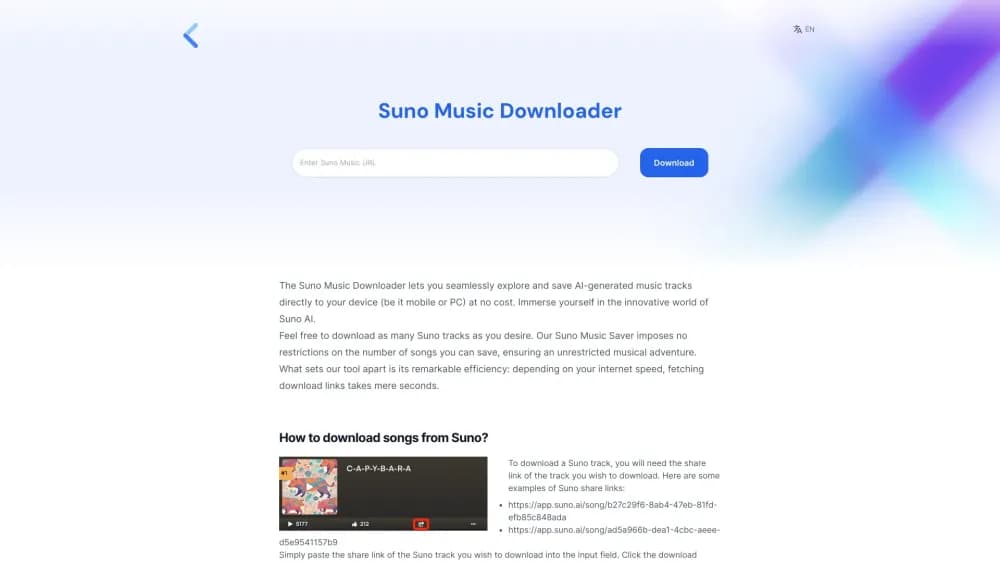
Suno Downloader is a web app at sunodownloader.io that pulls music off Suno AI and hands it back as a normal audio file. You bring a song link, paste it into the box at the top of the page, and the site returns a download button. The file lands in your browser's download folder, on a phone or a laptop, just like any other file.
The reason the tool exists is a gap in Suno itself. Suno only lets you download tracks you generated on your own account. Hear something in the Explore feed that you want to keep, and the Download option is missing. This site closes that gap: paste a share link from any public song and save it without a Suno login.
It works on any OS with a browser, including older Windows builds, Mac, Linux and Android or iOS phones. There's no install, no extension, and no sign-up wall in front of the download box. The site says it doesn't limit track counts and that link fetching finishes in seconds depending on your connection.
Read it as a convenience tool rather than a rights-clearing service. The MP3 you get is someone else's generation, and Suno's terms and copyright law still apply to how you use it.
Getting Started
- Open Suno, find the song you want, and hit the Share icon to copy its link. Public links look like app.suno.ai/song/ followed by a long ID.
- Go to sunodownloader.io and paste the link into the input field on the home page.
- Press Download and wait a few seconds while the site fetches the file. The button for the audio appears once it's ready.
- Click the download button and pick where to save the MP3, or let it land in the default folder.
- Rename the file after saving if you plan to keep a library, since song titles don't always come through cleanly.
Product Information
A quick look at Suno Downloader's pricing, supported platforms, and performance.
Best for
The users, tasks, and scenarios where this tool fits best.
Users
- Listeners who save tracks they like
- Content makers collecting background music
- People without a desktop
Tasks
- Saving a song as MP3
- Building an offline listening list
- Grabbing Suno tracks for a project
Scenarios
- Keeping a song before it disappears
- Sharing a track with a friend who isn't on Suno
- Quick download on a work computer
Key features
Share Link Downloads
The whole flow runs on the public share link Suno gives every track. Copy it from the Share icon, paste it into the home page field, and the site resolves it to a file. No song ID hunting and no developer tools needed.
Browser Based, No Install
Suno Downloader runs in the browser on Windows, Mac, Linux and mobile browsers. There's no app to install and no browser extension to add, which keeps it usable on locked-down machines.
No Account Required
The download field sits on the home page of this Suno downloader online tool, so no login stands between you and the file. Optional Google sign-in exists on the site, but saving a song doesn't depend on it.
No Stated Download Limit
The site states that it doesn't cap how many tracks you save. That puts it ahead of tools that meter daily downloads or push a paid tier after a handful of files.
Cross Device Support
The same page works on a desktop and a phone. iOS and Android users save through the browser download flow, then look in the default Downloads or Files location to find the MP3.
Related Downloader Tools
The same site also carries a Suno video downloader, a TikTok video downloader, a TikTok MP3 downloader and a Twitter video downloader, plus a paid AI music generator with credit packs from $9.99 to $29.99.
Pros and cons
Pros
- Free with no account needed for a basic song download
- No stated cap on how many Suno tracks you can save
- Works in any browser, including mobile, so no PC is required
- Link to MP3 takes seconds on a decent connection
- Saves public songs you didn't generate, which Suno's own download button won't do
Cons
- Only handles public Suno links, so private or deleted tracks are out of reach
- Audio quality matches whatever Suno serves, and there's no format choice like WAV or lossless
- Metadata often comes through thin, so titles and artist fields need manual cleanup
- No official API, so anything automated has to go through the page itself
- The site's paid AI music generator pricing isn't always visible in the navigation, which makes the free and paid offerings easy to confuse
Frequently asked questions
Yes, the downloader itself costs nothing and doesn't ask for an account. The site does sell credit packs for its separate AI music generator at $9.99, $15.99 and $29.99, but those have nothing to do with saving a Suno link as MP3.
Related content
Explore related tools, skills, and articles for Suno Downloader.
Suno Downloader Alternatives

Foley
Hanamori Labs, LLC · Voice & Language · Productivity · AI AssistantFoley is a voice to-do list that turns a spoken sentence into a filed task, complete with project, date and time, then helps you plan the day around what is already there.

HireKey
HireKey · Voice & Language · Productivity · LeaningHireKey is an AI job search copilot built by a former tech recruiter. It checks role fit, tailors resumes, runs interview practice and tracks every application.

Fluence
Yay Software (Yannick Huchard) · Writing · Voice & Language · ProductivityFluence is an Android app that reads PDFs, EPUBs, Word files and web articles aloud, follows each sentence as it speaks, and answers questions about the text on the phone itself.