

SupBot
SupBot · Marketing · Chatbot
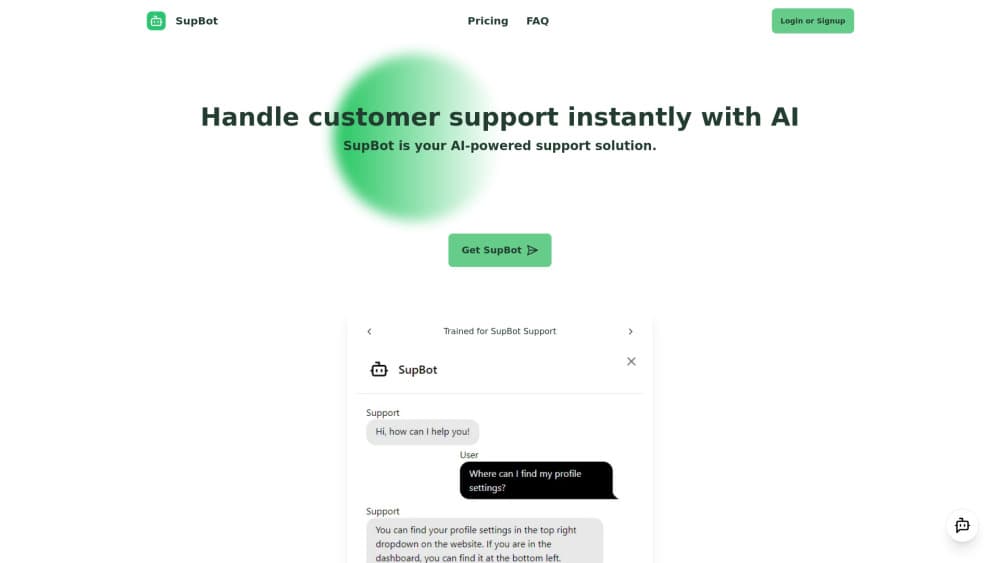
SupBot is an AI support bot that you train on your own business content and embed on any website, so routine customer questions get instant answers while real requests become tickets for your team.
About SupBot
What Is SupBot
SupBot is a chatbot for websites that answers customer questions on its own. You sign up, feed it the material your support team already uses, and paste a small embed on your site. Visitors get replies in the corner of the page at any hour, without waiting for an agent to come online.
The company says the setup can cut support costs by 79%. Treat that as a vendor claim, not a measured result, since it depends on how many of your questions are repeat questions. What you can check before paying is the shape of the product: one dashboard, three plans, and a hard monthly message cap on each.
The limit that matters most is the training data. SupBot answers from what you give it. If your return policy is vague or your help center is thin, the bot repeats that vagueness back to customers with full confidence. Someone still has to keep the source material accurate.
Getting Started
- Create a free account on supbot.io and open the dashboard.
- Add your business content, such as FAQ entries, shipping terms, and product details, then train the bot on it.
- Copy the embed code and place it on the pages where you want the chat bubble to appear.
- Test with real questions, retrain where answers miss, then connect the ticket view to whoever handles escalations.
Product Information
A quick look at SupBot's pricing, supported platforms, and performance.
Best for
The users, tasks, and scenarios where this tool fits best.
Users
- Small store owners
- Solo founders
- Support leads at growing shops
Tasks
- Answering repeat questions
- Collecting details before a human steps in
- Catching after hours traffic
- Testing whether automation fits
Scenarios
- A product launch that floods the inbox with the same five questions for a week.
- A seasonal sale where volume spikes past what a two person team can answer in a day.
- A site that sells in several regions and needs separate bots per storefront on the Premium plan.
Key features
Bots Trained on Your Own Content
You supply the source material, whether that is a help page, a policy document, or a list of common replies, and the bot answers from it. The company builds the product on OpenAI models, so the replies read like normal conversation rather than canned keyword matches. Paid plans allow unlimited retraining, which matters when prices or policies change mid season.
Embed Code for Any Website
SupBot ships as a support chatbot you embed rather than a platform specific plugin. You copy the embed snippet into your site and the bubble appears in the corner, which means the same bot works on a Shopify store, a WordPress blog, or a hand coded landing page. No theme file editing or app store approval is involved.
Human Handoff and Ticketing
When a customer asks for a person, the conversation turns into a ticket inside the dashboard. Your team sees the thread, not just a name and an email, so the reply starts from what the customer already said. This is the part that makes SupBot usable as a small AI ticketing system rather than a chat toy, and it starts on the $15 plan.
Model Choice Tied to the Plan
The free tier runs on GPT-4o mini, while Standard and Premium run on GPT-4o. In practice the cheaper model is fine for short factual answers and the stronger one holds up better on multi part questions. The switch happens by plan, not by a setting you can tune per bot.
Several Bots on One Account
Premium allows five deployable bots under one login. Each can carry its own training material, which suits a business running separate storefronts, languages, or brands that should not share a knowledge base. Retraining one does not disturb the others.
Monthly Message Caps You Can Plan Around
Each plan carries a fixed number of bot messages per month: 100 on Free, 1,000 on Standard, and 10,000 on Premium. The number is predictable, which helps when you are budgeting customer service automation for the first time. The published pricing does not say what happens after the cap is reached, so ask before a busy month.
Pros and cons
Pros
- The free plan is a real working bot, not a demo, so you can measure answer quality on live traffic before spending anything.
- Setup needs a signup and one embed line, which keeps the technical work out of the way for non developers.
- Ticketing lives in the same dashboard as the bot, so handoffs do not require a second helpdesk subscription.
- Unlimited retraining on paid plans makes it practical to keep answers aligned with changing policies.
- At $45 for five bots, the per site cost is low for anyone running more than one storefront.
Cons
- 100 messages a month disappears quickly on a live site, so the free tier works better as a trial than as a permanent setup.
- Standard caps at 1,000 messages, and a mid size shop can pass that during a single promotion with no published overage rule to plan against.
- Answer quality depends entirely on the material you feed it, which means ongoing upkeep that the pricing page does not account for.
- No integration or API documentation is published, so teams that need order lookups or CRM sync have to ask support first.
Frequently asked questions
SupBot is an AI support bot for websites. It answers customer questions from content you train it on, and it passes unresolved conversations to your team as tickets. The company describes it as an AI customer support solution that installs on any site through an embed code.
Related content
Explore related tools, skills, and articles for SupBot.
SupBot Alternatives

ngram 2.0
ngram · Video · Marketingngram 2.0 is an AI video generator for teams. It turns a prompt, a screen recording, or a product URL into a narrated explainer, product demo, or AI avatar video, and every scene stays editable.

shippedit.me
Krawlup · Marketing · Businessshippedit.me now redirects to Krawlup, a web platform that audits SEO, AEO and page speed every week, then hands the fixes to AI coding agents over MCP.

MePersona
MePersona, Inc. · Writing · Productivity · MarketingMePersona is an AI unified inbox for creators. It learns your voice, drafts replies to fan messages from 12 platforms, and sends only what you approve.