

Super Grok
Devyansh · Voice & Language · Chatbot
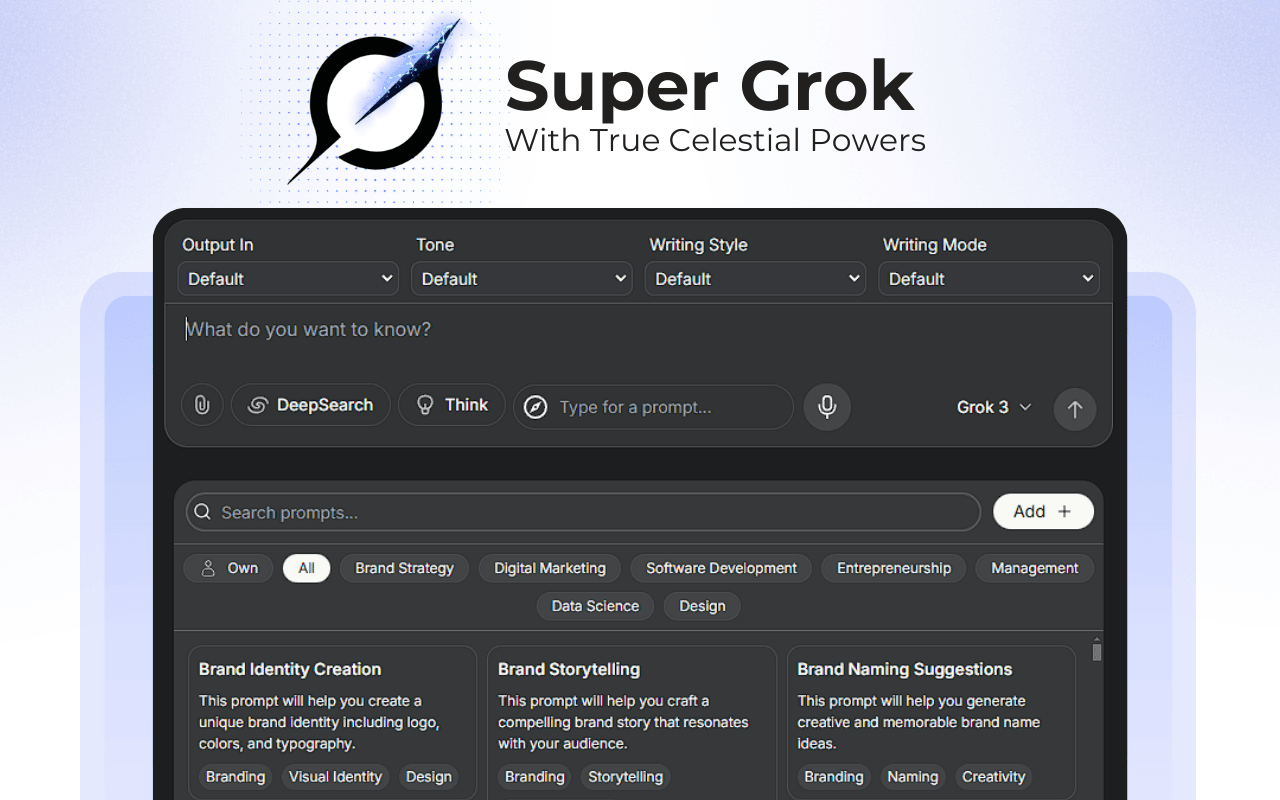
Super Grok is a Chrome extension that upgrades the Grok AI chat on grok.com with custom prompt libraries, voice input, multilingual replies, and a built-in website builder.
About Super Grok
What Is Super Grok
Super Grok is a browser add-on for Grok, the AI chatbot made by xAI. It doesn't replace Grok or run its own model. Instead, it layers extra tools on top of the grok.com chat page, so the answers you already get come with a faster way to steer them.
The extension targets people who type the same instructions over and over. A writer who always wants a casual tone, a student who needs simpler explanations, or a support agent juggling five tasks can save each of those instructions as a reusable prompt and swap them in with a click. Voice input and preset conversation modes round out the daily workflow, and a small site builder lets you turn a finished chat into a shareable page.
The catch is scope. Super Grok only works inside grok.com in a Chromium browser, so it does nothing for the Grok apps on iOS or Android, and nothing for other chatbots. You also need a Grok account first, because the extension rides on the chat you already have rather than standing on its own.
Getting Started
- Sign in to your Grok account at grok.com and confirm the chat loads normally.
- Open the Chrome Web Store listing for Super Grok and click Add to Chrome, then approve the storage permission.
- Open the extension from your browser toolbar and create your first saved prompt. Set the tone and the language you want Grok to answer in.
- Return to grok.com, pick the preset or prompt you saved, and either type your question or use voice input.
- Send the request, then refine the reply and export it through the site builder if you want something you can share.
Product Information
A quick look at Super Grok's pricing, supported platforms, and performance.
Best for
The users, tasks, and scenarios where this tool fits best.
Users
- Writers who keep retyping the same style instructions, since saved prompts remove the setup work on every new chat.
- Students and researchers who need Grok to explain things at a fixed reading level. A preset holds the tone steady.
- Non-English speakers who want answers in their own language without typing the request in English first.
Tasks
- Reusing a prompt across dozens of chats
- Drafting with voice
- Turning a finished conversation into a web page
Scenarios
- Working through a long writing session where tone has to stay consistent from the first draft to the last.
- Juggling several small requests in a row, where switching between saved presets beats rebuilding the same instructions.
- Sharing an AI-written explainer or summary with a class or team. The built-in page builder publishes it as a page.
Key features
Custom Prompt Library
You can save the instructions you use most, name them, and reload any of them with a single click. The library replaces the copy-and-paste routine that slows down regular Grok users, and it keeps your favorite phrasing ready between sessions. For anyone who repeats the same setup, this is the feature that earns the install.
Voice Input
Speech to text means you can speak a question instead of typing it. Grok already handles live conversation on its own, but this extension folds dictation into the same panel where your prompts live, so voice and typed requests sit in one place. It suits long-form dictation and quick questions alike.
Multi-Language Responses
You can ask Grok to answer in a language other than English and keep that choice attached to a saved prompt. That makes the extension useful for people who read comfortably in their first language but find English prompts tiring to compose. Set it once and every request from that prompt comes back in your preferred tongue.
Preset Conversation Modes
Presets bundle a tone, a style, and a purpose into one selectable option. Rather than spelling out "answer briefly and formally" every time, you pick the mode that matches the job. This is where the extension saves the most repeated effort for people who switch between formal reports and casual brainstorming.
System Prompt Design
Power users can shape the underlying system prompt that steers Grok's behavior, adjusting things like persona and output format. This is closer to configuration than casual chatting, and it rewards people who know what they want the model to do. The extension also exposes advanced options for tuning those interactions.
Built-In Website Builder
The site builder turns the content you produce in chat into a page you can publish and share. It's a light extra rather than a full web studio, but it closes the gap between a good AI answer and something you can hand to other people. It pairs well with the prompt library, since a strong saved prompt tends to produce reusable output.
Pros and cons
Pros
- Saves repeated prompts so you stop rebuilding the same instructions on every new chat.
- Adds voice input and your choice of response language in one lightweight panel.
- Preset modes make it quick to jump between formal and casual writing.
- Runs entirely inside grok.com with a minimal storage-only permission.
Cons
- Works only on grok.com in a Chromium desktop browser, so it won't help on the Grok mobile apps.
- Needs its own Grok account and login, which adds a setup step before the first chat.
- The site builder is basic, so anyone expecting a full publishing tool will find it limited.
Frequently asked questions
No. The extension is free to install and works with a standard Grok account on grok.com. It layers tools onto the chat you already have rather than unlocking paid model access on its own.
Related content
Explore related tools, skills, and articles for Super Grok.
Super Grok Alternatives

Prosp
Prosp · Writing · Voice & Language · MarketingProsp is an AI LinkedIn outreach tool built for agencies and sales teams, and it writes the message and the voice note in your own voice for each prospect so they actually reply. You connect your accounts, find leads, and let the AI draft and send personalized messages at scale, all from one inbox. It's built for people running outbound at volume. That's the whole pitch. Every touchpoint still has to feel human.

Wordly AI Translation
Wordly · Voice & Language · ProductivityWordly AI Translation is a real-time AI translation and captioning platform built for meetings, conferences, and events. It delivers live translation, captions, transcripts, and summaries in more than 60 languages, and attendees join by scanning a QR code or opening a link instead of using dedicated headsets. The platform works with Zoom, Microsoft Teams, Google Meet, and Webex, and it's designed for organizations that want multilingual access without hiring human interpreters for every session. Simple as that.
Musicful
Musicful AI · Voice & Language · VideoMusicful is an AI music generator and AI music video maker that turns text to music in minutes. Give it a text prompt, a set of lyrics, or a hummed melody and it returns a finished track with vocals and instruments. It also doubles as an AI song generator, produces music videos from the songs you create, and offers an AI cover tool plus a developer API. The platform runs in a web browser and through an Android app, so you can start a song on desktop and pick it up on your phone.