

Supermeme.ai
Supermeme.ai · Other
Supermeme.ai is an AI meme generator that turns a written idea into matching meme templates and editable captions, with 109 search languages, brand kits and a meme API.
About Supermeme.ai
What Is Supermeme.ai
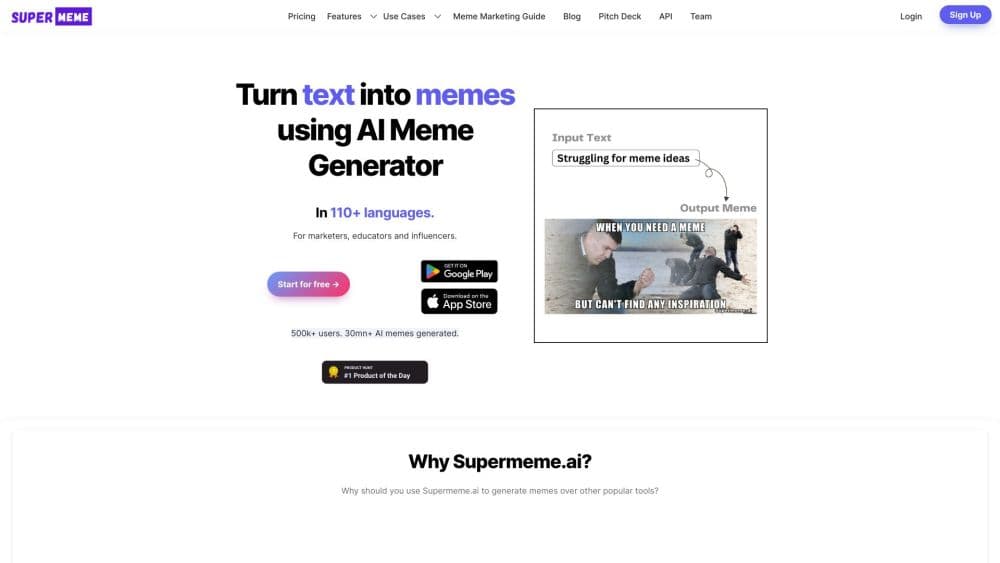
Supermeme.ai is a web-based AI meme generator. You describe a situation or idea in plain text, and the tool suggests meme templates that fit the meaning of your prompt and drafts captions you can rewrite before downloading.
The product grew out of the "blank canvas" problem most meme tools leave you with. A traditional meme maker helps once you already know the template and the punchline. Supermeme tries to cover the parts that need meme knowledge: picking a format that carries the right meaning, writing a caption that reads naturally, and fitting the result to a format you can post.
It suits social media managers, marketers, educators and anyone who wants a reaction image without digging through template galleries. The main limits are the credit system on free accounts, the watermark on free downloads, and template rights. Meme templates can include third-party images or characters, so commercial use depends on the template and how you publish it.
Getting Started
- Sign up for a free account, which comes with 10 creation credits per calendar month and no card required.
- Type what you want the meme to say, or upload your own image to add captions to it.
- Open the suggested templates and captions, then pick the option that fits your message.
- Edit the caption text and adjust its placement, switch between image and GIF output, or add a brand kit.
- Download the finished meme. Save it before the file is used elsewhere, and check that the wording reads the way you intended.
Product Information
A quick look at Supermeme.ai's pricing, supported platforms, and performance.
Best for
The users, tasks, and scenarios where this tool fits best.
Users
- Social media managers
- Marketing and brand teams
- Educators and presenters
Tasks
- Turning a written idea into a meme draft
- Writing a short caption
- Searching for a template by feeling
- Generating GIF memes
Scenarios
- Covering recurring team moments
- Adding humour to a deck or post
- Building a branded campaign
Key features
Text to Meme From a Written Idea
You describe the situation in plain text and Supermeme returns matching templates with draft captions. The intent-matching step encodes the whole prompt, searches a curated template index by meaning, and writes caption options for the formats it retrieves. You never have to name the meme you have in mind.
Curated Template Library
The generator works from a set of recognizable meme formats rather than inventing a new image for every prompt. That keeps the output closer to memes people already recognize, which matters when the joke depends on the audience knowing the format. You can also browse blank templates when you already know the one you want.
Multilingual Search and Captions
The semantic search covers 109 listed languages, so you can describe an idea in your own language and still get relevant templates. Caption generation is a separate step; check that the wording lands in the language you intended and edit it before sharing.
Image and GIF Modes
Supermeme works as both an image tool and a GIF meme generator from the same text prompt. Switching modes keeps one workflow for reactions and still images, which helps when you post the same idea to different feeds.
Caption and Placement Editing
Every generated option is a draft, not a final file. You rewrite the caption and adjust text placement before downloading. Adding or generating a caption for your own uploaded image follows the same edit-then-export pattern.
Brand Kits and Watermark Control
Paid plans remove the Supermeme watermark and add brand kits that store a logo, colours and header or footer styling per brand. The Startup plan raises the limit to 10 kits and lets you set custom watermark text for branded output.
Meme API and MCP Access
Paid plans include API request allowances and an MCP server. The API exposes endpoints for finished captioned images, caption-and-template pairs, template search and minimalist visuals. Teams can generate memes from their own tools and bots; API requests have a separate allowance from creation credits.
Pros and cons
Pros
- Works from a written idea, so you do not need to know a template name before you start.
- Covers 109 languages for template search, which suits multilingual teams and audiences.
- Image and GIF output share one prompt workflow, so the same idea works across formats.
- Brand kits and watermark removal on paid plans give branded memes a consistent look.
- A documented API and MCP access let teams generate memes from their own tools.
Cons
- Free accounts get only 10 creation credits per month, and free downloads carry a Supermeme watermark, so regular posting pushes you toward a paid plan.
- Creation credits and API requests are separate allowances, so unlimited credits on Startup does not mean unlimited API calls.
- Template rights vary, so a meme that fits a private chat might not be safe for paid media or merchandise without checking permissions.
- Generated captions are drafts that often need editing to read the way you intend, especially in languages other than the one you prompted in.
Frequently asked questions
It generates meme templates and captions from a written idea. You type a situation, review the suggested formats and captions, edit them, and download the result as an image or GIF.
Related content
Explore related tools, skills, and articles for Supermeme.ai.
Supermeme.ai Alternatives

Odyssey 3
Odyssey · OtherOdyssey-3 is Odyssey's foundation world model. It simulates physics in real time, turns a prompt into an interactive environment, and adapts to robots, cars and games.

JarvisCore
Prescott Data · Coding · Productivity · OtherJarvisCore is an open source Python runtime where AI agents work as equal peers on an agent mesh, claim tasks from a shared ledger, and reach external services through a zero-trust broker.
Clef
Cloudflare · Business · OtherClef is Cloudflare's open-source decision model for Workers AI. It returns calibrated probabilities for typed questions, not generated text, so agents can classify, route, and act fast.