

Super Send
Power Only Transit Inc. · Marketing
SuperSend is a cold email and LinkedIn outreach sequencer for founders and small sales teams. It mixes email and LinkedIn steps in one sequence, then collects every reply in a single inbox.
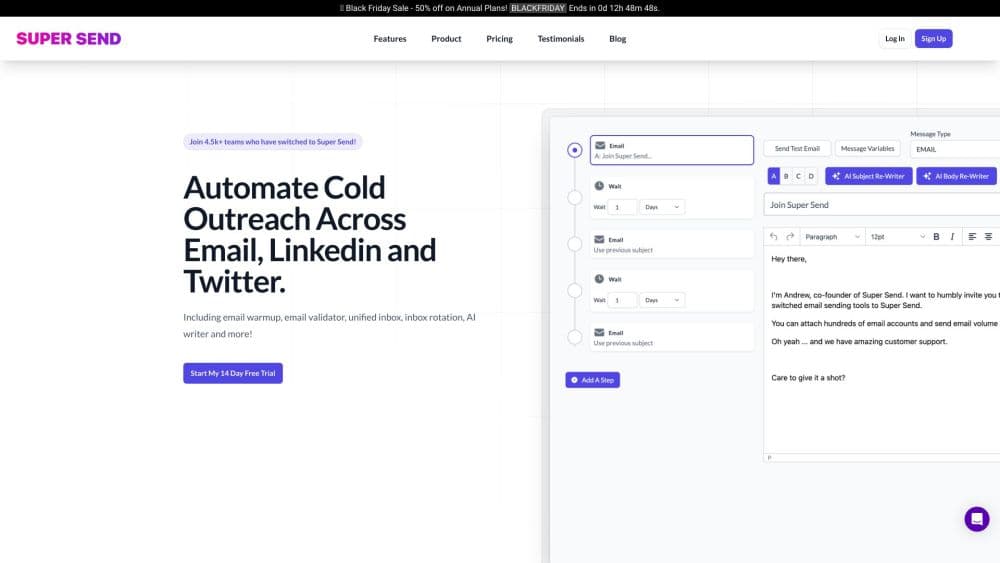
About Super Send
What Is SuperSend
SuperSend is an outbound tool that keeps email and LinkedIn in the same campaign. You build a sequence once, attach your Google, Outlook, or SMTP inboxes, add a LinkedIn account, and the tool paces the steps across both channels. A reply on either one stops the rest of the sequence for that contact.
Most outbound stacks split the work. One service sends the emails, another drives LinkedIn, a third warms the mailboxes, and you copy replies into a spreadsheet or a CRM by hand. SuperSend pulls those pieces onto one contact record. Sequences, LinkedIn actions, deliverability checks, and replies all sit in the same account.
Two limits decide whether it fits. It doesn't find leads for you. You bring a list, usually a CSV export from a prospecting tool, and your success depends on how good that list is. And plans are priced by email volume, starting at $59 per month, so it's built for people running outbound as a real channel, not for someone testing a single message.
Getting Started
- Sign up free at supersend.io. Setup takes no card, and you can connect inboxes and import contacts before paying anything.
- Connect senders. Plug in your existing Google or Outlook inboxes, or buy sending inboxes and domains inside SuperSend. Add your LinkedIn account as a sender.
- Build the sequence. Mix email steps and LinkedIn steps, add waits and branches, write A/B variants, and map your CSV columns to personalization variables.
- Test before launching. Send every email step to your own inbox first, filled in with a real contact's details, then launch the campaign. The 7-day trial starts at this step.
- Work the replies. Email and LinkedIn replies land in one inbox, tagged by AI, and you answer from the right sender without switching accounts.
Product Information
A quick look at Super Send's pricing, supported platforms, and performance.
Best for
The users, tasks, and scenarios where this tool fits best.
Users
- Seed-stage founders
- Small sales teams
- Agencies running client campaigns
Tasks
- Booking discovery calls from a cold list
- Reaching people who ignore email
- Keeping a sending domain healthy
- Sorting a pile of replies
Scenarios
- Launching a first outbound campaign in an afternoon
- Handing outbound to an AI agent
- Sending from many inboxes at once
Key features
Email and LinkedIn in One Sequence
The core of SuperSend is a single sequence that mixes both channels. You can open with a profile visit and a connection request, wait until someone accepts, then send a LinkedIn message, and fall back to email if they never do. Every step, on either channel, hangs off one contact record. When a prospect replies anywhere, the remaining steps for that contact stop. That stops the awkward case where someone answers on LinkedIn and still gets four follow-up emails.
Sequence Builder with Branching and A/B Tests
Campaigns are built from email steps, LinkedIn steps, and waits. You can branch on whether a contact replied, opened, clicked, or did nothing, and send follow-ups in the original thread so they read as part of the conversation. A/B tests cover subject lines, openers, and whole steps, so you can compare replies rather than opens. Spintax keeps two recipients from seeing identical copy, and any CSV column becomes a personalization variable.
Unified Inbox with AI Reply Labels
Every reply from every connected email inbox and LinkedIn account lands in one place. AI labels sort each one into interested, meeting request, not now, out of office, or unsubscribe, and saved views like "Needs reply" keep the queue short. Each conversation shows the campaign, step, and variant that triggered it, plus the contact's email and LinkedIn history, so you answer with context.
Deliverability Monitoring and Warmup
Deliverability is where most cold email software quietly fails, and SuperSend treats it as part of the campaign rather than a side task. Warmup runs on every connected inbox, SPF, DKIM, and DMARC checks flag what needs fixing on each sending domain, and placement tests send a real message to seed inboxes at Google and Outlook. Per-inbox health scores and grouped bounce reasons help you spot a sender that's dragging a campaign down before the domain takes damage.
Sending Inboxes and Domains You Can Buy Inside
You don't have to shop elsewhere for infrastructure. SuperSend sells Google or Outlook inboxes at $5 per month each and sending domains at $13 per year, with SPF, DKIM, and DMARC already configured. Inboxes arrive warm, so a new campaign doesn't start cold. If you'd rather use InboxKit, Mission Inbox, or Mailreef, those connect through API keys and keep their own warmup.
Agent and API Access
SuperSend publishes an agent guide at supersend.io/agents.md and a CLI that any terminal-capable agent can drive. Claude Code has a plugin, Claude on the web or desktop connects through SuperSend's MCP server, and Codex, Cursor, or Gemini CLI run the same commands from a terminal. The CLI returns JSON when an agent calls it, and an API reaches anything the CLI doesn't. Agents ask before launching, sending a reply, or spending money, which keeps a human in the loop.
Integrations with HubSpot, Pipedrive, Zapier, and Make
Interested replies can be pushed to HubSpot or Pipedrive, and Zapier or Make workflows can fire on campaign events. That matters for small teams that don't want to retype a conversation into a CRM. It's a narrower integration set than a full sales engagement platform, and there's no built-in CRM of its own.
Pros and cons
Pros
- Email and LinkedIn live in one sequence on one contact record, so a reply on either channel stops the rest of the follow-ups.
- Warmup, DNS checks, and placement tests come with every plan, which removes a separate warmup bill.
- Contacts are unlimited on all plans. You only pay for email volume, so a big list doesn't change the price.
- The 7-day trial starts when you launch a campaign, which gives you time to build and test before paying.
- The CLI, MCP server, and agent guide open the tool to Claude Code and other AI agents.
Cons
- There's no lead database. You need your own list, so the tool can't replace a prospecting platform.
- The $59 entry point is high for someone who wants to send a few hundred emails a month.
- Emails over your plan limit are billed per email, from $0.006 down to $0.0025, so a badly sized plan gets expensive.
- LinkedIn actions carry account risk that no tool can remove. Daily limits reduce it, but they don't clear a restricted account.
Frequently asked questions
SuperSend runs cold outreach across email and LinkedIn. You build a sequence, connect inboxes and a LinkedIn account, and the tool sends the steps, stops on replies, and collects every answer in one inbox. It's an outbound sequencer, not a lead database.
Related content
Explore related tools, skills, and articles for Super Send.
Super Send Alternatives

ngram 2.0
ngram · Video · Marketingngram 2.0 is an AI video generator for teams. It turns a prompt, a screen recording, or a product URL into a narrated explainer, product demo, or AI avatar video, and every scene stays editable.

shippedit.me
Krawlup · Marketing · Businessshippedit.me now redirects to Krawlup, a web platform that audits SEO, AEO and page speed every week, then hands the fixes to AI coding agents over MCP.

MePersona
MePersona, Inc. · Writing · Productivity · MarketingMePersona is an AI unified inbox for creators. It learns your voice, drafts replies to fan messages from 12 platforms, and sends only what you approve.