
Suppa
Suppa · Marketing · Leaning · Other · Chatbot
Suppa is a no-code AI chatbot builder for support and sales teams. It answers from your own knowledgebase, calls your APIs, and ships to websites, mobile apps, and WhatsApp.
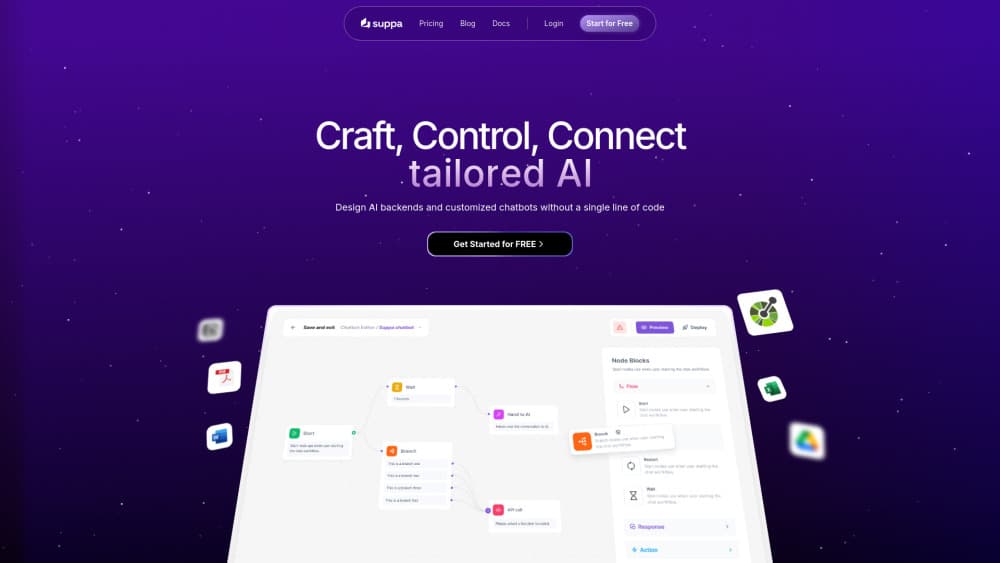
About Suppa
What Is Suppa
Suppa is a platform for building AI assistants that talk to your customers. You assemble a conversation on a visual canvas, point the bot at your own content, and decide which answers come from a script and which come from a language model. The finished bot then lives on your site, inside your mobile app, or in a messaging channel.
The product targets the gap most small teams hit: live chat tools are cheap but dumb, and custom builds are smart but expensive. Suppa sells AI customer service that sits in between the two. A support lead can ship a working bot without waiting on engineering, then hand the tricky paths to developers when an API call or an SDK install is needed.
The limits are worth knowing up front. Every plan caps chat sessions, knowledgebase items, and API actions, and the cheapest plan allows a single bot with five knowledgebase items. There's no free tier either, only a 14-day trial. Documentation is thin in places, and the public changelog stops in August 2024, so you're buying a lean product rather than a heavily documented one.
Getting Started
- Create an account at suppa.ai and start the 14-day trial. No card is required at signup.
- Add knowledgebase items. Paste the pages, documents, or text your bot should answer from.
- Build the flow on the canvas. Drop a start point, a user input node, then either a knowledgebase node, an AI response node, or a handoff to full AI control.
- Add API actions where the bot needs live data, such as an order status lookup or a ticket creation call.
- Install the widget on your site, or connect a channel like WhatsApp and Telegram, then test the conversation before you point traffic at it.
Product Information
A quick look at Suppa's pricing, supported platforms, and performance.
Best for
The users, tasks, and scenarios where this tool fits best.
Users
- Small support teams
- Solo founders and small business owners
- App developers
Tasks
- Answering repeat questions
- Qualifying leads
- Order and account lookups
- Escalating hard cases
Scenarios
- After-hours coverage
- Launch days and traffic spikes
- Internal help desks
Key features
No-code canvas with real branching
The editor is a node canvas, and the node set is practical rather than decorative. A start point triggers on user consent, a branch node routes on conditions, and a user input node stores replies in a variable you can reuse later. You can wire a send message node for fixed copy, a knowledgebase node for retrieved answers, or an AI response node when you want the model to write the reply itself. Flows stay readable because each node does one job.
Knowledgebase that drives the answers
Suppa takes content from multiple sources and uses it as the grounding layer for AI answers. Each plan includes a fixed number of knowledgebase items, from five on Starter to fifty on Business, so the practical question is how tightly you can scope your content. A tight scope is a feature, not a limitation: a bot with twenty clean pages about your product answers better than one stuffed with the whole intranet. The changelog also notes sub-page crawling for URLs, which matters when your help center is spread across nested pages.
API actions that touch your systems
An API call node hits your own endpoint mid-conversation. That's what makes the bot useful beyond FAQ duty. A customer can ask where an order is, the flow calls your order service, and the answer comes back with a real status and date. Each plan allows a set number of API actions, five on Starter and one hundred on Business, so heavy backend use pushes you up a plan. Third-party services work the same way if they expose an endpoint or a Zapier hook.
Model choice per bot
You pick the language model behind the assistant. The current lineup covers GPT-4o Mini, GPT-4o, Claude 3 Haiku, and Claude 3.5 Sonnet. Mixing a fast cheap model for routing with a stronger one for written answers is the obvious play, and Suppa leaves that decision to you instead of locking one provider. Model quality matters most on the free-form paths, so put your best model where the bot writes, not where it sorts.
Deployment across web, mobile, and messaging
The channel list is wider than most tools at this price. You can embed a widget on a website, install the Android or iOS SDK, or connect WhatsApp, Telegram, and Instagram. A WhatsApp chatbot reaches customers where they already message businesses, which is often the difference between a bot people use and a bot people ignore. The whitelabel API covers setups where the assistant has to appear as part of your own product.
Analytics, autotraining, and lead capture
The dashboard reports on conversations, and higher plans add advanced analytics, custom reporting, and weekly autotraining. Autotraining is the one to watch: it means the knowledge layer gets refreshed on a schedule instead of drifting out of date. Automatic lead collection runs alongside the chat, so a support conversation can also produce a sales lead. Basic analytics and email support come with every plan, including Starter.
Pros and cons
Pros
- The visual canvas covers branching, variables, and API calls, so a non-developer can ship a working flow without touching code.
- Entry price is low at $27/mo, and the 14-day trial needs no credit card.
- You choose between GPT-4o, GPT-4o Mini, Claude 3.5 Sonnet, and Claude 3 Haiku per bot.
- API actions connect the bot to real backend data instead of leaving it to paraphrase a help article.
- Channel coverage includes Android and iOS SDKs plus WhatsApp, Telegram, and Instagram, which most budget chatbot builders skip.
Cons
- Session caps bite fast. Starter allows 1,000 chat sessions a month, so a busy support queue moves you to Pro or Business quickly.
- The five knowledgebase items on Starter are tight for anything beyond a single product page, and item counting pushes teams to Pro early.
- There's no free plan, only a 14-day trial, so you can't keep a low-traffic bot running at zero cost.
- Documentation is thin and the public changelog stops in August 2024, which makes it hard to judge how actively the product is maintained.
Frequently asked questions
Suppa builds AI chat assistants for customer support, sales qualification, and internal help desks. The bot answers from your own content and can call your systems for live data.
Related content
Explore related tools, skills, and articles for Suppa.
Suppa Alternatives

ngram 2.0
ngram · Video · Marketingngram 2.0 is an AI video generator for teams. It turns a prompt, a screen recording, or a product URL into a narrated explainer, product demo, or AI avatar video, and every scene stays editable.

shippedit.me
Krawlup · Marketing · Businessshippedit.me now redirects to Krawlup, a web platform that audits SEO, AEO and page speed every week, then hands the fixes to AI coding agents over MCP.

MePersona
MePersona, Inc. · Writing · Productivity · MarketingMePersona is an AI unified inbox for creators. It learns your voice, drafts replies to fan messages from 12 platforms, and sends only what you approve.