

Get Website.Report
Unstack · Coding · Marketing
GetWebsite.Report is an AI website audit tool for agencies and marketers. It grades SEO, conversion, usability, and messaging, then hands back fixes.
About Get Website.Report
What Is GetWebsite.Report
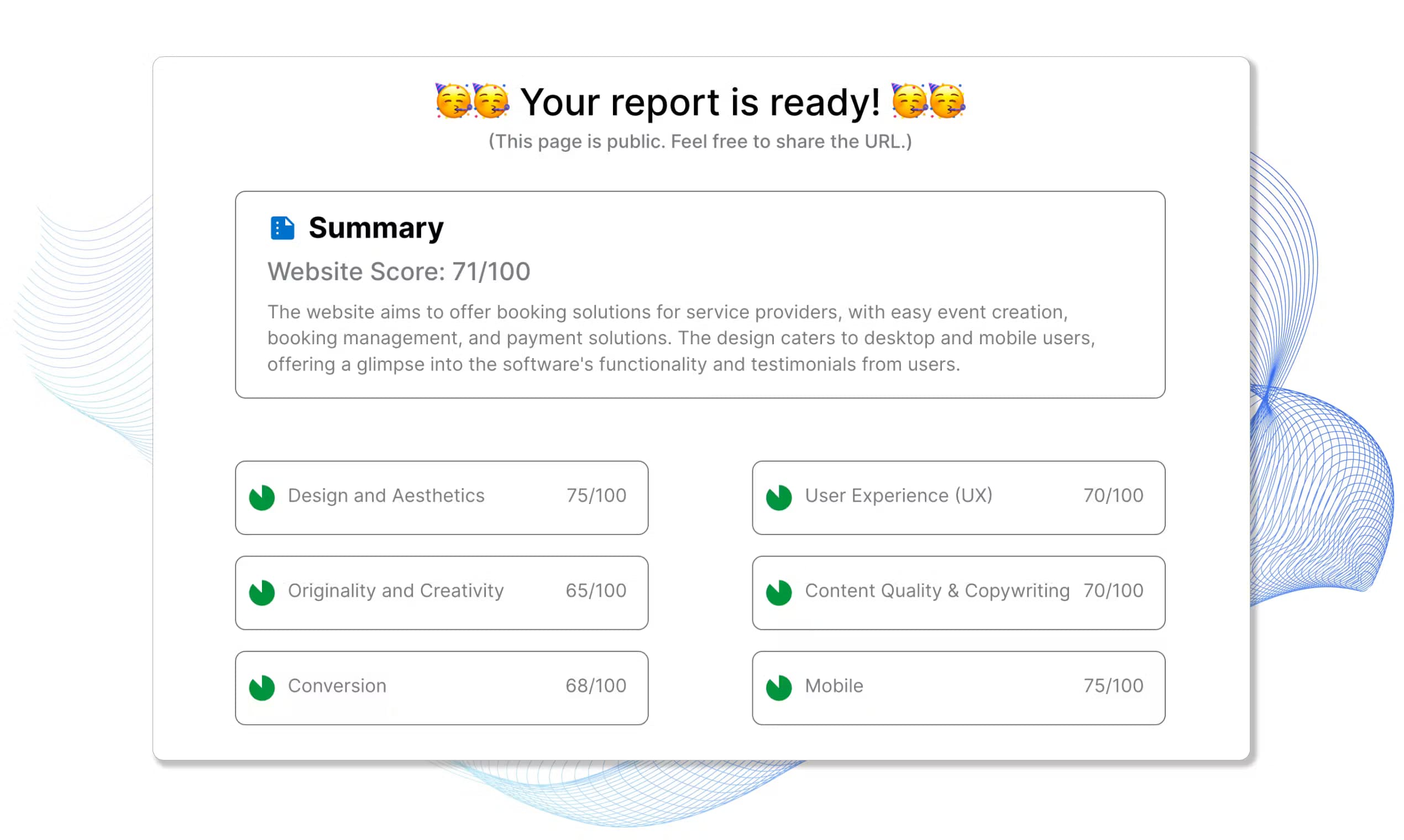
GetWebsite.Report is an AI website audit tool that reads a landing page the way a conversion specialist would and writes up what to change. You paste a URL, and the tool scores the page on SEO, performance, security, usability, and messaging, then returns recommendations tied to your business type, whether that is e-commerce, SaaS, or lead generation. The company says it has processed more than 1,800 audits and holds a 4.8 out of 5 rating from 350 or more users.
The tool aims at agencies and marketers first. Its audits come white-labeled, so an agency can run one on a prospect, send it over, and use the findings as a lead magnet or the opening of a paid pitch. Reports break down issues at the category level, covering copy, design, positioning, social proof, imagery, and load speed, so a reader can see the section that needs work rather than a single vague score.
The clear limits are the audience and the black-box scoring. GetWebsite.Report is built around agency workflows and lead generation, so a solo site owner who just wants a private todo list gets more report than needed. How the underlying model weighs each factor is not published, and since the site is a JavaScript app, the public details on plans and integration options are thin.
Getting Started
- Go to getwebsite.report and enter the URL of the landing page you want audited.
- Add the business type, such as e-commerce, SaaS, or lead generation, so the recommendations match your context.
- Let the tool generate the report, then read the section and category scores for SEO, conversion, usability, and messaging.
- Review the personalized recommendations, or brand the report with your own logo before sending it to a client.
- Work through the suggested fixes and re-run the audit to track what changed.
Product Information
A quick look at Get Website.Report's pricing, supported platforms, and performance.
Best for
The users, tasks, and scenarios where this tool fits best.
Users
- Digital agencies
- Freelance marketers and consultants
- Founders and in-house growth teams
- SaaS and e-commerce teams
Tasks
- Auditing a landing page before a redesign
- Turning audits into outreach
- Checking SEO, usability, and messaging together
- Benchmarking a page after changes
Scenarios
- An agency wants a different opening than a cold email
- A founder suspects the homepage looks fine but converts poorly
- A marketing team is about to spend on ads
- An in-house team needs a second opinion on a redesign
Key features
AI agents for conversion optimization
GetWebsite.Report leans on AI agents that review a page the way an experienced conversion specialist would. They surface observations and recommendations across messaging, positioning, and calls to action, which is the part a plain SEO crawler tends to miss.
SEO, performance, and security auditing
Beyond conversion, the tool runs an SEO audit alongside page performance and security checks, and it judges them against your business type. An e-commerce store, a SaaS product, and a lead-generation page each get criteria that fit their goals, so the advice stays relevant instead of generic.
Section and category level insights
Reports break a page down by category, including copy, design, positioning, social proof, imagery, and load speed. That structure lets a reader see which part of the page needs attention rather than staring at one overall number.
Personalized recommendations
The recommendations are tailored, not templated. Each note connects a specific problem to a suggested fix, so a user knows what to change and why it matters for conversion, usability, SEO, or messaging.
White-labeled audits for agencies
Audits can be branded, which makes them useful as client-facing deliverables. An agency can present the report under its own name, use it as a lead magnet, or fold the findings into a proposal for a redesign or conversion project.
Business type matching
The tool asks for the kind of business up front and adapts its checks to match. That keeps a SaaS signup flow from being graded with e-commerce rules, and it keeps the recommendations tied to how you actually make money.
GWR v2 audit engine
The current version, GWR v2, added the AI agents for conversion optimization on top of the earlier auditing engine. The company frames it as a step up in how closely the tool reads a page like a seasoned expert.
Pros and cons
Pros
- Covers SEO, conversion, usability, and messaging in one report, so teams skip running several tools separately.
- Section and category scoring shows which part of a page to fix, not just a single pass or fail grade.
- White-labeled reports fit agency workflows and double as lead magnets for outreach.
- Recommendations adapt to the business type, so e-commerce, SaaS, and lead-generation pages each get relevant advice.
- The tool reports a track record of more than 1,800 audits and a 4.8 out of 5 rating from 350 or more users.
Cons
- How the tool weighs each factor is not published, so scores are hard to verify or explain to a client.
- The public site is a JavaScript app, which makes plan details and pricing hard to confirm from the page itself.
- It is built around agency and lead-generation workflows, so a solo owner who only wants a private checklist gets an oversized report.
- No API or integration details are published, which limits use inside an existing marketing stack.
Frequently asked questions
GetWebsite.Report is an AI website audit tool. You give it a URL, and it grades the page on SEO, performance, security, usability, and messaging, then returns personalized recommendations on what to change.
Related content
Explore related tools, skills, and articles for Get Website.Report.
Get Website.Report Alternatives

Base Code
Base44 (Wix) · Coding · ProductivityBase Code is a shared cloud development environment from Base44. Teammates describe changes to an existing GitHub codebase in chat, preview them live and send them back as pull requests.

Google EmbeddingGemma 2
Google DeepMind · Writing · Image · CodingGoogle EmbeddingGemma 2 is a 740M-parameter open model that turns text, code, images, audio, and video frames into vectors in one 768-dimension space, running on phones and laptops.

GitGlow
GitGlow · Coding · ProductivityGitGlow is a local-first desktop Git client that lets independent developers review their own code and their AI agents' changes in one place before shipping.