
Tangia
Tangia · Other
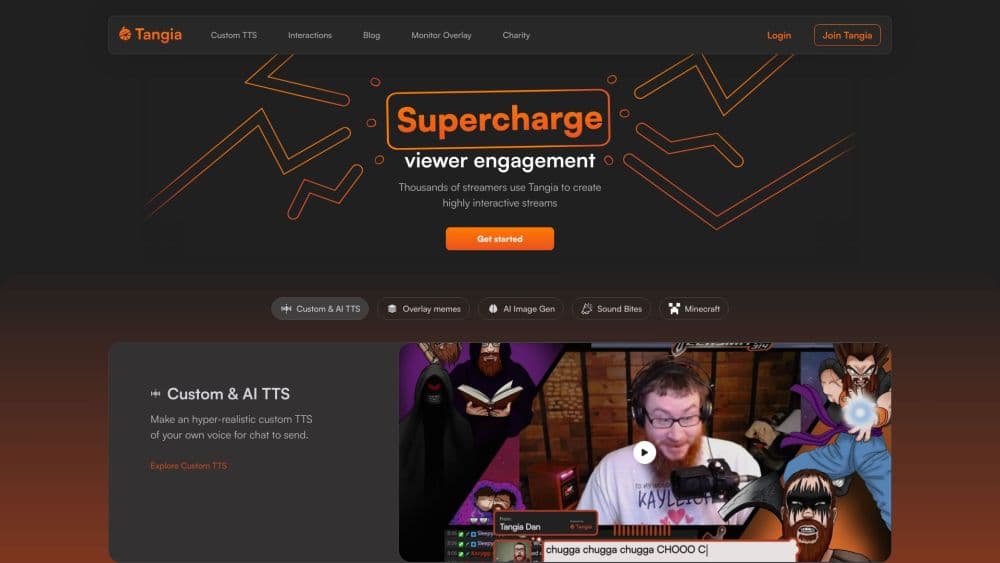
Tangia is an interactive streaming platform where viewers trigger AI text-to-speech, memes, and images on a live stream, helping Twitch, YouTube, and Kick creators turn chat into content.
About Tangia
What Is Tangia
Tangia is a cloud app that streamers add on top of their broadcast to give chat more ways to take part. Viewers spend channel points, Bits, or Tangia Tokens to fire off an interaction: a text-to-speech message, a meme, a jumpscare, or an AI image that lands on screen while the stream keeps rolling. The whole thing runs as a browser source, so it drops into OBS Studio, Streamlabs OBS, or Twitch Studio without eating into your PC's headroom.
The pitch is simple. A quiet stream is a dying stream, and most engagement tools stop at alerts and emotes. Tangia goes further by making the audience the content. Someone in chat can clone-fuel a voice line that sounds exactly like you, or ask an AI persona a question and watch it answer in real time. Those moments become clips, and clips bring new viewers.
The catch is that Tangia is built for live interaction, not general video work. If you don't stream live, most of what it does has nothing to grab onto.
Getting Started
- Create a Tangia account and link it to your Twitch, YouTube, TikTok, or Kick channel.
- Add the Tangia browser source to OBS Studio, Streamlabs OBS, or Twitch Studio.
- Record a short script in the TTS Studio to generate a custom AI voice, or pick from the built-in voice library.
- Browse the interaction catalogue and switch on the memes, sounds, and effects that fit your stream.
- Set up media share and alerts, then pick how viewers pay: channel points, Bits, or Tangia Tokens.
Product Information
A quick look at Tangia's pricing, supported platforms, and performance.
Best for
The users, tasks, and scenarios where this tool fits best.
Users
- Twitch streamers
- VTubers and variety streamers
- Creators with a mod team
Tasks
- Turning chat messages into on-air audio
- Building a soundbite library from your own clips
- Running a live image generation gag
- Rewarding community milestones
Scenarios
- Horror game streams
- Group watch sessions
- Subscriber and milestone celebrations
- Long variety streams
Key features
Custom AI Text-to-Speech in Your Own Voice
The TTS Studio clones your voice from a short script reading and hands you a synthetic version chat can trigger on demand. Effects like Inner Thoughts, Phone Call, and adjustable pitch or speed let viewers push the bit further. It takes minutes rather than a studio session.
150+ Hand-Crafted TTS Voices
Beyond your own voice, Tangia ships a library of more than 150 voices, from Goku and Sonic to Gordon Ramsay and Duke Nukem. A creative mode lets chat mix voices, delays, and sound effects inside a single message, which keeps the joke from getting stale.
AI Personas Chat Can Talk To
You can build custom AI characters tied to your cloned voice, so chat holds a conversation with an AI version of you. Ready-made personas like Ask AI Lola and Ask MEAN Marge are available on day one for streamers who want the feature without the setup.
Thousands of Memes and Overlay Interactions
A curated meme library of thousands of clips plays straight onto the stream, covering jumpscares, pop culture overlays, and community-made effects. Creators can publish their own interactions and earn REP each time another streamer uses one.
Soundbites from Your Twitch Clips
Viewers pull clips from your Twitch channel, trim them inside the extension, and submit them as playable soundbites. You or a mod approves each submission, so a personal audio library builds up without the queue turning into chaos.
AI Image Generation on Stream
Chat submits prompts that become on-screen images, read aloud by TTS as they appear. Tangia supports several image models, including FLUX and Google's Nano Banana Pro, which keeps the output unpredictable enough to be funny.
Better Alerts and Media Share
The alert builder combines Twitch and Tangia triggers, conditions, and actions into custom sequences, with 3D animated alerts and custom iFrame support. Media share adds a built-in trimmer and priority queue for YouTube, Twitch, and TikTok clips, with mod tools to manage the line.
Pros and cons
Pros
- Runs as a browser source, so it adds no meaningful load to your streaming PC.
- Voice cloning and 150+ voices give you personal and character audio without an editor.
- A free tier tied to channel points and Bits lets you test engagement before paying.
- Mod access on media share and soundbite approval keeps the stream manageable at scale.
- Multi-platform support covers Twitch, YouTube, TikTok, and Kick in one setup.
Cons
- The experience leans on live chat, so it's of little use for pre-recorded or non-streaming content.
- Most of the standout features sit behind the $9.99/mo Tangia+ plan, and limits on TTS redemptions can bite on busy channels.
- Custom 3D alerts and chained sequences take time to learn, and browser source setups can hit occasional hiccups.
- There's no documented public API, so you can't build your own integrations on top of it.
Frequently asked questions
Tangia is used to make live streams interactive. Viewers spend points, Bits, or Tokens to trigger AI text-to-speech, memes, soundbites, and AI images that play on stream, alongside alerts and the platform's other viewer interactions.
Related content
Explore related tools, skills, and articles for Tangia.
Tangia Alternatives

Odyssey 3
Odyssey · OtherOdyssey-3 is Odyssey's foundation world model. It simulates physics in real time, turns a prompt into an interactive environment, and adapts to robots, cars and games.

JarvisCore
Prescott Data · Coding · Productivity · OtherJarvisCore is an open source Python runtime where AI agents work as equal peers on an agent mesh, claim tasks from a shared ledger, and reach external services through a zero-trust broker.
Clef
Cloudflare · Business · OtherClef is Cloudflare's open-source decision model for Workers AI. It returns calibrated probabilities for typed questions, not generated text, so agents can classify, route, and act fast.