

Taurin
Taurin · Writing · Marketing
Taurin was an AI email client for teams. It mixed smart filtering, auto-segmentation, and a built-in CRM for inbox management. It shut down in July 2025.
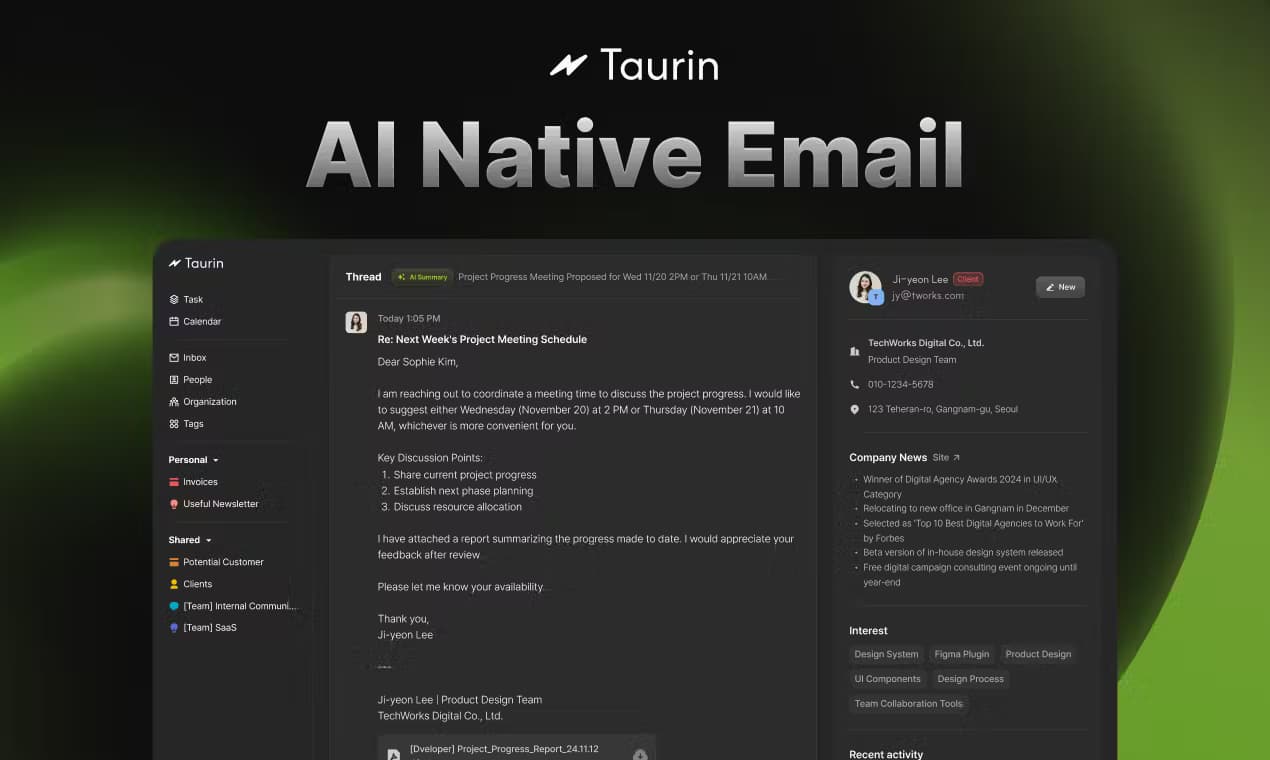
About Taurin
What Is Taurin
Taurin was an AI-native email client built by a company of the same name and led by founder and CEO Hayun Song. Instead of treating your inbox as a plain list of messages, it grouped mail automatically, filtered noise, and suggested replies as you typed. The pitch was simple: less sorting, more doing.
It also carried a lightweight CRM inside the same window. Wait, why is that unusual? Most AI email assistants stop at summarizing or drafting. Taurin didn't. Rather than copying contacts into a separate tool, you could track relationships and follow-ups right next to the conversation that started them. That combination is what separated it from the rest.
The catch is that Taurin no longer exists. The company announced on its official site that the service shut down on July 25, 2025, issued full refunds to paid users, and permanently deleted all user data after that date. So this page is a record of what it offered, not a recommendation to sign up. Hard to recommend something that isn't there.
Getting Started
- Open the Taurin site and create an account with your existing email address to connect a mailbox.
- Let the client scan your inbox so it can learn your senders, labels, and recurring threads.
- Review the auto-segmentation rules it suggests, then adjust the groups that matter to you.
- Turn on smart filtering and start typing a reply to see AI auto-complete suggestions.
- Add key contacts to the built-in CRM so follow-ups stay tied to their threads.
Product Information
A quick look at Taurin's pricing, supported platforms, and performance.
Best for
The users, tasks, and scenarios where this tool fits best.
Users
- Founders and small teams
- Sales and support staff
- Consultants juggling many clients
Tasks
- Triage a crowded inbox
- Drafting routine replies
- Tracking follow-ups
Scenarios
- Starting the day with a full inbox
- Sharing a support queue
- Keeping client notes close
Key features
Auto-segmentation
Taurin grouped incoming mail on its own, based on who sent it and how you handled similar threads before. You got labeled buckets instead of one endless list. It was the feature the whole product leaned on.
Smart filtering
Beyond simple rules, the filter learned what you ignored and what you opened. Low-priority mail moved out of the way. Real messages stayed visible. For anyone who got hundreds of emails a day, that mattered more than clever drafting. Big difference.
AI auto-complete
As you typed a reply, the client suggested the rest of the sentence, which worked best on short, predictable messages like confirmations or quick scheduling notes. Don't expect it to write a long, thoughtful email for you.
Built-in CRM
Contacts and their history lived inside the email client rather than a separate sales tool, so you could see who a person was and what you last discussed without leaving the thread. It was light by design, not a full Salesforce replacement.
Unified mailbox
Taurin pulled accounts into one view so you weren't hopping between tabs, and combined with segmentation and filtering, it aimed to make a single screen enough for the whole day. The catch: everything ran in the browser, with no desktop or mobile app.
Pros and cons
Pros
- Auto-segmentation cut manual folder sorting, which saves real time on a busy inbox.
- Smart filtering learned your habits instead of forcing you to write rules.
- AI auto-complete sped up short, repetitive replies.
- The built-in CRM kept contacts and context next to the thread that created them.
Cons
- The service shut down on July 25, 2025, so it can't be used at all today.
- Web browser only, with no native desktop or mobile app.
- The CRM was lightweight, so teams needing pipelines or reporting would outgrow it fast.
Frequently asked questions
Taurin was an AI-native email client with auto-segmentation, smart filtering, AI auto-complete, and a built-in CRM. The company shut it down in 2025.
Related content
Explore related tools, skills, and articles for Taurin.
Taurin Alternatives

Google EmbeddingGemma 2
Google DeepMind · Writing · Image · CodingGoogle EmbeddingGemma 2 is a 740M-parameter open model that turns text, code, images, audio, and video frames into vectors in one 768-dimension space, running on phones and laptops.

MePersona
MePersona, Inc. · Writing · Productivity · MarketingMePersona is an AI unified inbox for creators. It learns your voice, drafts replies to fan messages from 12 platforms, and sends only what you approve.

Fluence
Yay Software (Yannick Huchard) · Writing · Voice & Language · ProductivityFluence is an Android app that reads PDFs, EPUBs, Word files and web articles aloud, follows each sentence as it speaks, and answers questions about the text on the phone itself.