

Tenorshare AI Math
Tenorshare · Leaning
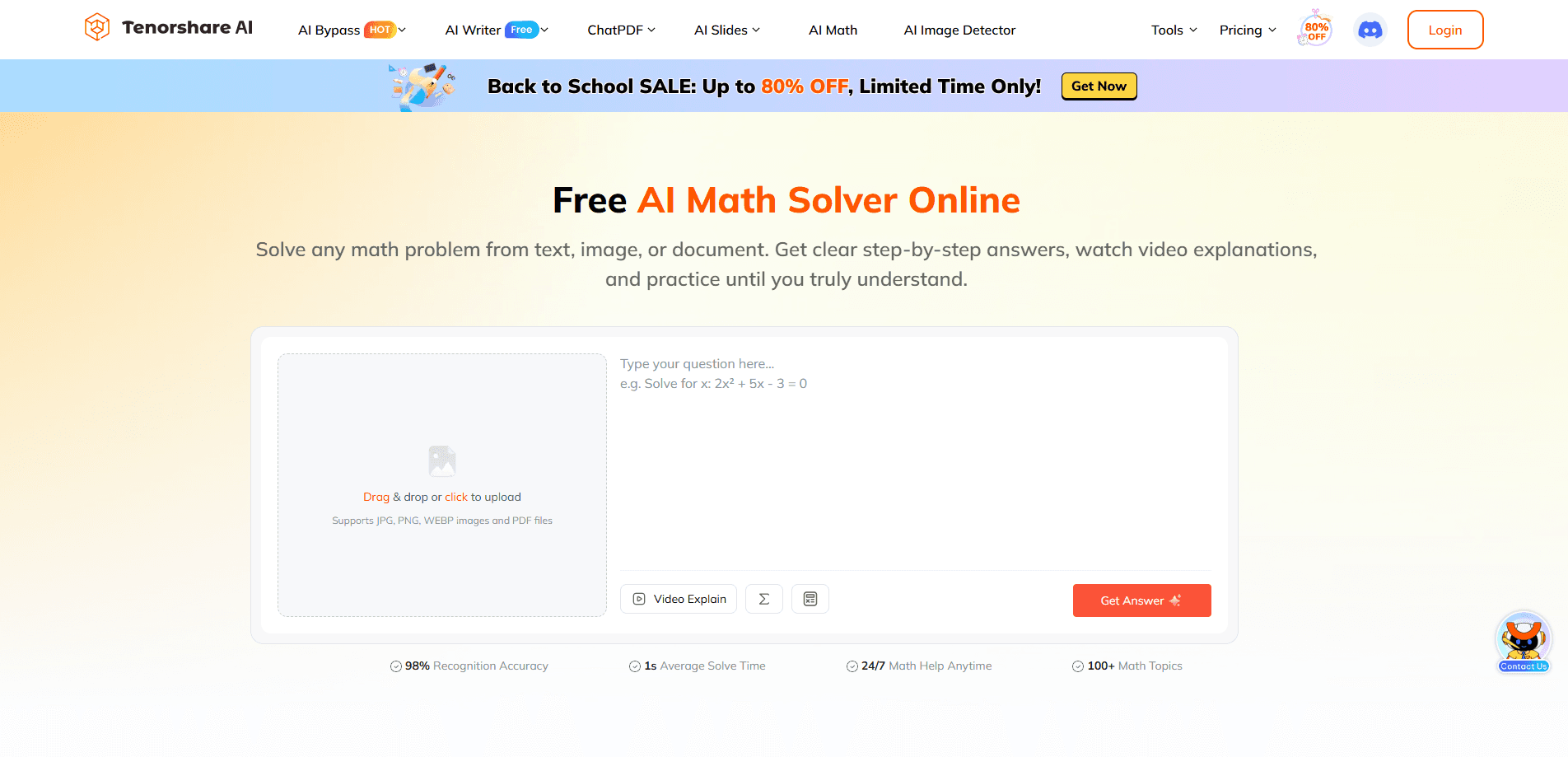
Tenorshare AI Math is a free online AI math solver that turns a typed question, a photo, or a PDF into a clear, step-by-step solution. It reads printed and handwritten problems, breaks each one into readable logic, and adds short video explanations plus practice sets so you can check whether you actually understood the method. You use it in a browser, with no install and no separate app to manage, which makes it a fast option for homework and quick concept review.
About Tenorshare AI Math
What Is Tenorshare AI Math
Tenorshare AI Math is a web-based solver built by Tenorshare. The pitch is simple: type a math problem, upload an image of it, or import a document, and the tool returns a worked solution instead of just a final number. That matters for students, since a bare answer rarely helps when the real goal is passing the next test.
The tool covers a wide spread of school math, from arithmetic and fractions up to algebra, geometry, trigonometry, calculus, and word problems. According to Tenorshare, it handles over 100 math topics, runs on a browser on any device, and reports roughly 98% recognition accuracy with an average solve time near one second. Those numbers come from the vendor, so treat them as a claim rather than a measured result.
The biggest limit is accuracy on messy input. Clean printed text or neat handwriting works best; a blurry photo, a stray light reflection, or a cramped multi-part question can throw off the scan. So what should you do with a hard-to-read problem? Retype it. It's faster than fighting the scan. The tool also can't replace a teacher when a concept needs real explanation, and it won't help with problems it can't read in the first place.
Getting Started
- Open the Tenorshare AI Math page in your browser. You don't need to download an app to start.
- Add your problem in one of three ways: type it, upload a JPG, PNG, or WEBP image, or import a PDF document.
- Read the step-by-step solution. The AI explains the method, shows each transformation, and highlights the final answer.
- Watch the video explanation and ask follow-up questions if a step is unclear.
- Generate similar practice problems to test whether the skill stuck, then review your mistakes.
Product Information
A quick look at Tenorshare AI Math's pricing, supported platforms, and performance.
Best for
The users, tasks, and scenarios where this tool fits best.
Users
- Middle and high school students who want to check homework steps and see where a mistake happened, provided they type or upload a legible problem
- Parents helping with math they've half forgotten, since the step-by-step format works as a refresher before explaining it to a child
- Self-learners reviewing algebra or calculus on their own, using the practice sets to confirm a concept before moving on
Tasks
- Solving word problems and equations
- Checking your own work
- Turning a solution into study material
Scenarios
- Last-minute homework at night
- Exam review week
- Grading a stack of practice sheets
Key features
Scan Text, Photos, and Documents
You can feed the solver a typed expression, a JPG, PNG, or WEBP photo, or a PDF file. That flexibility means you don't have to retype a page of problems by hand. The math scanner reads expressions and word problems alike, so both clean textbook questions and short written answers are fair game.
Step-by-Step Answers
The core promise is the breakdown, not the number. For each problem, the AI explains the method, shows every transformation, and marks the final answer. You follow the logic step by step. That's what separates a real AI math solver from a plain online math calculator, which usually just returns a total.
Video Explanations
After a solution, the tool can turn the answer into a short lesson with visuals and concept reminders. That helps when a written step leaves you stuck. The videos summarize the method. They don't teach a topic from zero.
Practice Tests
You can generate similar exercises once a problem is solved. Working through fresh variations is how you confirm you learned the skill instead of memorizing one answer, and it gives you something concrete to bring back to class.
Word Problem Support
Word problems are where a lot of students stall, and the solver is built to read the phrasing and convert it into the right operation. It reads both equations and the sentences that wrap around them, which is a real advantage over tools that only accept formulas.
Works in the Browser with No Install
Tenorshare AI Math runs online, so there's nothing to download or update. It works as an AI math homework helper without the storage and permission fuss that comes with a dedicated mobile math app. Open a tab, drop in the problem, done.
Pros and cons
Pros
- Free to use online, with no app install or account wall standing between you and a solution
- Accepts three input types at once, so an image or PDF spares you from retyping long problems
- Step-by-step output plus video explanations suits students who need the method, not just the answer
- Practice generator turns each solved problem into extra drills for the same skill
- Wide topic coverage, from basic arithmetic up through calculus and word problems
Cons
- Recognition stumbles on blurry photos or cramped handwriting, which can send you to a wrong solution you didn't catch
- The vendor's accuracy and speed figures come from Tenorshare itself, so there's no independent check to lean on
- It reinforces a concept after you've learned it, but it won't teach a topic from scratch the way a teacher can
- No public API, so you can't wire it into your own study tools or scripts
Frequently asked questions
It's a free online solver that reads a math problem from text, an image, or a document and returns a step-by-step solution, a short video explanation, and optional practice problems.
Related content
Explore related tools, skills, and articles for Tenorshare AI Math.
Tenorshare AI Math Alternatives

Kaggle AI
Google · Coding · LeaningKaggle AI is a community platform where people build, test, and compare machine learning models against shared data. It combines data science competitions, tens of thousands of public datasets, and free cloud notebooks with GPU and TPU access, so anyone with a browser can train a model without buying hardware. Google owns the platform, and joining costs nothing.

Bunch
Bunch AI · Leaning · BusinessBunch is an AI leadership coaching app that turns a few spare minutes a day into real management practice. It hands you one short, personalized tip each day, tracks how you respond, and lets you compare notes with peers inside private groups. The pitch is simple: you lead better by practicing a little, often, instead of sitting through a weekend seminar. Think of it as a leadership training app you actually open.

AI Mock Interview
SQLPad · Coding · LeaningAI Mock Interview is a practice tool built into SQLPad that simulates real job interviews and gives you instant feedback on both what you say and how you say it. You pick a role template or upload a job description, answer questions out loud in real time, and then review a transcript with notes on structure, clarity, and grammar. It's aimed at data professionals prepping for SQL, Python, data engineering, machine learning, and system design roles, and it works entirely in the browser. No install needed.