

terminal.dating
Jerry Feng · AI Assistant
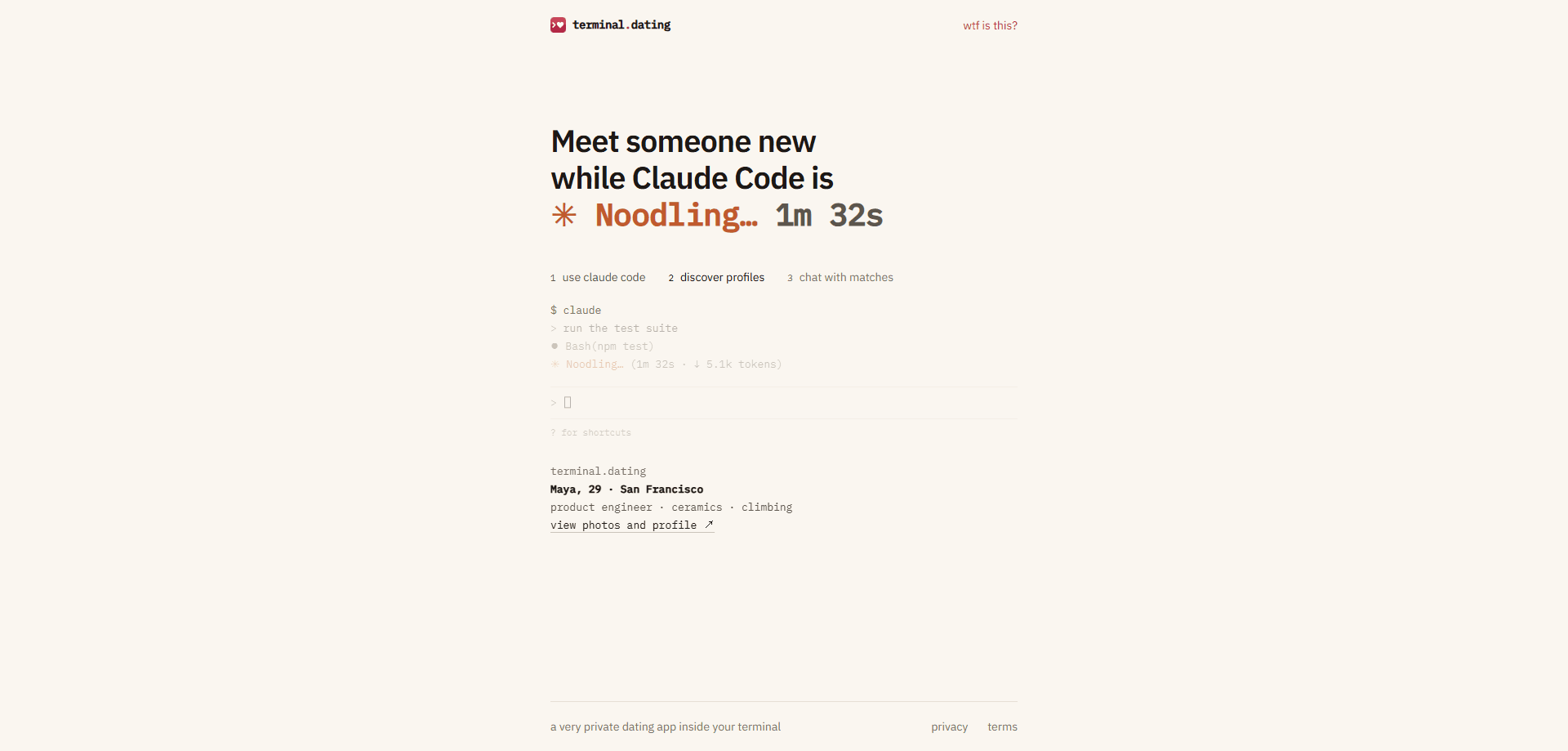
terminal.dating is a private dating app that runs inside your terminal as a Claude Code plugin. It shows a dating profile in the status line while Claude Code works. The app targets developers who'd rather meet someone during a build than open another app. You like or pass from the terminal, then head to the web to chat once you match.
About terminal.dating
What Is terminal.dating
terminal.dating is a dating app built for people who spend their day in a terminal. It doesn't have a feed, a directory, or a swipe deck you keep returning to. Instead, a profile appears in your status line while Claude Code runs, and you decide on it then and there.
The pitch is privacy by default. Profiles have no public URL. When someone shows up in your terminal, the link identifies that introduction only for you. It opens for no one else. Send it to a friend and it's a 404. There's no search. No browsing. No list of strangers waiting to be scrolled. The only way to see a person is to be introduced.
Everyone signs in with GitHub, which cuts down on burner emails and bots, and the plugin never reads your code, prompts, or files. The tradeoff is real. Messages aren't end-to-end encrypted. Moderation can read a reported conversation, and every such access is logged. If you want total secrecy in chats, this isn't that.
Getting Started
- Get early access by filling in the signup form on the terminal.dating homepage.
- Install the Claude Code plugin and link a terminal, which registers a device token and that terminal's hostname.
- Sign in with your GitHub account and confirm you're 18 or older.
- Build your profile: first name, date of birth, gender, city, occupation, bio, interests, photos, and dating preferences.
- Let profiles arrive in your status line as you work, then open the introduction on the web to like, pass, match, and chat.
Product Information
A quick look at terminal.dating's pricing, supported platforms, and performance.
Best for
The users, tasks, and scenarios where this tool fits best.
Users
- Developers who live in Claude Code all day and want to meet people without opening a second app
- Privacy-minded daters who hate public profiles and algorithmic feeds
- People in tech who'd rather date someone who already gets what they do at work
Tasks
- Meeting someone new during a long build or test run
- Chatting with a match without leaving your coding session
- Testing a lighter, intro-only approach to online dating
Scenarios
- Waiting out a slow compile when a profile pops into your status line
- A break at a hackathon when you'd rather not open Tinder
- Working from home and wanting a low-effort way to meet new people
Key features
Terminal Status Line Introductions
While Claude Code is working, terminal.dating shows a dating profile card in your status line. You glance at it, then open it on the web to like or pass. That's the whole discovery loop. You don't get pulled into a feed because there isn't one.
No Public Profiles
Every introduction link works only for the person it was shown to. Share it, and the other person sees a 404. There's no directory, no search bar, and nothing for a scraper to walk, because the rule is enforced in the database itself with row-level security. That means you can't be looked up by strangers who never got an introduction.
GitHub Sign-In
The app uses GitHub accounts only. No burner emails, no phone numbers, no separate password to manage. The same identity you ship code with is the one you date with, which makes mass spam and bot accounts much harder to run.
Code Stays Private
The plugin sends four things: a device token, your terminal's hostname, that a card reached your screen, and your likes and passes. It never reads your code, prompts, repositories, or file names. Your GitHub activity is also invisible to other members and isn't used for matching.
Introduction-Based Matching
You only ever see people you've been introduced to, and a match happens when both of you like each other. Introductions you never saw aren't spent, so a card that scrolled past while you were away won't burn a chance. Chat opens up on the web once you both say yes.
Blocking and Reporting
Blocking is permanent and mutual. Two people who've blocked each other stay invisible to one another for good, and neither profile can resurface. Reports go to a person, not a queue, and each review is logged. It's a small but real safety floor for a small community.
Account Deletion
Deleting your account in settings permanently removes your profile, photos, matches, and messages. There's no soft delete and no archive left behind. For a dating app that markets itself on privacy, a real delete button that does what it says matters.
Pros and cons
Pros
- Dating discovery fits inside a workflow you already have open, so there's no extra app to babysit
- Profiles have no public URLs, which shuts down scraping and browsing in a way most dating apps don't
- GitHub sign-in keeps bots and fake accounts out far better than email registration
- The plugin never touches your code, prompts, or files, which is the right default for a tool that runs next to your work
- One-time account deletion wipes profile, photos, matches, and messages for good
Cons
- Messages aren't end-to-end encrypted, so moderation can read a reported conversation, meaning less privacy in chats than the rest of the app suggests
- You can't browse or search. If no one gets introduced to you, there's nothing to do
- It's tied to Claude Code and GitHub, so if you don't use both, the app isn't for you
- It's still early access, so the user pool is small and matches may be slow to come by
Frequently asked questions
It's a dating app that runs inside your terminal through a Claude Code plugin. A dating profile shows up in the status line while you work, and you like, pass, match, and chat from there.
Related content
Explore related tools, skills, and articles for terminal.dating.
terminal.dating Alternatives

Iplan AI
Iplan AI · Productivity · AI AssistantIplan AI is an AI travel planner that turns a few trip details into a full day-by-day itinerary in seconds. You answer questions about your destination, interests, budget, and travel companions, and the tool builds a plan you can edit, share, and carry with you on any device. It targets travelers who want a solid draft without spending hours in spreadsheets and browser tabs. Think of it as an itinerary generator that does the tedious part for you.

Screenhelp
Screenhelp · Productivity · AI AssistantScreenhelp is an AI screen assistant that turns a single keyboard shortcut into real-time help. You press Ctrl+Shift+Space, it captures what's on your screen, and it streams an answer into a private panel in about two seconds. Think of it as an AI screenshot helper you trigger on demand. It runs on Mac, Windows, and the web, starts free with 30 answers a month, and stays invisible during screen sharing on Zoom, Teams, and Google Meet.

Rainbow
Rainbow · AI AssistantRainbow is an AI weather forecast app built around short-term precipitation nowcasting. Its engine pushes min-by-min rain and snow predictions up to four hours ahead, blending live satellite and radar feeds into hyperlocal forecasts. The app adds live rain radar, a seven-day outlook, precipitation alerts, home-screen widgets, and a hurricane tracker, and it runs on both Android and iOS with a free tier plus paid upgrades.