

Termsy
Gopigraphy · Other
Termsy is a Chrome extension that reads the Terms of Service and privacy policy pages you'd normally skip and drops a plain-language summary into a sidebar. It scans the page, pulls out the clauses that actually affect you, and explains them in short blocks. It isn't legal advice, and it won't sign anything on your behalf. Think of it as a second pair of eyes before you click Agree.
About Termsy
What Is Termsy
Termsy is a Chrome extension for terms pages, built by Gopigraphy, a small design studio that also ships other tools. It watches for legal pages as you browse, then reads them and writes a summary you can finish in a minute or two.
The problem it targets is familiar. Almost nobody reads a 9,000-word privacy policy before signing up for a new app, and companies count on that. Termsy tries to cut the gap by flagging the parts that matter: data collection, cancellation rules, auto-renewal, and the clauses that quietly limit what you can do if something goes wrong. That's the whole pitch.
The limits are worth stating upfront. It's Chrome-only, it summarizes rather than interprets law, and it can't judge whether a clause is enforceable in your country. Treat the output as a starting point for your own judgment, not a verdict. No tool fixes that gap for you.
Getting Started
- Open the Termsy page in the Chrome Web Store and click Add to Chrome, then confirm the permissions prompt.
- Pin the extension to your toolbar so you can reach it on any legal page.
- Visit a site's Terms of Service or Privacy Policy page and open the sidebar from the toolbar icon.
- Read the highlighted clauses and the short summary blocks, then size up the terms before you commit.
- Upgrade to the paid tier from inside the extension if you want the extra limits or features it unlocks.
Product Information
A quick look at Termsy's pricing, supported platforms, and performance.
Best for
The users, tasks, and scenarios where this tool fits best.
Users
- Privacy-conscious people
- Students and researchers
- Freelancers and small teams
Tasks
- Reading a privacy policy before signup
- Checking auto-renewal terms
- Spotting data-sharing clauses
Scenarios
- Signing up for a new app on a lunch break
- Prepping for a job that needs client tools
- Comparing two similar services
Key features
Automatic Page Scanning
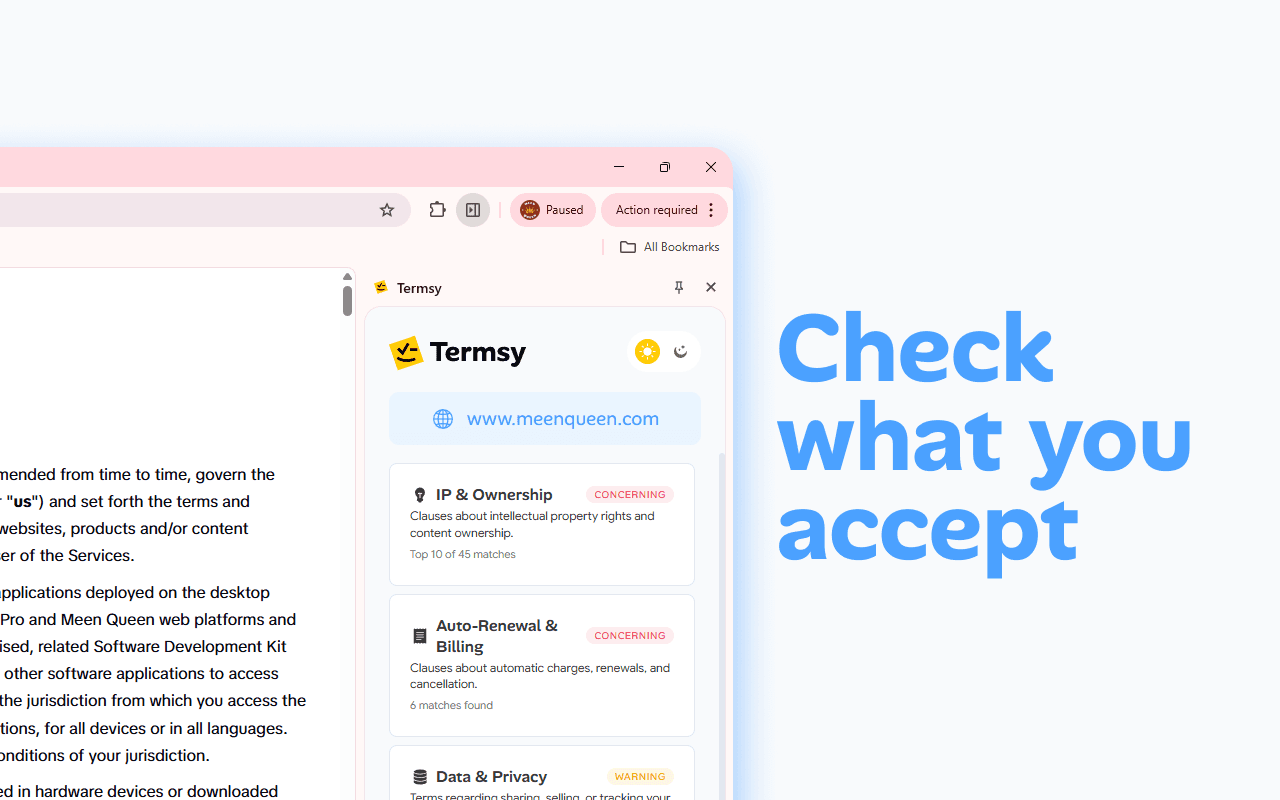
The Termsy Terms of Service summarizer detects when you're on a Terms of Service or Privacy Policy page and starts scanning without any extra clicks. You don't have to copy text into another app or hunt for a button. Open the page, open the sidebar, and the summary is there.
Critical Clause Highlighting
The extension marks the clauses that affect you most: data collection, third-party sharing, arbitration, and cancellation rules. Highlights sit on the page itself, so you can jump from the summary back to the exact sentence that triggered it. That link between plain English and the original wording is what makes it more than a generic chatbot answer, since you can always check the summary against the sentence it came from instead of trusting a black box.
Clean Sidebar Summary
Everything lands in a sidebar next to the page instead of in a popup that disappears the moment you click somewhere else. You can scroll the original document on the left and read the summary on the right at the same time. For long policies, that side-by-side layout saves a lot of back-and-forth. It's a small thing. It adds up.
Plain-Language Explanations
Termsy rewrites legal phrasing into short, readable blocks rather than pasting the original text with a highlight. It reads more like a plain AI legal summary than a wall of statutes. A clause about "transfer of personal data to affiliated entities" becomes a sentence about who gets your information. The tone stays neutral, and the extension repeats that it isn't legal advice.
In-App Purchases Tier
The extension itself is free to install, and the store listing notes it offers in-app purchases. Those paid options are how the developer funds the scanning, and they're bought inside the extension rather than through a separate account. If you only check the occasional policy, the free tier is enough to start.
Pros and cons
Pros
- Runs inside Chrome with no separate account or website login.
- Scans legal pages automatically and highlights the clauses tied to each summary point.
- Sidebar layout keeps the summary and the original document visible together.
- Reads in plain English, so you don't need a legal background to follow it.
- Free to install, with paid options only if you want more.
Cons
- Chrome only, so Firefox and Safari users can't use it at all.
- Summaries aren't legal advice and can't tell you whether a clause holds up in your jurisdiction.
- The developer's store listing shows a small user base, so you're relying on a young, unproven tool.
- No public API, which means you can't plug it into your own workflow or automate checks.
Frequently asked questions
It's a Chrome extension that scans Terms of Service and privacy policy pages and summarizes the important clauses in a sidebar. It highlights the parts that affect your data and your rights, then explains them in plain language. It doesn't file anything or act on your behalf.
Related content
Explore related tools, skills, and articles for Termsy.
Termsy Alternatives
BinkBink
BinkBink · OtherBinkBink is a free online game platform and AI game maker that lets anyone turn a short text description into a playable browser game. You can jump into hundreds of community-made games. Or describe your own idea and play it in seconds, then share it with friends. Want to create your own game? You don't need to code. No engine setup, no download, no hassle.

Audiogen
Audiogen Inc. · OtherAudiogen is an AI music generator built by Audiogen Inc., a small research team that spent about 2.5 years training its own generative music model and designing a web interface around it. Instead of a plain text box, this AI music tool turns the timeline into a beginner-friendly Generative Audio Workstation, or GAW, where inpainting, extending, remixing and stem editing work more like painting on a canvas. The product is still in beta, so access runs through a waitlist or an invite. Paid plans aren't published yet.

Aiml API
AIMLAPI OÜ · OtherAiml API is a unified AI model API that puts more than 1000 models from OpenAI, Google, Anthropic, and others behind one endpoint and one bill. You write code against a single OpenAI-compatible schema, then switch between chat, image, video, and audio models by changing a model string. It suits developers and small teams who want multi-model access without juggling a dozen separate provider accounts, and it removes the usual billing headache that comes with testing several vendors. One key covers it all.