

Testportal: Online assessment platform
Testportal Sp. z o.o. · Coding · Leaning
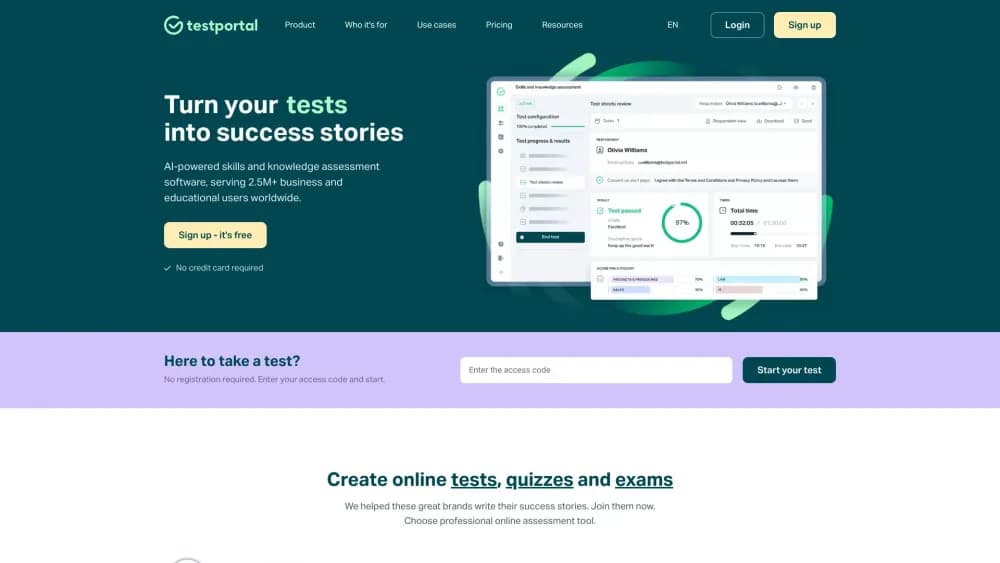
Testportal is an AI-powered online assessment platform for building tests, quizzes, and exams. It generates questions from your own materials and grades responses automatically.
About Testportal: Online assessment platform
What Is Testportal
Testportal is a web platform for creating and running online assessments. It works as an online test maker and quiz maker for both classrooms and workplaces, and it doubles as exam software for longer, higher-stakes sittings. The people who use it fall into two groups: schools and universities that test students, and companies that check the skills of candidates or employees. You build a test, share an access link, and the platform collects the answers, scores them, and turns the results into reports.
The core appeal is the work it removes. Writing questions by hand is slow, so Testportal includes an AI question generator that drafts questions from a document, a file, or a chosen topic. Grading that follows is automatic for choice and short-answer questions, and the analytics dashboard pulls scores, timings, and cheating signals into one place.
Two things shape whether it fits. First, it is built for assessments rather than as a general content tool, so you get proctoring, timing controls, and access codes rather than open-ended course authoring. Second, the AI output is a starting point. You still review and edit generated questions before a real exam. For teachers, trainers, and HR teams that run regular evaluations, that trade is easy to accept.
Getting Started
- Register for a free account at testportal.com. You can create a test before paying anything, and respondents do not need an account at all.
- Create your questions. Write them yourself, import an existing test from a PDF or Word file, or let the AI question generator draft a set from your source material or a topic.
- Configure the assessment. Set time limits per test and per question, choose whether respondents can go back or skip, and decide how access is shared through a link, a group password, or individual codes.
- Share the test. Send an access link or code, or embed the assessment in your own site. Respondents open it in a browser with no install and no login.
- Review the results. Scores, timings, and per-question details appear in the dashboard, with automated feedback and certificates released according to your settings.
Product Information
A quick look at Testportal: Online assessment platform's pricing, supported platforms, and performance.
Best for
The users, tasks, and scenarios where this tool fits best.
Users
- Teachers and university lecturers
- HR and recruitment teams
- Corporate trainers and certification teams
Tasks
- Building a graded quiz from existing material
- Running a timed remote exam
- Screening job applicants
- Checking staff knowledge after training
- Running a classroom quiz or competition
Scenarios
- Switching a paper exam to an online one
- Testing a large group at once
- Collecting honest results for a high-stakes test
- Embedding an assessment in your own site
Key features
AI Question Generator
The generator turns source material into draft questions. You upload a file such as a PDF or Word document, or name a topic, and the platform proposes questions you can review and edit. It also produces different versions of a question from the same content, which helps when you want several students to get equivalent but non-identical tests. There is no character limit on the material you feed in, so longer documents work.
Online Proctoring and Security
Testportal ships several ways to protect a remote assessment. It can give each respondent a different set of questions through question-drawing algorithms, block going back or skipping, and measure time on the server side so the clock cannot be altered in the browser. It tracks how many times someone leaves the test tab and on which questions, and the platform works with video tools like Zoom, Webex, and Google Meet for live supervision. A dedicated AI proctoring feature that detects suspicious movement and extra people on screen is in development.
Automated Grading and Feedback
Choice questions and short-answer questions are graded automatically, while descriptive answers can be marked by the test owner. Feedback can be released right after the test or held back, and a two-stage mode shows part of the feedback immediately and the rest only after a review. This lets a teacher hand back quick results and still control what an exam reveals.
Insights and Analytics
The dashboard collects more than a final score. You see pass or fail, total, partial, and multidimensional scores, the grade, and a timeline that shows start time, end time, and how long each question took. Results appear in a sortable table and as a histogram, and a live feed shows who has finished while a test is still running. The per-question breakdown shows exactly where a group struggled.
Microsoft Teams Integration
Testportal runs as an app inside Microsoft Teams, so a quiz can live where a team already works. Access can be restricted to a team or a chat, with authorization handled through Microsoft Entra ID, which gives a level of access control close to individual codes. The same integration brings webcam supervision and shared question creation into the Teams environment.
Integrations and API
Assessments do not have to stay inside Testportal. You can link to a test from your own site, embed it so it appears as part of your pages, or connect through a full API that lets respondents authorize, start a test, and receive results inside your own software. That makes it usable as an assessment engine behind a learning platform or an HR tool.
Certificates and Customization
Finished assessments can issue certificates, either from ready-made templates you fill with basic data or from a layout you design yourself. You can place your own logo on test sheets, and on higher plans there are more customization and integration options, including additional user accounts for teams that share the work of building and reviewing tests.
Pros and cons
Pros
- The AI question generator cuts the slowest part of test building, turning a document or topic into a first draft you can edit.
- Grading is automatic for choice and short-answer questions, so large groups do not mean hours of marking.
- Proctoring and server-side timing give remote exams some of the reliability of an in-person sitting.
- Respondents need no account and no install, which removes a common source of drop-off when a test is shared.
- The Microsoft Teams integration fits organizations that already run their work inside Microsoft Teams.
Cons
- Entry plans cap monthly results, so a busy testing cycle can push you to a higher plan sooner than expected.
- The count of results, not seats, drives the pricing steps, which can be hard to predict for teams with uneven demand.
- The AI generates drafts, not finished questions. Someone still has to review them before a real exam.
- Advanced customization and extra user accounts sit on the higher plans, so small teams may pay for features they barely touch.
Frequently asked questions
Testportal builds and runs online assessments such as tests, quizzes, and exams. You create questions, share the assessment through a link or code, and the platform collects responses and turns them into scores, feedback, and reports. Schools and companies both use it to check skills and knowledge.
Related content
Explore related tools, skills, and articles for Testportal: Online assessment platform.
Testportal: Online assessment platform Alternatives

Base Code
Base44 (Wix) · Coding · ProductivityBase Code is a shared cloud development environment from Base44. Teammates describe changes to an existing GitHub codebase in chat, preview them live and send them back as pull requests.

Google EmbeddingGemma 2
Google DeepMind · Writing · Image · CodingGoogle EmbeddingGemma 2 is a 740M-parameter open model that turns text, code, images, audio, and video frames into vectors in one 768-dimension space, running on phones and laptops.

GitGlow
GitGlow · Coding · ProductivityGitGlow is a local-first desktop Git client that lets independent developers review their own code and their AI agents' changes in one place before shipping.