
Text to Speech Online
Text to Speech Online · Voice & Language
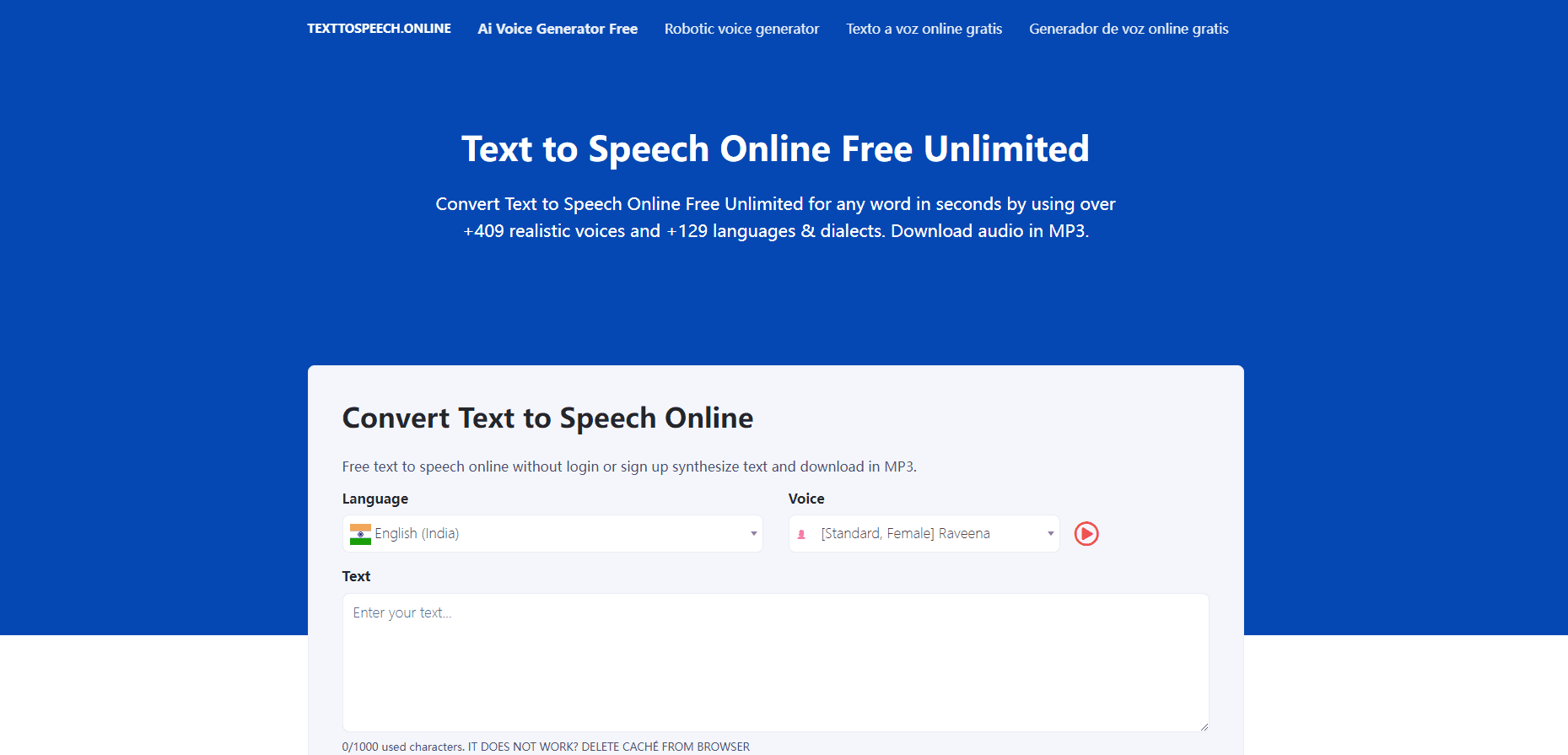
Text to Speech Online is a browser based AI voice generator that converts text into natural speech across 129 languages and dialects, with 409+ voices, SSML controls, and MP3 or WAV downloads.
About Text to Speech Online
What Is Text to Speech Online
Text to Speech Online is a web app that reads written text aloud in a synthetic voice. You paste a script, pick a language and a speaker, then download the result as an audio file. No software install, no microphone, no recording session.
The voice library is the main draw. It covers 409+ voices across more than 80 languages and accents, and the site lists 129 languages and dialects in total, including regional variants that general purpose tools often skip. Both standard and AI voices sit in the same picker, so you can compare a robotic read against a neural one before committing to a full script.
The limits are worth knowing up front. Everything runs in the browser, so there's no offline mode and no mobile app. The site advertises free unlimited use, yet long scripts still depend on server capacity at the moment you hit generate. And there's no documented developer API, which rules it out for teams that want to wire speech into their own product.
Getting Started
- Open texttospeech.online and sign in, or create a free account with an email address.
- Paste your script into the editor and choose the output language or dialect.
- Pick a voice from the library and preview a short line before you commit.
- Adjust speed, pitch, and volume, or drop in SSML tags for pauses, emphasis, and pronunciation.
- Generate the audio, then download it as MP3 or WAV, or publish it through an RSS feed.
Product Information
A quick look at Text to Speech Online's pricing, supported platforms, and performance.
Best for
The users, tasks, and scenarios where this tool fits best.
Users
- Podcasters
- Teachers and course creators
- Marketers and social media teams
- Accessibility teams
Tasks
- Converting blog posts into audio
- Dubbing short videos
- Language practice
- Proofreading by ear
Scenarios
- Producing a weekly audio digest on a tight schedule
- Building a multilingual help center
- Adding narration to e-learning modules
- Testing a script before a voice actor session
Key features
409+ Voices Across 129 Languages
The library spans 409+ voices and more than 80 languages and accents, with 129 languages and dialects listed overall. That range matters when your audience sits outside the big five languages, since smaller regional variants are often missing from free tools. You can preview a voice before generating a full script, which saves wasted renders on long documents.
SSML Controls for Pitch, Pause and Emphasis
SSML tags let you shape a read instead of accepting the default cadence. Adjust pitch, volume, and speed, mark words for emphasis, or force a pause where a sentence needs air. You can also spell out or beep over a word or phrase, which helps with names, numbers, and anything you don't want spoken plainly.
MP3 and WAV Export at Multiple Sample Rates
Audio comes out as MP3 or WAV, and you can set the sample rate before export. MP3 keeps file size down for web players and podcast hosts, while WAV gives you a cleaner file for editing. Downloads and exports aren't metered, so you can re-export the same script with a different voice as often as you need.
Podcast Publishing With RSS Feeds
The tool can turn text into podcast episodes and hand you an RSS feed for distribution. You can push the feed to iTunes, Spotify, Soundcloud, or Google Podcasts, which turns a written archive into a listenable show without a separate hosting workflow. It's the feature that separates this from a plain text to speech box.
Standard and AI Voices in One Library
Every voice sits in the same picker, from basic standard voices to AI generated ones built for video, podcasts, and e-learning. Standard voices render faster and sound flatter. AI voices cost more processing time and sound closer to a person. Being able to A/B them in one place makes the tradeoff easy to judge.
Browser Based Editor With No Install
The whole workflow runs in a browser tab, on desktop or mobile. There's nothing to download, no extension to add, and no account level setting to configure before your first render. That keeps the barrier low for one-off jobs like a single voiceover or a quick audio version of a document.
Pros and cons
Pros
- Free access to the full voice library, including the 409+ AI voices that most competitors lock behind a subscription.
- Wide language coverage with 129 languages and dialects, which covers markets that English first tools ignore.
- SSML support gives you control over pitch, speed, pauses, and emphasis without a separate editor.
- MP3 and WAV export plus RSS publishing covers both quick downloads and podcast distribution.
Cons
- Browser only, so there's no offline mode and no mobile app for recording on the go.
- No documented API, which means you can't integrate the TTS engine into your own app or automate bulk jobs.
- Voice quality varies a lot between standard and AI voices, so a voice that sounds fine in preview can still stumble on long or technical scripts.
Frequently asked questions
The site advertises free unlimited use and lists a single Free Package at $0 that includes all voices. There's no subscription tier shown on the pricing page, so you can generate and download audio without a paid plan.
Related content
Explore related tools, skills, and articles for Text to Speech Online.
Text to Speech Online Alternatives

Off the Record
Weird Machines · Voice & Language · ProductivityOff the Record is a macOS app from Weird Machines that reshapes your voice in real time to block AI transcription, so people hear you normally and notetakers get nothing usable.
Cekura Bench
Cekura · Voice & Language · BusinessCekura Bench is a public benchmark that runs speech-to-speech models and deployed voice agents through 82 simulated phone calls, three times each, then publishes pass rates, latency and cost.
Griffin by Tavus
Tavus · Voice & Language · Video · ChatbotGriffin by Tavus is the first Human Interaction Model: a full-duplex, video-to-video system that watches, listens, and answers during a live video call in real time.