

TextAdviser
TextAdviser · AI Detection
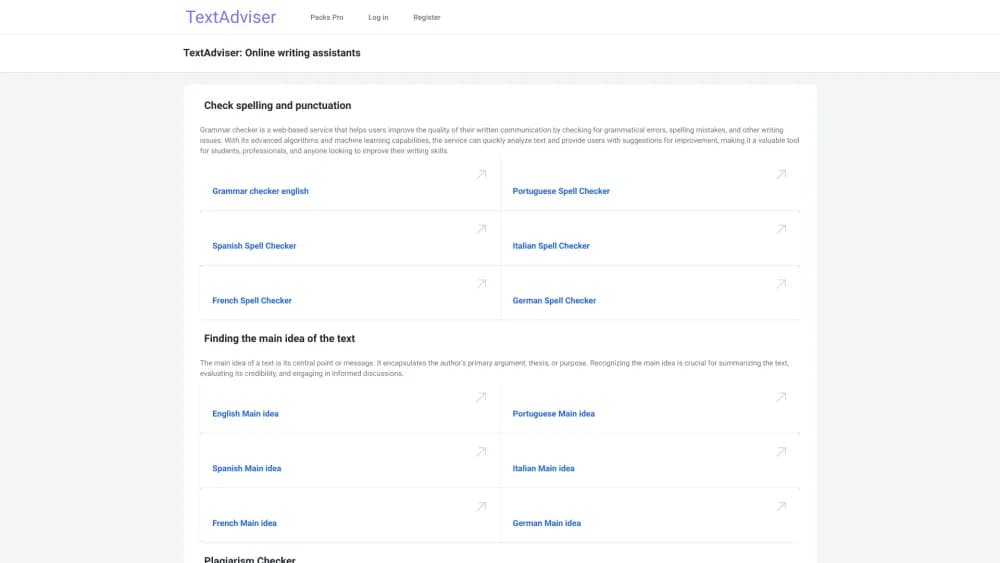
TextAdviser is a free AI writing assistant. It checks grammar, spelling, punctuation, plagiarism and AI-generated text, and runs more than 80 generators and tools in over 20 languages.
About TextAdviser
What Is TextAdviser
TextAdviser is a web-based writing toolkit built around a single idea: catch the mistakes that make text hard to trust. Paste a paragraph and it hunts down grammar slips, misspellings and missing commas in seconds, then shows you where the problems sit so you can fix them one by one.
The service does more than proofreading. It bundles a plagiarism checker, an AI text detector, a summarizer, a humanizer and a library of generators for stories, names, titles and translations. Everything runs in the browser, and the bulk of it works without an account.
The main limit is scope. TextAdviser is a checker and a generator, not a full document editor, so there is no long-form drafting workspace or team collaboration. It also leans toward English and the major European languages, so writing in less common languages gets thinner support.
Getting Started
- Open textadviser.com and paste up to 2,000 characters into the box on the home page, or register for a 3,000 character limit.
- Pick your text language from the dropdown, then run the spelling check and the punctuation check in that order.
- Click any highlighted word or mark to see why it was flagged, and accept or reject the suggested correction.
- Copy the cleaned text out, or jump to a dedicated tool like the plagiarism checker or the AI summarizer for a second pass.
Product Information
A quick look at TextAdviser's pricing, supported platforms, and performance.
Best for
The users, tasks, and scenarios where this tool fits best.
Users
- Students
- Non-native English speakers
- Bloggers and content writers
- Teachers
Tasks
- Proofreading emails and reports
- Verifying originality
- Screening AI-generated text
- Condensing long articles
Scenarios
- Last-minute essay cleanup before a deadline, when you only need the obvious errors gone.
- Reviewing a client draft and needing a fast originality check before you send it back.
- Turning a rough text into a natural-sounding post, when you want a humanizer pass without rewriting every line.
- Checking a suspicious document when you are not sure whether a person or a model wrote it.
Key features
Grammar, Spelling, Punctuation Checks
The core checker scans your text and flags errors in spelling, punctuation and sentence structure. It is the first of the site's free grammar check online tools, so you can proofread without a signup. Spelling mistakes show up in yellow and offer correction options when clicked. The punctuation check claims to find up to 80% of punctuation errors and color-codes them, with orange for changed capital letters, red for likely punctuation mistakes, yellow for added marks and green for marks that are already correct.
Plagiarism Checker
The plagiarism tool compares your text against existing web content and highlights matching phrases. It runs without an account, which makes it useful for a quick originality pass on an essay or a blog draft. It is a similarity check, not a citation manager, so you still have to decide how to rework flagged passages.
AI Text Detector
The detector estimates whether a text was written by a person or a model, then marks the fragments that look generated. It covers output from ChatGPT, Claude, Gemini, DeepSeek, GigaChat, Grok, Qwen, Kimi and GLM. Accuracy is a probability, not a verdict. The company reports 99% of human texts recognized as human and 98.8% of AI texts caught, based on its own testing.
AI Summarizer and Humanizer
The summarizer condenses articles, paragraphs and documents into short summaries. The humanizer takes machine-sounding text and rewrites it to read more naturally across more than 20 languages. Both work on pasted text, so you can move a draft in, clean it up and copy the result back out.
Generator Library
Beyond checking, TextAdviser hosts 87 generators for letters, essays, stories, song lyrics, names, quizzes, captions and hashtags. There are also translation tools and utilities like converters and calculators. It is a grab-bag rather than a single focused product, which helps if you want one place for small writing jobs.
Mobile Apps and Multi-Language Support
TextAdviser ships Android and iOS apps that mirror the web tools for on-the-go checks. The service checks English, Spanish, Portuguese, German, French, Italian, Russian and many more languages, and the interface is localized across 20-plus languages. The Pro tier lifts the character limit to 200,000, moves you up the queue and removes ads.
Pros and cons
Pros
- Free tier covers the essentials, with up to 2,000 characters for guests and 3,000 for registered users.
- Bundles grammar, punctuation, plagiarism and AI detection in one place instead of spreading them across four sites.
- Click-to-explain corrections show why a word or mark was flagged.
- Android and iOS apps keep the same tools handy on a phone.
- Supports more than 20 languages for checks and generators.
Cons
- Free character limits are tight, so long essays or reports need the paid tier or several passes.
- The AI detector returns a probability, and even the company notes its result is not a verdict, so it can misfire on clean human writing.
- There is no long-form editor or team workspace, which means it is a checker you visit rather than a place you write.
- Support thins out for less common languages compared with the well-covered English and European set.
Frequently asked questions
Yes. The grammar, spelling, punctuation checks, the plagiarism checker, the AI detector and most generators are all free to use. A Pro tier adds a much higher character limit, priority queueing and an ad-free view.
Related content
Explore related tools, skills, and articles for TextAdviser.
TextAdviser Alternatives
Isgen AI
Isgen · AI DetectionIsgen AI is a web-based AI detector that scores text for machine authorship and shows you which sentences and phrases push the number up. It's built for teachers, editors, students, and writers. Their question is simple: did this draft come from ChatGPT, GPT-5, Claude, Gemini, DeepSeek, or another model? You paste or upload content, run a scan, and get a Human, AI, and Mixed breakdown in seconds. There's also a companion editor that scores text while you write it.
Humanizeai Tools
Humanizeai Tools · Writing · AI DetectionHumanizeai Tools is a web-based AI humanizer that rewrites machine-generated text so it sounds like a person wrote it, which is the whole point of the category it belongs to. Paste a draft from ChatGPT, Claude, or Gemini, run it through the tool, and it swaps out the phrases and sentence patterns that AI detectors flag. If your goal is to make AI text sound human before you publish it, this is the kind of tool built for exactly that. It suits students, bloggers, and marketers who need copy that reads naturally and clears tools like GPTZero, Copyleaks, and Winston AI after a single pass.

Hidemyai
Hidemyai · Writing · AI DetectionHidemyai is an AI content humanizer. It rewrites text from ChatGPT, Jasper, and similar tools so the result reads like a person wrote it. You paste your draft, pick a document type and tone, and the service returns a version meant to bypass AI detectors such as Originality.ai, Turnitin, and ZeroGPT. It targets writers, marketers, and students who lean on AI drafts but can't ship copy that sounds robotic. The promise is simple: make AI content undetectable.