

Textbuddy
Textbuddy · Writing
Textbuddy is a free AI writing toolbox that drafts, rewrites, proofreads, summarizes, and translates text in more than 50 languages, with no login required.
About Textbuddy
What Is Textbuddy
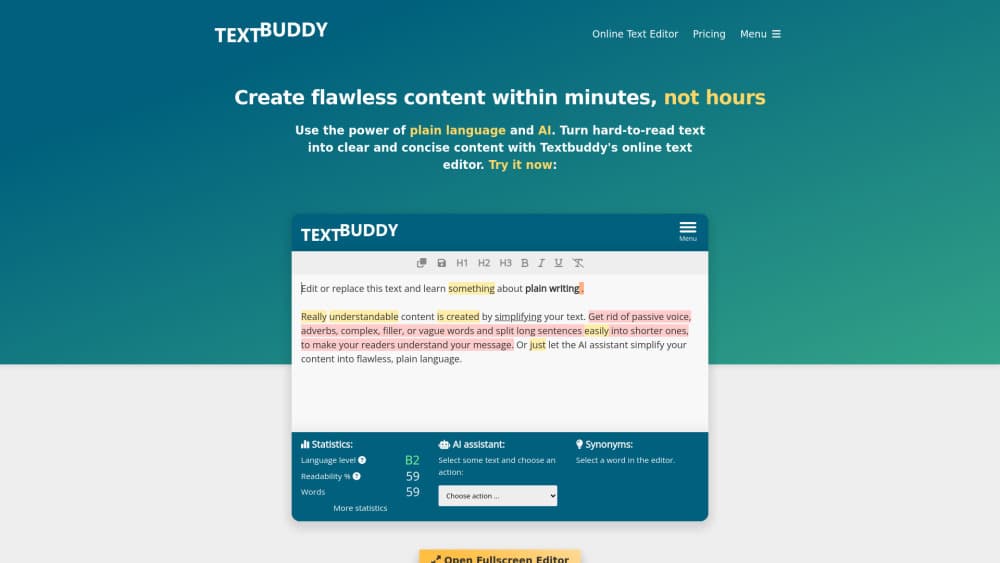
Textbuddy is a browser-based AI writing assistant built around one idea: plain language beats polished noise. Rather than one chat box, it gives you 17 small tools, each tuned for a single job. There's an AI text generator, an AI blog post generator, an AI rewriter, an AI proofreader, an AI summarizer, a social post maker, a hook generator, a reply writer, an idea generator, a translator, a text comparison view, and a plain language editor that scores how readable a draft is.
The plain language editor is what sets the product apart from a general chatbot. It counts words, sentences, and paragraphs, then points at the specific habits that make text drag: repeated sentence openers, long clauses, passive constructions, and words that hide the point. You get a readability score and a list of fixes, not a vague "make it better" button. That makes the AI writing toolbox useful for editing your own drafts, not only for generating new ones.
The setup is deliberately small. There's no project dashboard, no brand voice library, and no team workspace. Tools open, take your text, and return a result you can export as plain text, HTML, or a Doc file. Everything runs in the browser on EU servers, the service says it is fully GDPR compliant, and your text is not used to train AI models. Pricing beyond the free tier is not published on the site, so treat the free tools as the product you can actually evaluate today.
Getting Started
- Open textbuddy.com and pick a tool from the grid. No account or email is needed to start.
- Paste your text, or for generation tools, enter a topic, choose a tone, and add context. The AI blog post generator also has a toggle for pulling in current web results.
- Generate or analyze the text, then rerun it with a different tone or a shorter target if the first pass reads stiff.
- Export the result as Text, HTML, or Doc, or copy it straight into your editor.
Product Information
A quick look at Textbuddy's pricing, supported platforms, and performance.
Best for
The users, tasks, and scenarios where this tool fits best.
Users
- Freelance writers and bloggers
- Marketing generalists
- Non-native English speakers
Tasks
- Tightening a rough draft
- Producing a first blog draft
- Answering email and messages
- Translating and checking copy
Scenarios
- A quick edit between meetings
- Localizing product copy for several markets
- Auditing a page that reads like AI wrote it
Key features
Plain Language Editor
This is the core of the product and the reason to pick Textbuddy over a chat window. It highlights long sentences, passive voice, repeated openers, and hard words, then suggests shorter replacements you can accept one by one. A readability score and an AI score sit next to the text, so you can see whether an edit helped or just moved words around.
AI Blog Post Generator With Web Search
You supply a topic, a tone, and optional context, and the tool returns a structured article rather than a wall of text. A toggle lets it pull current search results into the draft, which matters for anything tied to recent releases or prices. Output is search-friendly by design, but the facts still need a check before publishing.
AI Rewriter and AI Proofreader
Both tools work on text you already wrote. The AI rewriter removes flowery phrasing and repetitive sentence patterns while keeping the meaning. The AI proofreader fixes grammar, spelling, and punctuation and leaves your personal style alone, which is the opposite of the usual "rewrite everything" behavior.
AI Humanizer
The AI humanizer is built to strip the patterns readers now recognize as machine writing: stacked clauses, hedged openings, and the same three transition words on repeat. Textbuddy markets it as a way to get past detectors such as ZeroGPT and Grammarly. Independent tests of that claim are hard to find, so judge the output by how it reads, not by the promise.
Translation Across 50+ Languages
The AI translator moves content between more than 50 languages and keeps formatting intact. Pair it with the text statistics tool to compare length before and after, since translations often expand and push a page past its layout. For product copy, the clarity check is the useful second step.
Text Stats, Clarity, and Style Rating
Three small tools cover the checking work. Text statistics counts words, sentences, paragraphs, and pages, and lists word repetitions. The clarity tool returns readability and AI scores with pointers on what to fix. The AI rater gives a score out of 10 with reasoning, which is crude but handy when you need a quick sanity check on a draft.
Pros and cons
Pros
- Free to use without an account, so you can test every tool before committing to anything.
- The plain language editor gives specific, fixable feedback instead of generic advice.
- 17 focused tools mean less prompt writing for routine jobs like replies, summaries, and social posts.
- Export options cover plain text, HTML, and Doc, which fits most publishing workflows.
- EU hosting, GDPR compliance, and a no-training promise are stated plainly on the site.
Cons
- No pricing page is published, so you can't compare plans or see what limits apply if you need more than the free tier.
- Blog drafts still need fact-checking, and the web search toggle can pull in thin sources.
- Browser only. There's no mobile app or offline mode, which hurts when you're editing on a train.
- The AI humanizer's detector claim is marketing until someone tests it independently.
Frequently asked questions
Yes. Every tool on the site runs without payment, and you can generate or analyze text without creating an account. No credit card is requested to start.
Related content
Explore related tools, skills, and articles for Textbuddy.
Textbuddy Alternatives

Google EmbeddingGemma 2
Google DeepMind · Writing · Image · CodingGoogle EmbeddingGemma 2 is a 740M-parameter open model that turns text, code, images, audio, and video frames into vectors in one 768-dimension space, running on phones and laptops.

MePersona
MePersona, Inc. · Writing · Productivity · MarketingMePersona is an AI unified inbox for creators. It learns your voice, drafts replies to fan messages from 12 platforms, and sends only what you approve.

Fluence
Yay Software (Yannick Huchard) · Writing · Voice & Language · ProductivityFluence is an Android app that reads PDFs, EPUBs, Word files and web articles aloud, follows each sentence as it speaks, and answers questions about the text on the phone itself.