
TextPixie AI Translator
TextPixie · Writing · Voice & Language
TextPixie AI Translator is a free online tool that translates text, images, audio, and documents across 100+ languages.
About TextPixie AI Translator
What Is TextPixie AI Translator
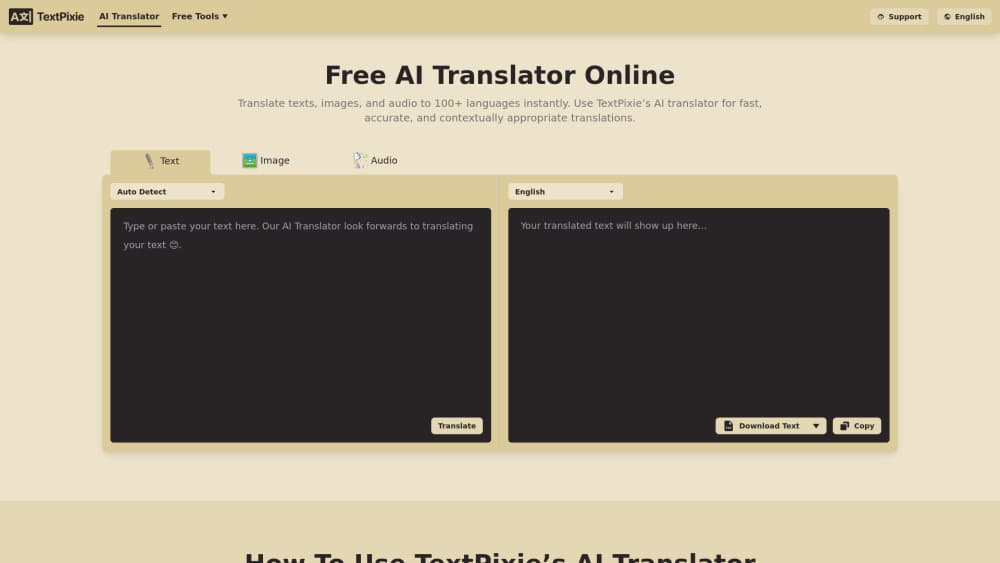
TextPixie AI Translator is a web-based translation service from the TextPixie team. Think of it as a free online translation tool that handles more than plain text: paste in an image, drop an audio file, upload a document, or point it at a web article, and it returns a translation in one of 100+ languages. The pitch is simple. One box for every format you'd normally shove through three different apps.
Most translation tools force a tradeoff. Google Translate is fast but won't read text off a photo for you. Dedicated OCR apps read images but choke on audio. So what do you do with a mixed pile? TextPixie bundles the common cases into a single interface, which is why people reach for it when a screenshot or a voice note shows up in a chat and they'd rather not open a second app just to decode it.
The catch is the daily allowance. The free tier caps text at 2,000 characters per translation and limits images and audio to a handful per day. Heavy users will hit the wall fast. That's where the paid plan comes in.
It's cheap anyway.
Getting Started
- Open textpixie.com in any browser, on desktop or mobile.
- Pick your source format by pasting text, uploading an image or document, or adding an audio file.
- Set the target language from the dropdown, then start the translation.
- Read the result in the output panel, or download it as a Word or PDF file.
- For larger jobs, sign up for a Premium subscription to lift the daily limits.
Product Information
A quick look at TextPixie AI Translator's pricing, supported platforms, and performance.
Best for
The users, tasks, and scenarios where this tool fits best.
Users
- Travelers
- Students
- Support teams
Tasks
- Translating text inside images
- Converting audio to another language
- Localizing documents and articles
Scenarios
- Handling a foreign message on the go
- Prepping research from a non-English source
- Working through a media pile
Key features
Multi-Format Translation in One Place
TextPixie takes text, images, audio, documents, and web articles through the same interface. Instead of switching between an OCR reader, a voice transcriber, and a text translator, you stay in one tab. It's the main reason to pick this over a plain text translator. Why bother? Because juggling three apps to read one screenshot gets old fast. One tab. Done.
Image and OCR Translation
Upload an image and the tool reads the text inside it, then translates. Screenshots, photographed signs, scanned pages all work. This covers the everyday case where the text you need isn't selectable, like a physical menu or a chat screenshot that someone sent you from a device you don't own and can't simply copy from. Handy? Very.
Audio Transcription and Translation
Drop in an audio file and TextPixie transcribes it and translates the result. On the free plan you get up to 1 minute per clip and 5 minutes a day; Premium raises that to 1,000 minutes a month with asynchronous processing for longer files. Simple enough.
100+ Language Coverage
The translator spans more than 100 languages, which covers the usual suspects plus plenty of less common ones. You set the target from a dropdown and the AI handles context rather than word-for-word swapping, so an idiom in one language tends to land as something a native speaker would actually recognize instead of a literal phrase that reads as nonsense.
Document and Article Translation
Beyond raw text, it handles documents and full web articles. Point it at a page and it translates the content, which saves the copy-paste dance you'd otherwise do paragraph by paragraph. Easier. Much easier.
Word and PDF Export
Results can be downloaded as Word or PDF files straight from the output panel. That matters when you need to hand off a translated document rather than paste text into another app. Clean output. No reformatting. It even skips the retyping step.
Free Daily Allowance
Every day you get free translation tokens, 5 image translations, and 5 minutes of audio without paying. It's a generous way to test the tool on real work before deciding whether Premium is worth it. Not bad for a free tier.
Pros and cons
Pros
- Handles text, images, audio, documents, and articles without switching tools.
- Free tier is usable daily, with tokens, images, and audio refreshed every day.
- Works in a browser on desktop and mobile, so there's nothing to install.
- Word and PDF export saves a step when you need a finished file.
- Premium is cheap at $7.9/mo and removes the free tier's character cap.
Cons
- Free plan caps text at 2,000 characters per translation, which is tight for long documents.
- Only 5 images and 5 minutes of audio per day on the free tier, so heavy use needs Premium.
- Ads run on the free version, and they can crowd the interface.
- No public API details, so it's not a fit if you need programmatic access.
Frequently asked questions
It translates text, images, audio, documents, and web articles into 100+ languages from a single browser tool. People use it when the content they need isn't plain text, like a screenshot or a voice clip.
Related content
Explore related tools, skills, and articles for TextPixie AI Translator.
TextPixie AI Translator Alternatives

Emailwritr
Emailwritr · Writing · MarketingEmailwritr is an AI email copywriting tool built for affiliates, course creators, and online businesses that want more revenue from the list they already own. Instead of blank pages or generic chatbot prompts, this AI email writer generates welcome sequences, launch campaigns, cart recovery emails, and promo series from frameworks modeled on well-known direct-response copywriters. You connect your autoresponder, answer a few questions about your offer, and it writes the copy for you.

Swms
Swms AI · Writing · Productivity · BusinessSwms is an AI safety compliance tool that turns a plain description of a job into ready-to-use safety documents. Describe your project, trade, and known hazards, and it writes a safe work method statement, job hazard analysis, safe work procedure, RAMS, or safety data sheet in seconds. It also ships with Oscar, a chat assistant that answers workplace safety questions in any language. Teams in construction, mining, transport, and warehousing use it to cut the paperwork that usually eats into a workday.

Prosp
Prosp · Writing · Voice & Language · MarketingProsp is an AI LinkedIn outreach tool built for agencies and sales teams, and it writes the message and the voice note in your own voice for each prospect so they actually reply. You connect your accounts, find leads, and let the AI draft and send personalized messages at scale, all from one inbox. It's built for people running outbound at volume. That's the whole pitch. Every touchpoint still has to feel human.