

TextWisely Directory
TextWisely · Other
TextWisely Directory is a free web collection of one-click AI writing tools and workflows from the team behind the TextWisely Mac app. It gathers a grammar checker, an email writing assistant, a paraphrase tool, and more in one place, so you can jump straight to the task you need instead of hunting across the web. Everything runs in the browser and costs nothing. No sign-up, no credit meter.
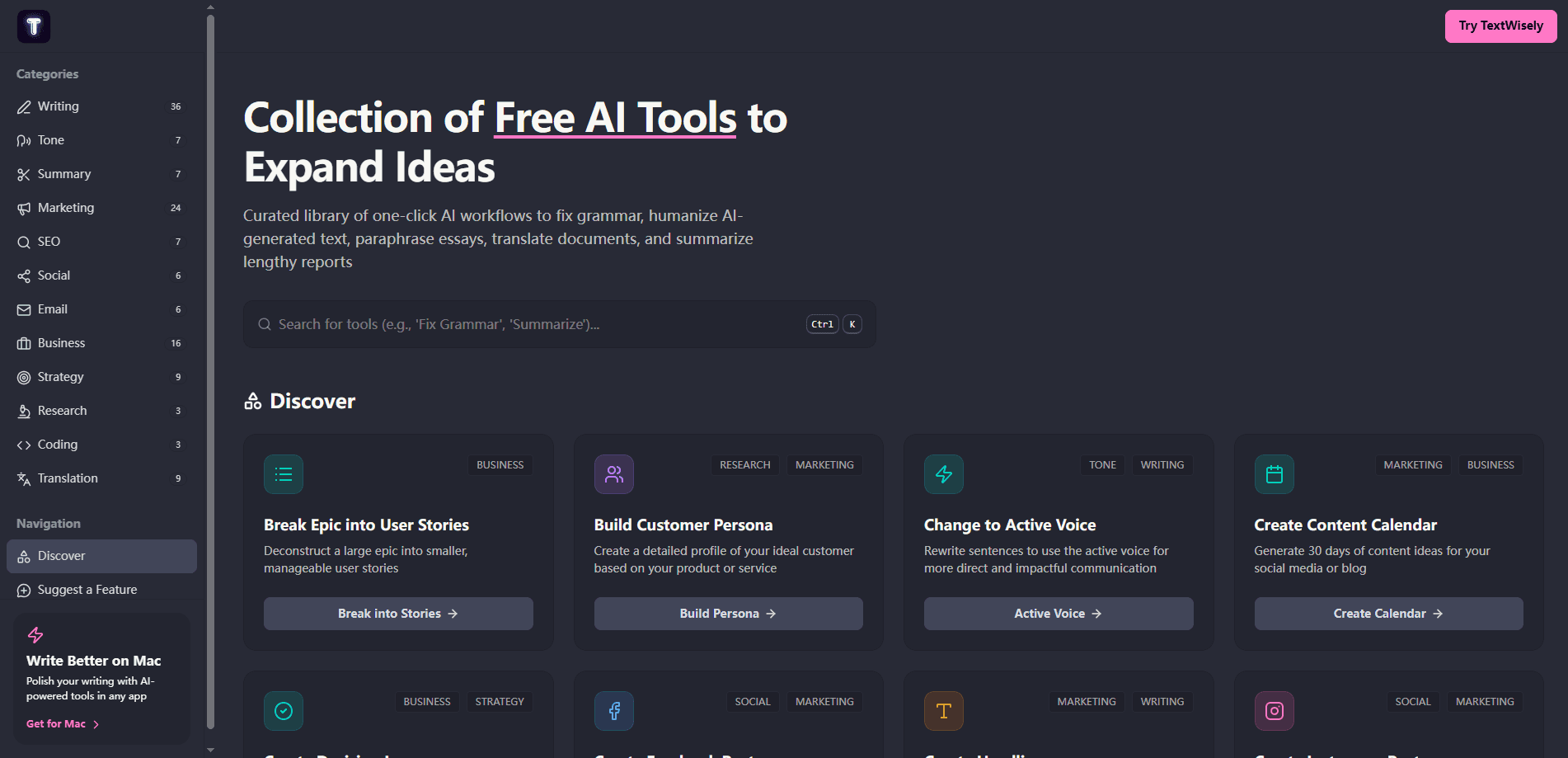
About TextWisely Directory
What Is TextWisely Directory
TextWisely Directory is the free, browser-based arm of the TextWisely product family, and it exists for people who want one clear writing task handled fast without paying for another subscription. Where the paid Mac app lives in your menu bar and works across every application on your machine, the Directory is a public library of standalone writing tools you can open on any platform without installing anything.
The pitch is simplicity. Each entry does one job: fix grammar, polish an email, expand an idea, paraphrase a paragraph, translate a document, summarize a long report, or humanize text that reads too robotic. You paste your text, run the workflow, and copy the result. There's no account wall and no credit system to fight, which is rare for AI writing utilities in 2026.
That's the whole loop.
The main limitation is depth. These are single-purpose tools, not a full editor, so they won't manage long documents, track revisions, or remember your personal tone across sessions. If you need that, the Mac app is the paid option. The Directory is best treated as a fast utility belt for grab-and-go tasks.
Getting Started
- Open textwisely.ai/directory in any modern browser.
- Pick the workflow that matches your task, such as Fix Grammar, Paraphrase Content, or Summarize Documents.
- Paste or type the text you want to process into the input field.
- Run the tool and review the output; adjust your input and rerun if the result misses the mark.
- Copy the finished text into your email client, doc, or wherever it needs to go.
Product Information
A quick look at TextWisely Directory's pricing, supported platforms, and performance.
Best for
The users, tasks, and scenarios where this tool fits best.
Users
- Students who need quick grammar fixes, paraphrasing, or simplified explanations of dense readings, as long as the task fits a single paste-and-go pass.
- Non-native English speakers polishing emails and messages, since translation and tone tools cover 39 languages.
- Freelancers and marketers who want a fast proofread or a shorter version of a draft without paying for another subscription.
Tasks
- Fixing grammar and spelling in a message before you hit send, which is often faster than opening a full editor.
- Summarizing a long report or article when you only need the key points.
- Paraphrasing a paragraph to avoid repetition or to reword source material in your own voice.
Scenarios
- Cleaning up a rough email draft on a work laptop where you can't install apps.
- Making AI-generated text sound less mechanical before publishing it.
- Translating a short piece of text when you just need a quick, readable version.
Key features
Grammar and Spelling Fixes
Type or paste your text and the tool corrects grammar, spelling, and awkward phrasing in one pass, which means you can send a clean message without opening a full editor or reading it three times first. It's built for messages and short documents rather than long-form editing, so a single paragraph or email is the sweet spot.
Paraphrasing and Rewriting
The paraphrase workflows reword your content while keeping the original meaning. That helps when you're stuck repeating the same phrasing or want a cleaner version of a clumsy sentence without changing what it says.
Summarization
Drop in a long article, report, or thread and get back a condensed version that keeps the main points. This is useful for skimming research or catching up on documents you don't have time to read line by line.
Text Humanizing
The humanize workflow targets text that sounds stiff or obviously machine-written. It smooths out the flat, uniform rhythm that trips up readers. Want to humanize AI text before publishing? Writers who lean on AI drafts reach for this step first.
Translation Across 39 Languages
Translation tools handle a wide set of languages, which matters if you work with international clients or read sources in another tongue. The output reads naturally rather than word-for-word literal.
One-Click Workflows
Every entry runs as a single action: select the tool, add your text, get the result. There's no setup checklist and no credit meter, so the friction between finding a tool and using it stays low.
Browser-Based Access
The whole directory runs in the browser on any operating system, so a Chromebook, Windows PC, or phone works the same as a Mac and you never have to wait on an install or a permissions prompt to fix a single sentence. You don't need the TextWisely app to use these tools.
Pros and cons
Pros
- Completely free with no account required, which keeps a quick proofread genuinely quick.
- Covers a broad spread of writing tasks in one place, from grammar and paraphrasing to translation and summarization.
- Works in any browser on any platform, unlike the Mac-only paid app.
- Single-purpose tools mean less interface to learn; you pick a task and go.
- Text humanizing and tone tools address a real need for people publishing AI-assisted drafts.
Cons
- Tools are one-off helpers, so they won't manage long documents, track changes, or remember your preferred tone between sessions.
- No API access, which rules it out for automating writing tasks inside your own software.
- No free-form editor layer; if you want to write and revise in the same window, a dedicated tool serves you better.
- Quality depends on the underlying AI models, so results can vary and may need a second pass.
Frequently asked questions
Yes. The directory is a free collection of web tools, and you don't need an account or subscription to use any of the entries. The paid Mac app is a separate product.
Related content
Explore related tools, skills, and articles for TextWisely Directory.
TextWisely Directory Alternatives
BinkBink
BinkBink · OtherBinkBink is a free online game platform and AI game maker that lets anyone turn a short text description into a playable browser game. You can jump into hundreds of community-made games. Or describe your own idea and play it in seconds, then share it with friends. Want to create your own game? You don't need to code. No engine setup, no download, no hassle.

Audiogen
Audiogen Inc. · OtherAudiogen is an AI music generator built by Audiogen Inc., a small research team that spent about 2.5 years training its own generative music model and designing a web interface around it. Instead of a plain text box, this AI music tool turns the timeline into a beginner-friendly Generative Audio Workstation, or GAW, where inpainting, extending, remixing and stem editing work more like painting on a canvas. The product is still in beta, so access runs through a waitlist or an invite. Paid plans aren't published yet.

Aiml API
AIMLAPI OÜ · OtherAiml API is a unified AI model API that puts more than 1000 models from OpenAI, Google, Anthropic, and others behind one endpoint and one bill. You write code against a single OpenAI-compatible schema, then switch between chat, image, video, and audio models by changing a model string. It suits developers and small teams who want multi-model access without juggling a dozen separate provider accounts, and it removes the usual billing headache that comes with testing several vendors. One key covers it all.