

Theee.ai: Access Over 50,000 GPTs Tools Powered by GPT4o for Free
Theee.ai · Other
Theee.ai is a browser hub for more than 50,000 GPTs and AI tools. You can test chat, image, video, and writing helpers in one tab, then pay $10 a month once the free sessions run out.
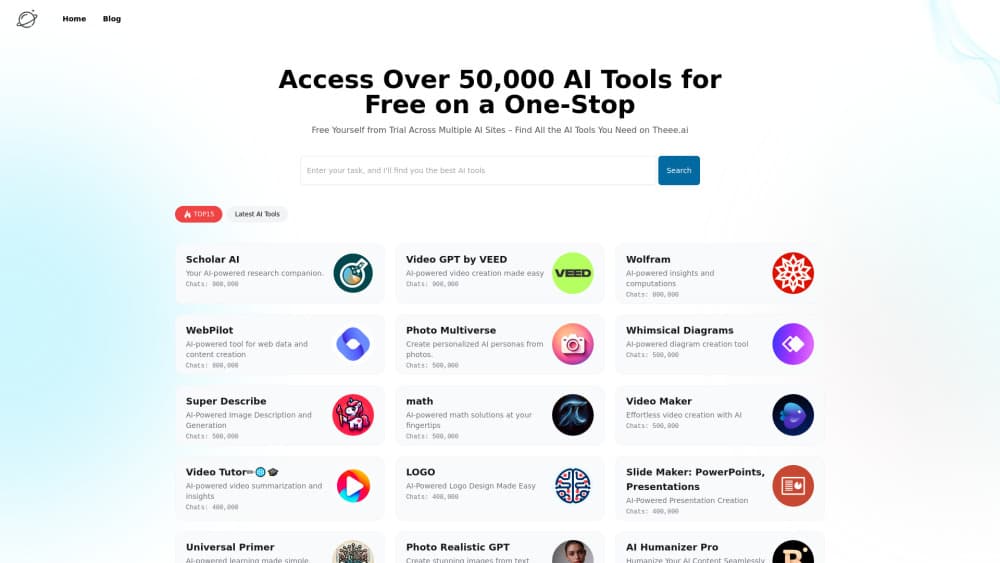
About Theee.ai: Access Over 50,000 GPTs Tools Powered by GPT4o for Free
What Is Theee.ai
Theee.ai works as an AI tools aggregator: it takes assistants that normally live on separate sites and files them into one searchable index. The AI tool directory runs past 50,000 entries, from chat helpers and logo makers to slide builders and code reviewers. Each listing follows the format OpenAI made familiar with GPTs, with a name, a one-line description, and a chat window that opens on the same page.
The problem it fixes is decision fatigue. Testing five writing assistants usually means five sign-ups, five free tiers, and five sets of limits. Here you scan a ranked list, check how many conversations a tool has logged, and start typing. The site frames the pitch as an end to hopping between trials.
The limit is control. Every tool runs inside the same chat frame, so you get prompts and text, not the full surface of a native app. Layer-based image editing, video timelines, and programmatic access stay elsewhere. Free sessions also end, and the meter starts after that.
Getting Started
- Open theee.ai in a browser. The homepage loads the newest tools with chat counts attached, so you can judge popularity before signing up for anything.
- Pick a tool from the list or search for the job in front of you, such as a logo, a summary, or an Excel formula.
- Type your prompt into the chat box. The Prompt Generator button rewrites a rough request when you can't find the right words.
- When the trial sessions stop, choose the $10 monthly plan or a $3.99 pack of 100 credits tied to one tool.
Product Information
A quick look at Theee.ai: Access Over 50,000 GPTs Tools Powered by GPT4o for Free's pricing, supported platforms, and performance.
Best for
The users, tasks, and scenarios where this tool fits best.
Users
- Curious beginners who want to see what AI tools actually do
- Freelancers handling several kinds of work
- Small teams without a procurement process
Tasks
- Testing a use case before committing
- Quick image and logo drafts
- Writing support for short pieces
- Learning a new AI workflow
Scenarios
- A Sunday night when a deck is due by morning
- Comparing two model answers side by side
- A one-off job that doesn't justify a subscription
Key features
A GPTs library of more than 50,000 tools
The GPTs library groups chat assistants, image generators, video helpers, and writing utilities in one index. Listings carry a description, a logo, and a conversation count, so a tool with 900,000 chats sits near the top and an unknown one sits lower. You can browse by popularity or search for a task.
GPT-4o chat inside the tool window
Paid access runs the tools on GPT-4o, according to the company, and the monthly plan adds Claude 3 and Midjourney for work outside the GPT format. You get one chat box for text, images, and follow-up questions, which kills most of the tab hopping.
AI prompt generator for blank-page moments
Each tool page includes a button that expands a rough idea into a fuller prompt. The AI prompt generator is a small feature, and a useful one when you don't know how to brief an unfamiliar assistant. The output still needs your edit.
Conversation counts and ratings
Every listing shows how many chats it has logged, and tool pages accept a rating. Numbers this large are a popularity signal, not a quality score. A niche tool with 20,000 conversations can beat a general one with 900,000.
Credit packs for a single tool
Don't want another subscription? $3.99 buys 100 conversations on one tool, valid for a month. The credits stay tied to an emailed link, so keep that message somewhere safe.
Multilingual interface and tutorial blog
A language switcher covers English plus several European and Asian locales, which helps if you'd rather read tool descriptions in your own language. The blog adds walkthroughs for tools that are new or confusing.
Pros and cons
Pros
- One place to compare thousands of AI tools, with popularity data attached, so the research phase shrinks to a few minutes.
- The $10 plan bundles GPT-4o chat with Midjourney access and Claude 3 mentions, a low entry price for that spread.
- No install and no separate accounts for each tool: a browser and an email address cover it.
- Prompt Generator and related-tool links make unfamiliar assistants easier to try.
- A $3.99 credit pack fits one-off jobs better than another monthly bill.
Cons
- Free sessions end quickly, and the paywall shows up while you're still evaluating.
- Tools run in a shared chat frame, so you lose native app controls: no layers, no timelines, no fine settings.
- Access depends on an emailed link and expiring credits. Lose the email and you're stuck chasing support.
- Listings lean on self-reported descriptions, and ratings are thin on newer tools, so quality varies a lot.
Frequently asked questions
Browsing is free, and new visitors get trial sessions on the tools. After those run out, you pay $10 a month or buy a credit pack.
Related content
Explore related tools, skills, and articles for Theee.ai: Access Over 50,000 GPTs Tools Powered by GPT4o for Free.
Theee.ai: Access Over 50,000 GPTs Tools Powered by GPT4o for Free Alternatives

Odyssey 3
Odyssey · OtherOdyssey-3 is Odyssey's foundation world model. It simulates physics in real time, turns a prompt into an interactive environment, and adapts to robots, cars and games.

JarvisCore
Prescott Data · Coding · Productivity · OtherJarvisCore is an open source Python runtime where AI agents work as equal peers on an agent mesh, claim tasks from a shared ledger, and reach external services through a zero-trust broker.
Clef
Cloudflare · Business · OtherClef is Cloudflare's open-source decision model for Workers AI. It returns calibrated probabilities for typed questions, not generated text, so agents can classify, route, and act fast.