

Thinking Orbs
Yogesh (yogesharc) · Coding
Thinking Orbs is an open-source React component library of animated status indicators for AI agents, with a distinct orb for each agent action, from reasoning to retrying.
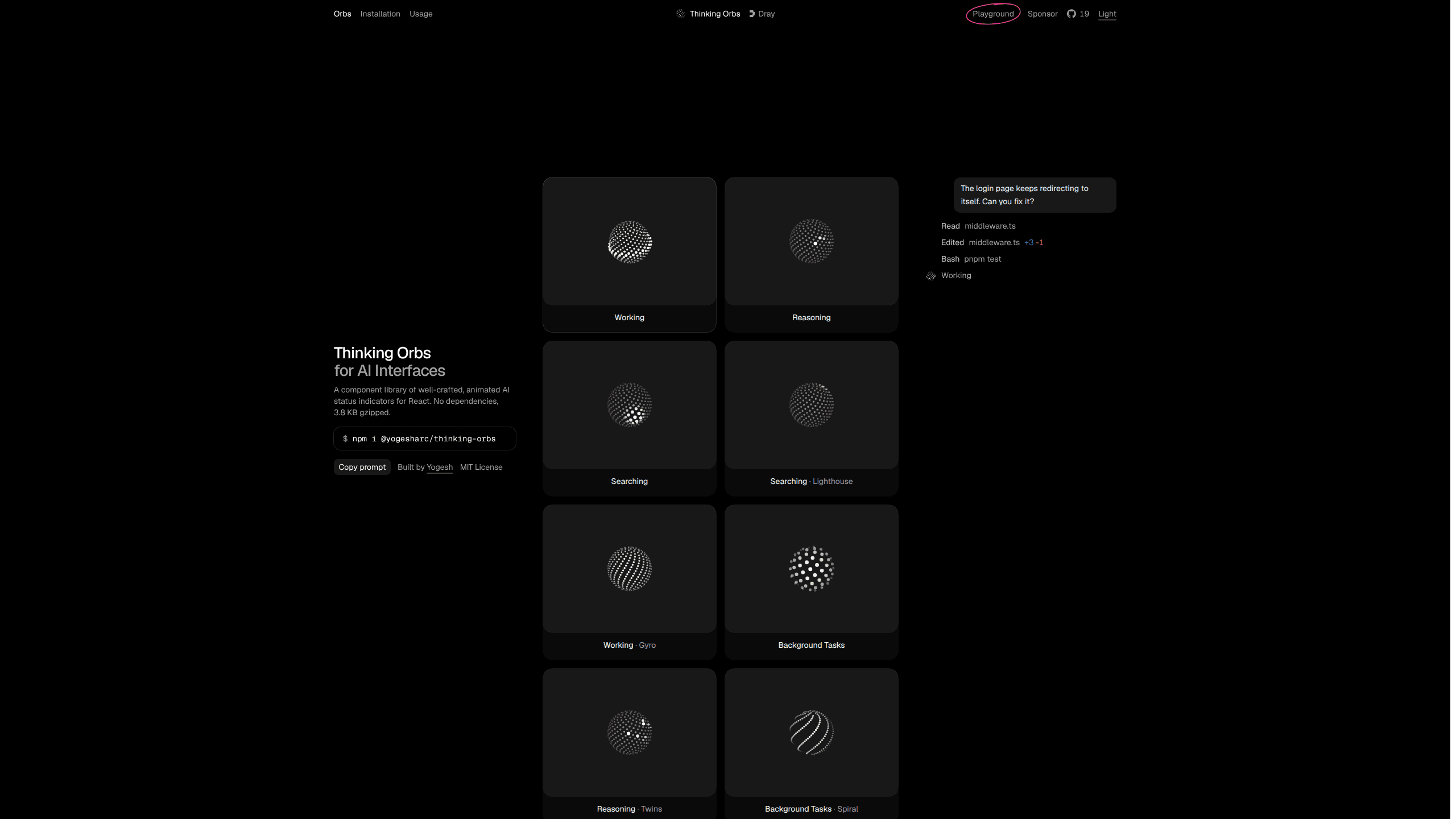
About Thinking Orbs
What Is Thinking Orbs
Thinking Orbs is a small React component library that draws animated orbs for AI agent interfaces. Each orb is a sphere of dots, and each state changes how those dots move. When an assistant is reasoning, a spark wanders across the surface. When it searches the web, a lens hops between spots. When it retries after an error, the orb spins and winds back.
The package exists because agent UIs spend a lot of time in a vague working state. A spinner says nothing about what the model is doing, and users cannot tell a slow answer from a stuck request. This thinking orb turns that dead time into a readable signal, at a size that fits next to a line of text.
Yogesh builds it as an open-source package under the MIT license. The React orb needs only React, the plain JS version needs nothing at all, and the SwiftUI package covers iOS 17 and macOS 14. Shapes and renders beyond the default ship as separate modules, so a project only bundles what it imports.
The limits are worth knowing before you install it. The component animates, but it does not track your agent. You choose which state to show and when to switch, usually from your own request lifecycle. Shapes and renders stay web-only for now, and the SwiftUI version accepts a narrower set of options.
Getting Started
- Install the package with npm, pnpm, yarn or bun: npm i @yogesharc/thinking-orbs.
- Import Orb and pass a state, such as reasoning or searching.
- Set size, speed, density and tilt so the orb matches your text, then add a label for screen readers.
- Import a shape or a render from the optional modules to change the form or the way dots are drawn.
- Or copy the source into components/ with the shadcn command and edit it as your own file.
Product Information
A quick look at Thinking Orbs's pricing, supported platforms, and performance.
Best for
The users, tasks, and scenarios where this tool fits best.
Users
- React developers building AI chat or agent products
- Frontend engineers on small teams without a designer
- Indie makers shipping a side project
Tasks
- Distinguishing reasoning from web search in a streaming chat
- Showing long background work, such as an indexing job or a dev server style task
- Warning about a retry or a rate limit
- Filling an empty panel while a tool call returns
Scenarios
- A chat app that streams tokens and needs a status next to the answer header.
- A coding agent or editor plugin where tool calls run one after another and each one needs its own signal.
- A SwiftUI app for iPhone or Mac that wants the same visual language as the web build.
Key features
An AI status indicator for every agent action
Nine states cover the agent loop: working, reasoning and searching at the top, then background jobs, browser control, retries, context compaction, usage limit waits and idle time. Most states have named variants, so gyro can wobble a work orb and lighthouse can sweep a search beam. Each one has its own motion, so a user can tell a web search from a retry without reading a label. Variants change the mood of a state, for example gyro for a wobbling work orb or lighthouse for a sweeping search beam.
Props that tune the look without extra CSS
Size, speed, density, dotSize and tilt are plain number props, which means you can match the orb to a 14px caption or a 48px hero without writing styles. A paused prop freezes the animation on its current frame, and className lets the orb inherit a text color from your existing utility classes. The orb draws in currentColor, so dark mode works with no extra setup.
Opt-in shapes and renders
The core ships one shape and one render. Four more shapes (cube, octahedron, tetrahedron, torus) and seven more renders (dashes, squares, crosses, mesh, halftone, lines, verticalLines) live in separate entry points. Tree shaking keeps the unused ones out of your bundle, and custom shapes are a function that returns points inside the unit sphere.
Four ways to adopt it
You can install from npm, copy the source with a shadcn URL, mount it in plain JavaScript with mountOrb, or add the Swift package in Xcode. The vanilla version exposes pause, play and destroy, which suits a page that manages its own lifecycle. The SwiftUI version draws in the foreground style, so a modifier like foregroundStyle(.blue) tints it.
Small footprint and accessible defaults
The React build has no dependencies beyond React, and the vanilla build has none at all. The default 20px size is the size the shapes were drawn for, so the dots stay legible in a dense interface. A label prop names the orb for screen readers, and the animation holds still when the system reports reduced motion.
Open source under the MIT license
The full source sits on GitHub, and the MIT license allows commercial use, modification and redistribution. Payment is optional through Patreon, which funds the work rather than unlocking features. That makes the cost predictable for a team that wants to fork the component and own it.
Pros and cons
Pros
- Ten states with variants cover most of the actions an agent UI needs to report.
- No dependency chain, so the install adds almost nothing to a React project.
- The default 20px size reads clearly in toolbars, message headers and side panels.
- Reduced motion support and a screen reader label are built into the component.
Cons
- The orb is visual only, so you still have to map your agent events to the right state yourself.
- Shapes and renders are web-only, which leaves the SwiftUI version with fewer options.
- Documentation lives on one page, so deeper guidance on state timing comes down to trial.
Frequently asked questions
Yes. The package is open source under the MIT license, and every state, shape and render is included at no cost. There is no paid tier and no account to create.
Related content
Explore related tools, skills, and articles for Thinking Orbs.
Thinking Orbs Alternatives

Base Code
Base44 (Wix) · Coding · ProductivityBase Code is a shared cloud development environment from Base44. Teammates describe changes to an existing GitHub codebase in chat, preview them live and send them back as pull requests.

Google EmbeddingGemma 2
Google DeepMind · Writing · Image · CodingGoogle EmbeddingGemma 2 is a 740M-parameter open model that turns text, code, images, audio, and video frames into vectors in one 768-dimension space, running on phones and laptops.

GitGlow
GitGlow · Coding · ProductivityGitGlow is a local-first desktop Git client that lets independent developers review their own code and their AI agents' changes in one place before shipping.