

Thousand
Thousand · Coding · Productivity · Business
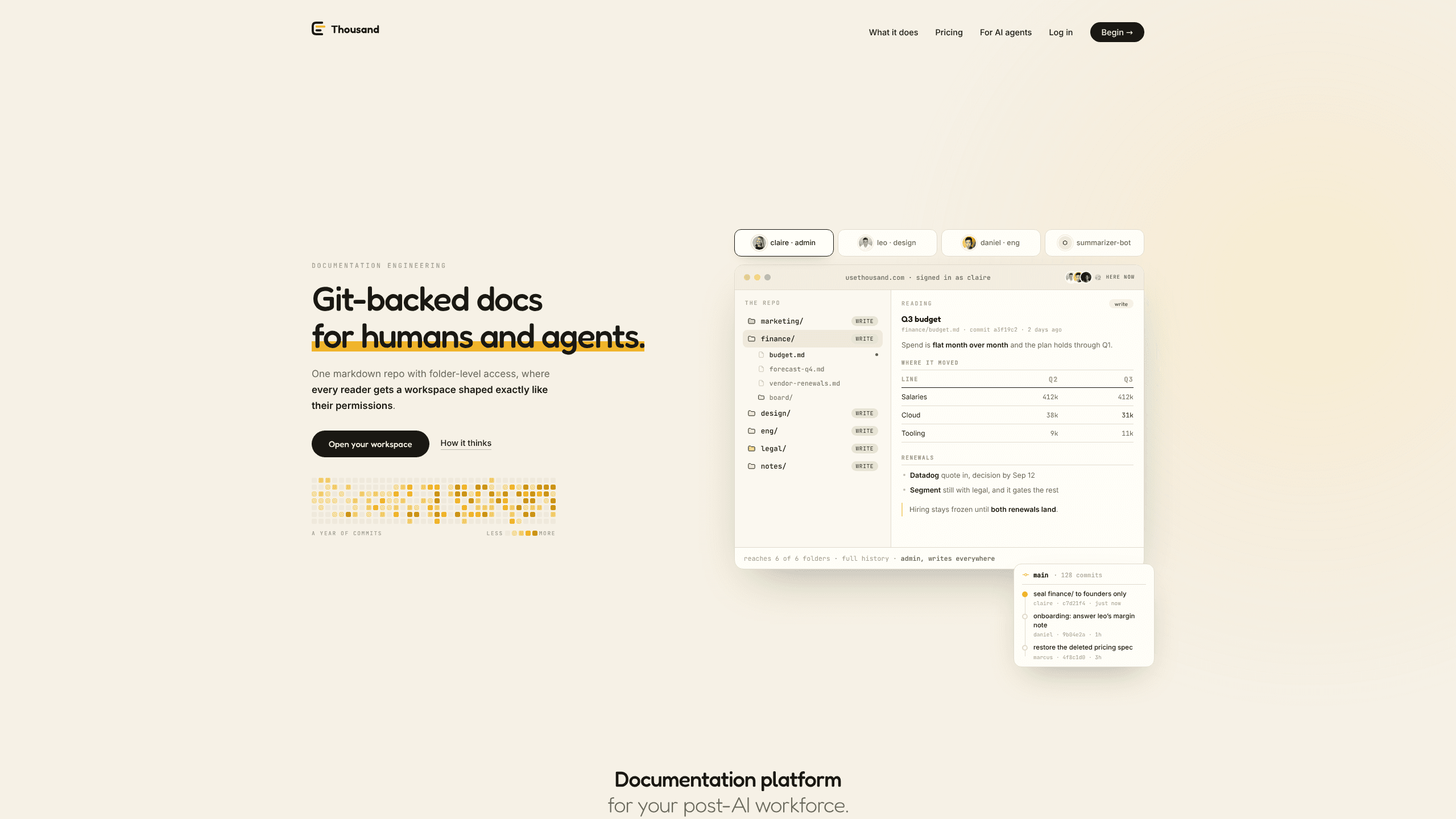
Thousand is a documentation workspace that keeps every page as plain markdown inside a real git repository, then serves it to both people and AI agents from one source. Instead of storing docs in a proprietary format, it gives each teammate a workspace shaped to their permissions. A teammate reads the same bytes an agent reads. It fits small teams that want a documentation platform built for the post-AI workflow, and it stays free while the product is in early access.
About Thousand
What Is Thousand
Thousand is a git host with a reading and writing surface on top. Each workspace is an actual git repository, and everything else, the editor, comments, access rules, and the agent API, reads and writes that same repository. That's what makes it more than static git-backed docs: nothing lives in a separate document database that git syncs to, so there's no second copy to drift.
The problem it targets is specific. Tools like Notion and Google Docs keep content in proprietary formats behind APIs, which is why an AI agent reads them badly. Plain markdown in git is what agents handle natively, but git has no sharing model: a repository is all-or-nothing. So what happens when one folder has to stay private? A team usually falls back to a tool the agents can't read. Thousand removes that trade by enforcing access per folder.
The most important limit is that the product is early. Pricing is announced as coming, and the whole thing is free while that lasts. People who need enterprise controls, a mature mobile app, or a wide integration library today should look elsewhere.
Getting Started
- Sign in with Google. Signing in creates your workspace, so there's nothing to request and no one to wait for.
- Clone the workspace over git, or open the web editor if you'd rather not touch a terminal.
- Write (or paste) markdown into folders, then commit. In the app, an edit is a draft until its author commits it, and nothing is ever committed on a timer.
- Add a colleague on the access page with their email, then choose folder by folder what they can see.
- Point an agent at
/AGENTS.mdon the workspace host. It signs in like a CLI, then reads and comments under the same rules as the person it acts for. That setup is the core of its AI agent documentation story.
Product Information
A quick look at Thousand's pricing, supported platforms, and performance.
Best for
The users, tasks, and scenarios where this tool fits best.
Users
- Small engineering teams
- Technical writers working with agents
- Non-technical teammates on the same repo
- Teams with mixed visibility needs
Tasks
- Writing and versioning internal documentation
- Giving an AI agent a safe slice of company docs
- Querying office files and PDFs
- Sharing a single document outward
Scenarios
- Onboarding a new hire who needs read access to some folders but not others.
- Keeping product specs, budgets, and meeting notes in one searchable workspace instead of five tools.
- Letting a support bot answer from the current docs without exporting them anywhere.
- Handing a document to a client or contractor who has no account.
Key features
One file, two readers
The selling point is the format. Your agent reads the markdown. Your teammate reads the same bytes as a rendered document. No export step. No second copy that drifts out of sync. That single-file approach is what makes a markdown documentation platform trustworthy for teams that mix people and AI.
Folder-level access control
Git shares everything or nothing. Thousand enforces access at the folder level instead, and it holds even for readers who never touch git. Sealed folders aren't hidden from a restricted clone. They're absent from it, along with their history and their objects. A generated note names who can see a page, so a person or an agent knows the audience before writing.
Git sync for every codebase
Each repo's docs folder can sync into the workspace on every commit, stamped with its source. An edit made in Thousand lands back in the repo as a commit under your name. Nobody maintains a copy by hand, so the docs don't rot.
A real editor for people who don't use markdown
Half a team will never open a terminal. Thousand accepts that, and it's the point of this take on a team wiki. They write in a document editor while the file on disk stays clean markdown, and every save becomes a named commit. The output stays diffable and machine-readable underneath.
Comments that live in the repo
Threads sit beside the document rather than inside it, saved as markdown that a clone carries too. A discussion on a page is a markdown file next to it, readable in any editor and by any agent. Delete Thousand tomorrow and every comment is still in your workspace.
Agents as first-class users
Agents sign in the way a CLI does, then read and comment under the same rules as the person they act for. They're told the house rules by the repository itself, through a page that always sits at /AGENTS.md on the workspace host. The API works with tools you already have: git and HTTP, plus an MCP server for agent workflows.
An exit that stays open
A full clone is the entire workspace in a format that outlives the product. Nothing here is built to make leaving hard. For teams burned by lock-in before, that's a real difference, not a slogan.
Pros and cons
Pros
- Docs are plain markdown in a real git repository, so there's no proprietary format and no separate copy to keep in sync.
- Folder-level access control gives you selective sharing on top of git, which git alone can't do.
- People and agents read from the same source, cutting the risk of an assistant working from stale exports.
- The free plan is genuinely usable, with up to 3 members, 1 GB per workspace, and full git access at no cost.
- A full clone works as a complete exit, so the lock-in is low.
Cons
- Pricing is announced as coming, so teams budgeting for more than 3 members can't lock in a rate yet.
- There's no mobile app, which means quick edits on a phone aren't an option.
- The integration library is thin, so a team that lives inside a big suite of product tools may not find every connector it wants.
- Heavy git workflows still favor people comfortable with a terminal. The editor softens that for everyone else, but it doesn't erase it.
Frequently asked questions
Thousand is a documentation workspace for teams and the AI agents that work alongside them. It keeps docs as markdown in a git repository, then serves the same files to human readers and to agents, with access control applied per folder.
Related content
Explore related tools, skills, and articles for Thousand.
Thousand Alternatives
Forefront
Forefront · CodingForefront is a web platform for building with open-source AI. It lets you fine-tune leading open-source language models on your own data, evaluate how they perform, and run them through an API or export them to host yourself. Developers who want the convenience of a closed-source platform but insist on owning their models and data are the target audience here.

Startkit
StartKit.AI · CodingStartkit is a boilerplate for building AI SaaS and AI wrapper products. Think of it as an AI startup boilerplate with the boring parts already wired up: authentication, Stripe and Lemon Squeezy payments, usage limits, transactional email, and an AI API starter that talks to OpenAI, Anthropic, Groq, or Llama. You clone the repo, set your price, and start on the part of your product that people actually pay for. It's Next.js under React and Tailwind, so most of the boilerplate code already feels familiar.
Testim
Tricentis · CodingTestim is an AI-powered test automation platform for building and running end-to-end tests across web, mobile, and Salesforce applications. It leans on machine learning to keep tests stable when an interface changes, so teams spend less time fixing broken selectors. Not bad for an automated testing tool you can start using today. You create tests by recording actions in a browser, then optionally add JavaScript when you need more control. It's a solid pick for busy QA teams.