

TikTok Voice
MoGoFun · Voice & Language
TikTok Voice is a free browser tool from MoGoFun that turns typed text into the robotic and character voices heard in TikTok videos, then exports the result as an MP3 in 20+ languages.
About TikTok Voice
What Is TikTok Voice
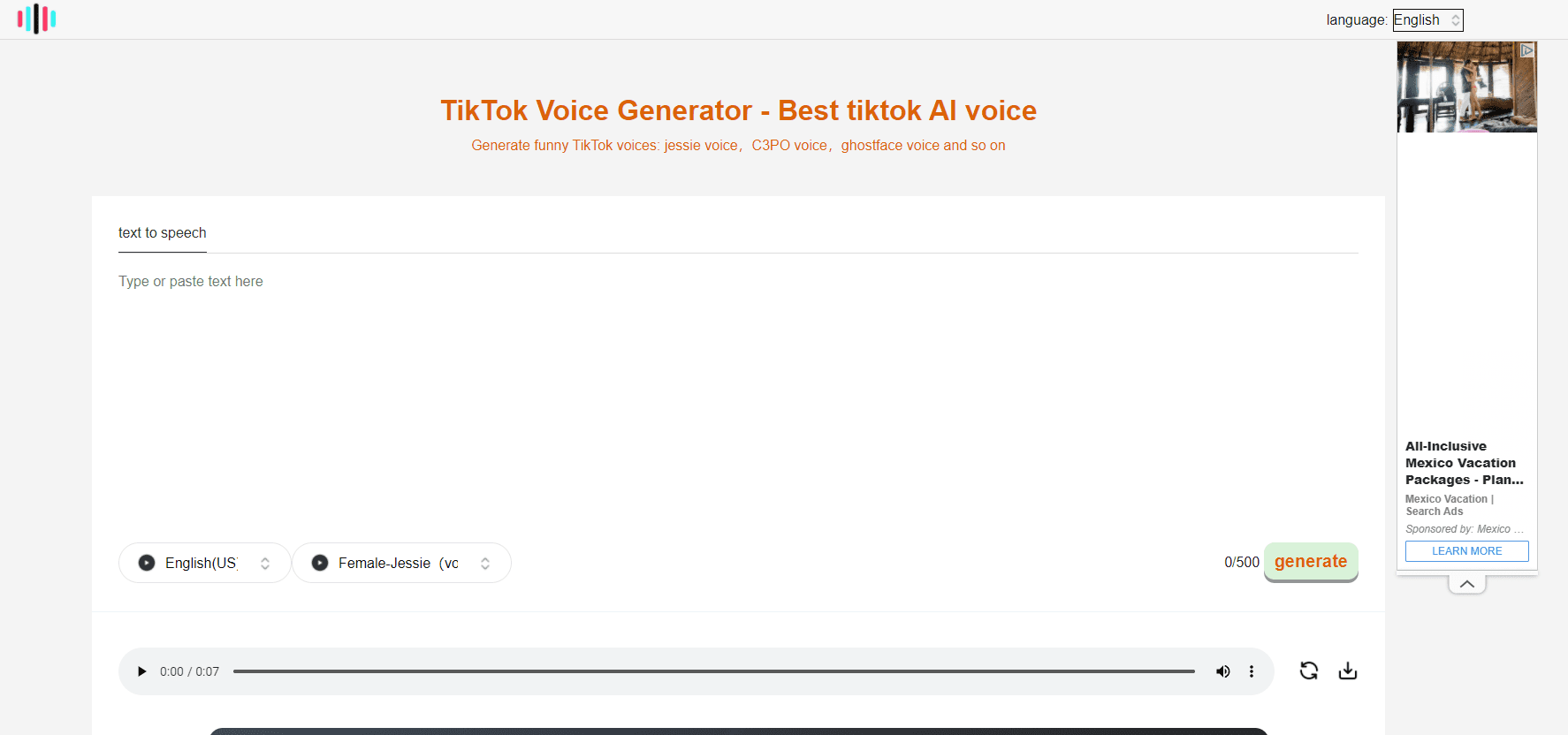
TikTok Voice is a free text to speech page and AI voice generator that runs in a browser. It's made by MoGoFun, the team behind the site that used to sit at tiktokvoice.net. That old address now redirects to mogofun.com, and the generator works the same way it did before: you type a line, pick a voice, and get audio back in a few seconds.
The appeal is access. TikTok's own reading voices live inside the app, appear on the record screen, and don't show up for every account or region. If you write scripts in a document, edit on a laptop, or record in batches, you can't reach them. This tool pulls the voices out of the app, so you can generate a line on a desktop, download the file, and drop it into whatever editor you already use.
The trade is depth. Free generations cap out at 500 characters, which covers a short hook or a caption, not a full voiceover. There's no timeline, no pitch or speed slider, and no voice cloning on this page. The voices are impersonations of styles people recognize from the app, not licensed celebrity recordings.
Getting Started
- Open mogofun.com in a browser. The tiktokvoice.net address redirects there. The free generator doesn't ask for an account.
- Choose a language from the menu at the top, then pick a voice from the list below the text box.
- Paste your script. The counter stops at 500 characters, so split long scripts into separate runs.
- Generate the clip, listen back, then download the MP3 and import it into your video editor. Paid plans raise the character limit and add extra audio tools.
Product Information
A quick look at TikTok Voice's pricing, supported platforms, and performance.
Best for
The users, tasks, and scenarios where this tool fits best.
Users
- Short-form creators who write scripts outside the app
- Meme and reaction accounts
- Faceless channel owners
Tasks
- Turning a caption into audio
- Narrating a clip in a language you don't speak
- Adding a sound effect or stripping a vocal
Scenarios
- Editing a batch of Shorts on a desktop
- Testing a hook before you record
- Reusing one script across markets
Key features
TikTok Style Voice Library
The TikTok voice generator builds its list around the styles people already associate with the app's reads: the flat robotic narrator, the deep movie-trailer tone, and character voices such as C3PO and Ghostface. You pick from a list rather than tuning settings, which keeps the workflow short. The catch is control: no pitch, speed, or emotion sliders on the free page.
20+ Languages on One Page
A language menu sits above the text box, and the voices change with it. English, Spanish, Portuguese, Japanese, and other markets are covered, which makes the tool usable for localized versions of the same video. Voices vary in quality between languages, so it's worth a test run before you commit to a long script.
MP3 Download Without an Account
You don't sign up to generate or download. Type, generate, and save the file, which comes back as an MP3 that any editor accepts. For a creator testing an idea at midnight, that's the whole pitch: no card, no email, no queue.
Character and Meme Voices
Beyond the standard narrators, the catalog carries voices tied to specific memes and characters. They work best on short lines, jokes, and reaction clips, where the recognition does the work. On longer passages the effect wears off fast, and the delivery stays flat.
Monthly Character Quotas on Paid Plans
Starter runs $4.9/mo for 100,000 characters a month, about three hours of audio. Advance is $8.9/mo for 400,000 characters, and Pro is $12.9/mo for 1,000,000 characters, roughly 30 hours. Annual billing cuts the monthly rate, and all three plans unlock the full voice list and unlimited downloads.
Extra Audio Tools on Paid Plans
Paid tiers add AI sound effects, a vocal isolator for pulling a voice out of a mix, a vocal remover for karaoke-style backing tracks, and an audio extractor that lifts the sound from a video file. Starter includes 30 runs of each utility per month, Advance 90, and Pro 200.
Pros and cons
Pros
- Free to try without an account: the generator opens in a browser and returns an MP3 with no sign-up step.
- Voices match what short-form audiences expect: the robotic narrator and character reads are the same styles that trend on TikTok.
- Works outside the app: desktop editing and batch production stop being a problem once the voice is a downloadable file.
- Paid plans are cheap for the volume: $4.9/mo buys 100,000 characters, which covers a daily posting schedule for most solo creators.
- Extra tools in the same place: sound effects, vocal isolation, and audio extraction save a second subscription.
Cons
- The free tier caps every run at 500 characters, so anything longer than a hook turns into several files you have to join by hand.
- There's no fine control: no speed, pitch, or pause settings, and no way to fix a mispronounced word beyond spelling it out.
- Quality is uneven across languages, and character voices sound thin on long passages.
- The site publishes no clear commercial license for the free generator, so brand work needs a check before you publish.
Frequently asked questions
TikTok Voice is a browser-based text to speech tool from MoGoFun that reproduces the robotic and character voices used in TikTok videos. You type text, choose a voice, and download the result as an MP3.
Related content
Explore related tools, skills, and articles for TikTok Voice.
TikTok Voice Alternatives

Off the Record
Weird Machines · Voice & Language · ProductivityOff the Record is a macOS app from Weird Machines that reshapes your voice in real time to block AI transcription, so people hear you normally and notetakers get nothing usable.
Cekura Bench
Cekura · Voice & Language · BusinessCekura Bench is a public benchmark that runs speech-to-speech models and deployed voice agents through 82 simulated phone calls, three times each, then publishes pass rates, latency and cost.
Griffin by Tavus
Tavus · Voice & Language · Video · ChatbotGriffin by Tavus is the first Human Interaction Model: a full-duplex, video-to-video system that watches, listens, and answers during a live video call in real time.