
ToneBird
Ampliftai Inc. · Writing · Productivity
ToneBird is a desktop AI reply assistant that drafts answers inside Gmail, Slack, WhatsApp, and other apps, using past conversations, notes about each person, and your own tone.
About ToneBird
What Is ToneBird
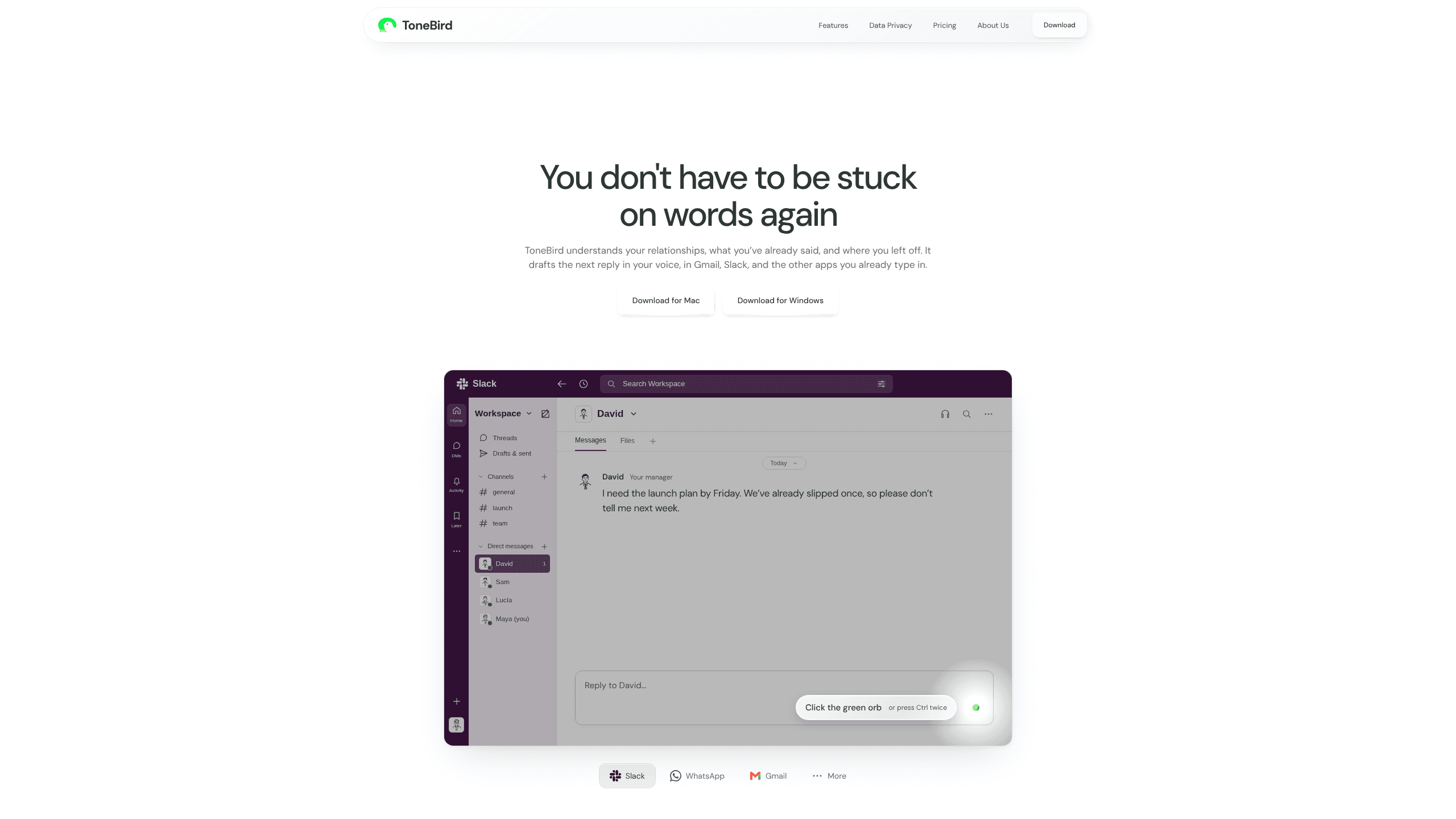
ToneBird is a reply drafting app for macOS and Windows from Ampliftai Inc. It sits beside the reply field in apps you already type in, reads the thread on screen, and offers three drafts you can edit and insert yourself.
What separates it from a chatbot in a browser tab is memory. ToneBird keeps a card for each person you talk to, holding earlier conversations, promises you made, how they prefer to be addressed, and where the work stands. A tone profile built from messages you send keeps the wording close to how you actually write, which matters when a reply goes to a client or a manager.
On a Mac the app asks for Accessibility so it can read reply fields and fill them, plus Screen Recording for apps such as WeChat whose text cannot be captured another way. Screenshot reading starts with text recognition on your device. If that fails, a vision model may see the cropped conversation image for that single read, and the image is discarded afterward.
Context-aware replies are the reason to pick this over a general AI reply generator: the draft knows who you are writing to, not only what the last message said.
The limits are worth knowing before you install it. ToneBird never sends a message. It puts a draft in the box and you press send in your own app. Coverage depends on the app and the field: Slack threads and Gmail compose windows usually work, while some custom fields cannot be read at all. Paid plans are listed on the site, but checkout is not open there yet, so treat the pricing table as a comparison chart for now.
Getting Started
- Download the macOS .dmg or the Windows x64 .zip from the ToneBird download page and install it. The Windows build is portable, so keep the extracted folder together.
- On a Mac, open System Settings, go to Privacy & Security, then Accessibility, and switch on ToneBird. Reopen the app if macOS asks you to.
- Open a conversation in a supported app and click inside the reply box. On a Mac, the trigger is the ToneBird bubble or a double press of Option.
- Read the three reply drafts. Use Tweak for a more precise, warmer, or funnier version, and check names, dates, and numbers before you commit.
- Press Insert to place the draft in the reply box, make any final edit, then send from the app itself.
Product Information
A quick look at ToneBird's pricing, supported platforms, and performance.
Best for
The users, tasks, and scenarios where this tool fits best.
Users
- Freelancers and consultants
- Sales and account people
- People who freeze at the reply box
Tasks
- Answering a message you left sitting
- Declining extra work or renegotiating a deadline
- Pulling a number out of a document
Scenarios
- Four apps open at once
- Picking up a thread after a holiday
- A shared or work laptop
Key features
Relationship memory that carries the thread
Circle holds a card for each person: recent conversation, open tasks, past commitments, and the form of address they prefer. Open Rewind to see earlier history, then come back to the current thread with the facts in view. The point is continuity, so a reply can mention the scope change from last quarter without you digging through search results.
Three drafts and a nudge in the right direction
Every reply starts as three options, not one block of text you have to rewrite. Tweak shifts a draft toward more precise, warmer, or funnier, which is faster than editing a tone that missed by a mile. Insert drops the chosen draft into the reply box, and the send button stays in your app.
A tone profile you approve
Me holds your personalized tone settings: the wording rules and openers you want to reuse. ToneBird learns from the messages you send only while that setting is on, and every suggested adjustment waits for your approval before it changes future drafts. You can review what it learned, apply a change, or leave it alone.
Answers grounded in your own documents
Context accepts a pasted note or an imported text file. A proposal, a rate card, or meeting notes can supply the facts a reply needs, such as the package price or the delivery date. ToneBird flags the detail it used, and you check prices and terms against the source before sending.
Runs beside the apps you already type in
The app works next to readable reply fields in Gmail, Slack, WhatsApp, iMessage, Discord, WeChat, Lark, and X, on macOS and Windows. There is no new inbox to check and no separate chat window to keep open. Multilingual replies are supported as well, which helps when a thread switches language halfway through.
Local memory with controls you can see
Your tone profile, person cards, learned corrections, and usage counts are stored on your device. Settings offers Export My Data, Delete My Data, and Clear Local Cache, and the last two do different things. Turning off learning stops new messages from feeding the profile, while everything already saved stays visible and removable.
Home view for pending replies and tasks
Home gathers the replies waiting to go out and the open tasks tied to them. Recent learning appears next to the conversation it affects, so you can see why a draft changed. It is a small feature, but it saves the mental sweep through five apps to work out who is still waiting on you.
Pros and cons
Pros
- The memory of people and past commitments is the part most AI reply tools skip, and it is what makes a draft usable weeks later.
- Drafts land inside the apps you already use, so there is no copy and paste between a chat window and a writing tool.
- Learned changes need your approval, which keeps an odd phrasing from quietly becoming your default voice.
- Local storage, an export button, and a delete button give you a way out if you stop using it.
- The free plan covers 15 drafts a day and 30 people, enough to judge whether the workflow fits.
Cons
- Nothing is sent for you. If you wanted a tool that answers messages on its own, this is not it.
- Field support varies by app and some compose boxes cannot be read, so the bubble does not appear everywhere.
- The Mac version needs Accessibility and sometimes Screen Recording, and a corporate device policy may block both.
- Checkout is not live on the site, so the $10 and $40 plans are advertised without a way to buy them there yet.
Frequently asked questions
No. Insert places a draft in your reply box and stops there. You review the text, edit if needed, and press the send button in Gmail, Slack, or whichever app you are using.
Related content
Explore related tools, skills, and articles for ToneBird.
ToneBird Alternatives

Google EmbeddingGemma 2
Google DeepMind · Writing · Image · CodingGoogle EmbeddingGemma 2 is a 740M-parameter open model that turns text, code, images, audio, and video frames into vectors in one 768-dimension space, running on phones and laptops.

MePersona
MePersona, Inc. · Writing · Productivity · MarketingMePersona is an AI unified inbox for creators. It learns your voice, drafts replies to fan messages from 12 platforms, and sends only what you approve.

Fluence
Yay Software (Yannick Huchard) · Writing · Voice & Language · ProductivityFluence is an Android app that reads PDFs, EPUBs, Word files and web articles aloud, follows each sentence as it speaks, and answers questions about the text on the phone itself.