

Crustimate
Crustdata · Business
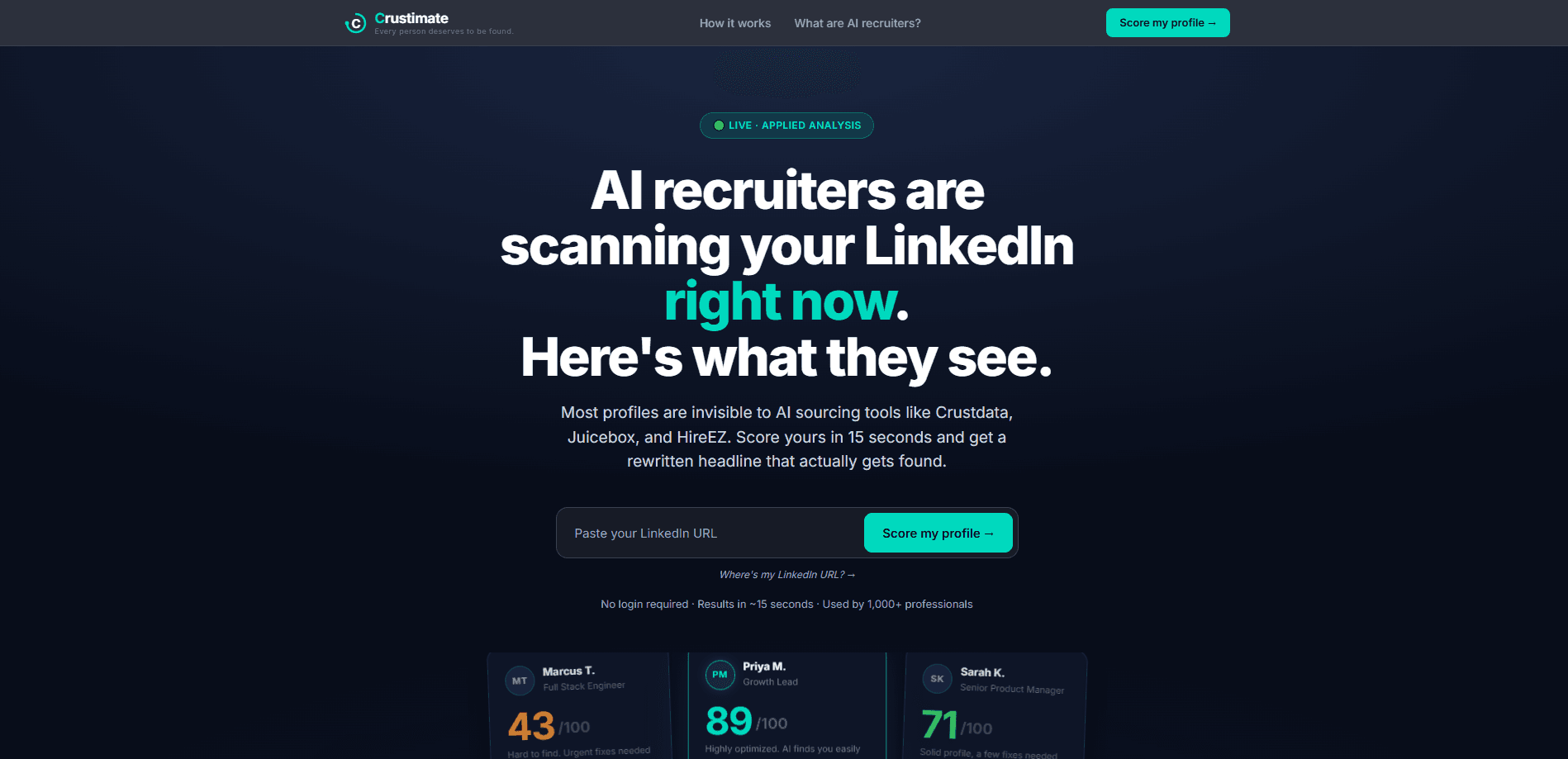
Crustimate scores your LinkedIn profile the way AI recruiter visibility tools see it. It's a free, no-login web tool from Crustdata that reads a profile, hands back a score out of 100, and rewrites the headline so AI sourcing systems pick it up. You paste a URL, wait about 15 seconds, and get a breakdown of what's missing. So what does it actually catch? Generic titles, missing domain keywords, and zero quantified outcomes top the list.
About Crustimate
What Is Crustimate
Crustimate is a LinkedIn profile checker built by Crustdata, a company whose main business is selling data to recruiters and AI sourcing tools. The pitch is simple. AI recruiting software now filters candidates before a human ever reads a name, and most profiles are written for people, not machines.
The tool reads a public LinkedIn profile, estimates how often it would surface in recruiter queries, and gives a score out of 100. Anything under roughly 40 means you're nearly invisible to AI sourcing tools, and the page walks you through the gaps: generic titles, missing domain keywords, zero quantified outcomes.
The most useful part isn't the number. It's the rewritten headline. Crustimate takes a weak line like "Marketing Professional | Helping companies grow" and turns it into something keyword-heavy, such as "B2B SaaS Growth Marketer | PLG · Demand Gen · Pipeline Attribution | Ex-HubSpot, Salesforce."
The limits are real. It scores public data only, so private content and endorsements don't count. It's a single-shot diagnostic, not a tracker. And since Crustdata runs it as a free lead magnet for its recruiting business, expect the product to evolve around that, not around you.
Getting Started
- Open the Crustimate page in any browser. No account, no email, no LinkedIn login required.
- Paste your public LinkedIn profile URL into the scoring box.
- Wait roughly 15 seconds while it reads the profile and scores it out of 100.
- Review the gaps it flags, then copy the rewritten headline it suggests.
- Optionally paste extra context, like a resume or project notes, to re-score with a fuller picture.
Product Information
A quick look at Crustimate's pricing, supported platforms, and performance.
Best for
The users, tasks, and scenarios where this tool fits best.
Users
- Job seekers
- Recruiters and TA leaders
- Career coaches and educators
Tasks
- Rewriting a LinkedIn headline
- Auditing a profile for keyword gaps
- Testing a profile change
Scenarios
- Before a round of applications
- Prepping a candidate for a client submission
- Workshop or classroom exercise
Key features
AI Visibility Score
Crustimate rates a profile out of 100 based on how likely AI sourcing tools are to surface it. It's the tool's LinkedIn AI visibility score. That number comes with context. You see if you land as "nearly invisible" or "highly visible," not just a bare figure with no meaning.
Headline Rewrite
The LinkedIn headline generator produces a keyword-rich replacement built from your real role and background. It keeps employer signals and domain terms that recruiters actually search for, and you can edit the result before using it.
Gap Breakdown
Each score comes with the specific reasons behind it: no quantified outcomes, a generic title, missing domain keywords. Naming the gaps is more useful than the number itself, and it turns a vague call for LinkedIn profile optimization into a short, concrete list you can work through.
Re-Scoring With Extra Context
You can paste a resume, project descriptions, or a brag doc and re-score. This widens the picture beyond the LinkedIn page alone and catches strengths the profile leaves out.
Guided Profile Story Builder
If writing about yourself is the hard part, the tool asks eight questions you answer by typing, then assembles a profile story from your answers. No video or voice required. It's a small feature, and an easy one to overlook. Skip it if you already know what you want to say.
Non-LinkedIn Data Capture
Crustimate reads the public profile without asking for your LinkedIn password. That keeps the friction low. It also avoids handing credentials to a third-party tool, which is the safer way to run a profile check.
Pros and cons
Pros
- Free and instant, with no signup, no email, and no LinkedIn login.
- The rewritten headline is the standout output, giving you a usable draft in seconds.
- Gap breakdown explains why the score landed where it did, so it doubles as a to-do list.
- Re-scoring with a resume or project doc fills in context the LinkedIn page alone misses.
Cons
- Reads public data only, so private sections and endorsements don't influence the score and can drag a strong profile down.
- The 0-100 scale is Crustimate's own model, not a published industry benchmark, so don't treat it as an absolute grade.
- No API and no tracking over time, so you'll re-run it manually each time you want to check a change.
Frequently asked questions
It rates how visible your LinkedIn profile is to AI recruiting tools, on a 0 to 100 scale. The higher the number, the more likely those tools are to surface you in recruiter queries.
Related content
Explore related tools, skills, and articles for Crustimate.
Crustimate Alternatives

Knocket
Knocket (Tencent RTC team) · Productivity · Business · ChatbotKnocket is a free live chat and contact page tool that lets visitors message you from your website, app, or a shareable link, with every reply handled from Telegram or one inbox.

shippedit.me
Krawlup · Marketing · Businessshippedit.me now redirects to Krawlup, a web platform that audits SEO, AEO and page speed every week, then hands the fixes to AI coding agents over MCP.

Ayven
Alknoma · Productivity · BusinessAyven is an AI control centre by Alknoma that turns a plain-language goal into a dated plan, hands the work to your people and AI agents, and asks for your approval only when the call is yours.