

Track AI Answers
Track AI Answers · AI Detection
Track AI Answers is a web tool that collects what ChatGPT, Google's chatbot and other AI assistants say about your name, brand or product, then emails you when those answers change.
About Track AI Answers
What Is Track AI Answers
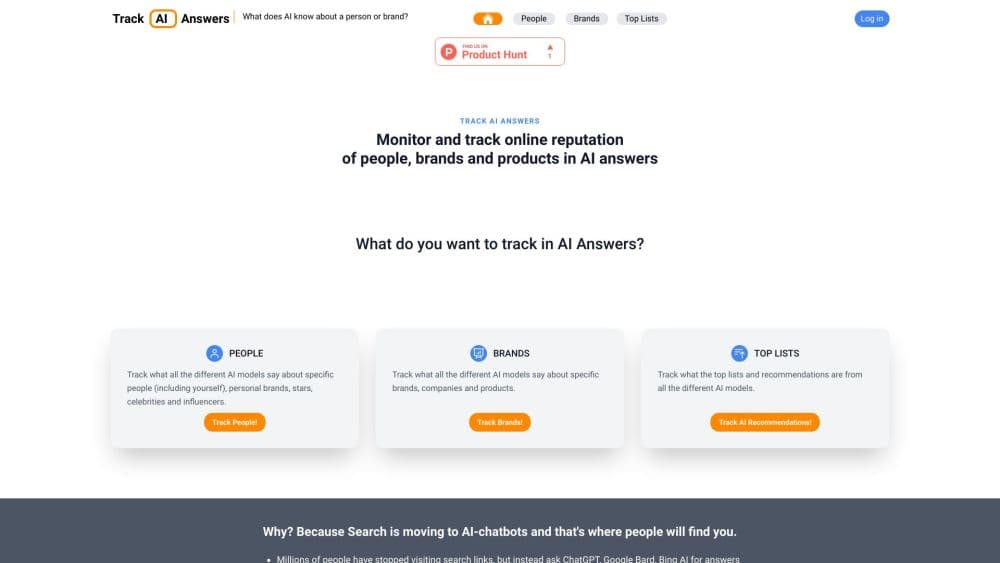
Track AI Answers is a reputation monitor for the AI search era. You type in a person, company or product, and the site asks several AI chatbots the same question, then lays their answers side by side on one page. The point is simple: people now ask an assistant instead of scrolling through links, so the answer an assistant gives about you has become a search result you can't edit. AI reputation monitoring starts with knowing that baseline.
The team behind it, led by Silver Keskkula, built the tool around three jobs: track what AI systems say, notify you when the wording shifts, and point you at ways to change the underlying information. It has been featured on Marketplace Tech, and the company publishes a blog on AI reputation. The most recent posts date from late 2023.
There are real limits. The platform page still names GPT-3, Bing AI and Google Bard, which tells you the covered assistants haven't been refreshed in a while. There's no public API, no bulk dashboard for agencies, and no way to push corrections straight into a model. What you get is a reading of current answers plus a nudge when they move.
Getting Started
- Open trackaianswers.com and pick a track type: People, Brands, or AI Top Lists.
- Enter the name, company or product you want to check. A "Top 5" style query also works for category recommendations.
- Wait roughly ten seconds while the site queries each connected assistant and builds the comparison page.
- Register your email on the results page to switch on change alerts for that subject.
Product Information
A quick look at Track AI Answers's pricing, supported platforms, and performance.
Best for
The users, tasks, and scenarios where this tool fits best.
Users
- Founders and small business owners
- Consultants and freelancers
- PR and marketing teams
Tasks
- Auditing what an assistant claims about your company
- Catching a change in a product recommendation
- Checking a person's AI profile before a hire or partnership
- Tracking category-level AI top lists
Scenarios
- Preparing for a funding round or press interview
- A rebrand or product rename
- Ongoing reputation work with a small budget
Key features
Multi-Assistant Answer Comparison
The core screen asks several chatbots the same question and stacks the replies for reading in one pass. You stop switching tabs and spot disagreements in seconds. Coverage is built around OpenAI's models, Microsoft's assistant and Google's chatbot, plus a growing list the site describes without a firm count.
Change Alerts by Email
Once you register an address, the service keeps watching the subject and mails you when an answer changes. That turns a one-off check into AI answer tracking you don't have to remember. Alerts are plain email, so there's no app to install and no dashboard to open.
People Tracking
The People mode covers you, a colleague, an executive or a public figure. It's the fastest way to see what an assistant says about someone's job history, reputation or expertise, which is handy before an introduction or a hiring conversation.
Brand and Product Tracking
Brands mode targets companies, products and services. Brand monitoring in AI chatbots works differently from rank tracking, because answers come back as a paragraph with a few named competitors. You learn both how you're described and who else gets mentioned in the same breath. That second part is often the more useful signal.
AI Top Lists and Recommendations
A separate Top Lists mode accepts prompts like "best 5 mobile phones to consider buying" and returns each assistant's ranked picks. Brands that live on comparison traffic can watch these lists the way they once watched page one of Google.
Guidance for Changing Answers
The site pairs monitoring with advice on how assistants pick up information: structured pages, consistent facts across profiles, third-party mentions. It won't fix anything for you, but it shortens the guesswork about where to start.
Pros and cons
Pros
- Free to search, with no card required to see the comparison page
- Puts several assistants on one screen, which saves a repetitive manual routine
- Email alerts cover people, brands and category lists in the same account
- Plain-language results you can forward to a client or a founder without cleanup
- Useful starting point for AI visibility tracking when budgets are tight
Cons
- The assistant lineup looks dated, with GPT-3, Bing AI and Bard still named on the site, so you may not see current models
- No published pricing, no team seats and no export, which blocks agencies managing several clients
- Alerts tell you an answer changed but don't explain which source caused it
- No API means you can't fold the checks into your own reporting stack
Frequently asked questions
It answers the question "what does ChatGPT say about my brand" and the same question for other assistants, then shows the replies together on one page. After you register an email, it watches for changes and notifies you.
Related content
Explore related tools, skills, and articles for Track AI Answers.
Track AI Answers Alternatives
Isgen AI
Isgen · AI DetectionIsgen AI is a web-based AI detector that scores text for machine authorship and shows you which sentences and phrases push the number up. It's built for teachers, editors, students, and writers. Their question is simple: did this draft come from ChatGPT, GPT-5, Claude, Gemini, DeepSeek, or another model? You paste or upload content, run a scan, and get a Human, AI, and Mixed breakdown in seconds. There's also a companion editor that scores text while you write it.
Humanizeai Tools
Humanizeai Tools · Writing · AI DetectionHumanizeai Tools is a web-based AI humanizer that rewrites machine-generated text so it sounds like a person wrote it, which is the whole point of the category it belongs to. Paste a draft from ChatGPT, Claude, or Gemini, run it through the tool, and it swaps out the phrases and sentence patterns that AI detectors flag. If your goal is to make AI text sound human before you publish it, this is the kind of tool built for exactly that. It suits students, bloggers, and marketers who need copy that reads naturally and clears tools like GPTZero, Copyleaks, and Winston AI after a single pass.

Hidemyai
Hidemyai · Writing · AI DetectionHidemyai is an AI content humanizer. It rewrites text from ChatGPT, Jasper, and similar tools so the result reads like a person wrote it. You paste your draft, pick a document type and tone, and the service returns a version meant to bypass AI detectors such as Originality.ai, Turnitin, and ZeroGPT. It targets writers, marketers, and students who lean on AI drafts but can't ship copy that sounds robotic. The promise is simple: make AI content undetectable.