
Trancy for Chrome
L2D LIMITED · Other
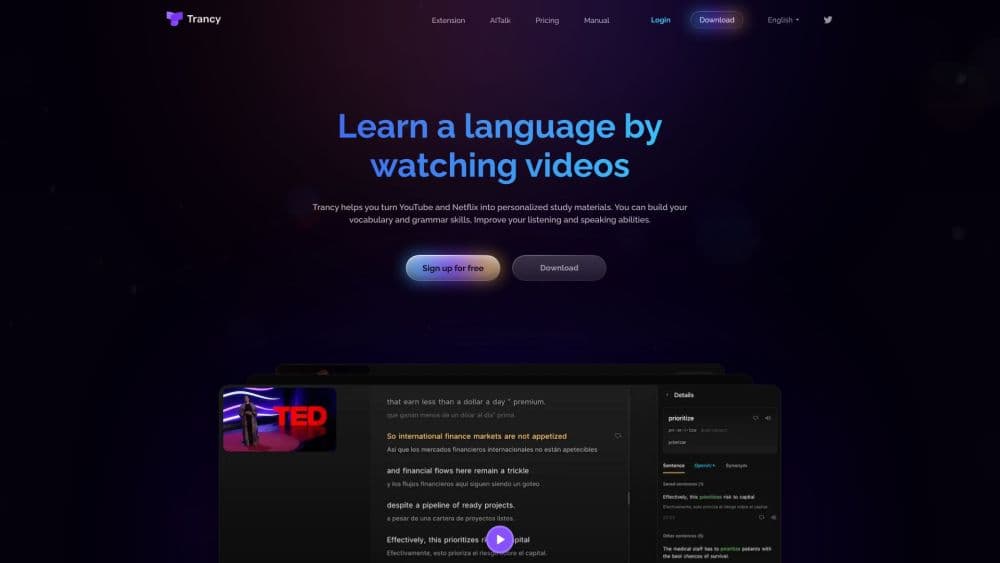
Trancy is an AI language learning extension that adds bilingual subtitles to YouTube and Netflix, translates web pages, and turns saved words into review material.
About Trancy for Chrome
What Is Trancy
Trancy is a language learning extension that lives in your browser and works on the videos and pages you visit anyway. It shows two subtitle tracks at once, so you read the meaning in your own language while your ears follow the original audio. The same habit carries into reading: select a sentence on any page and Trancy translates it in place, with the option to save words to a personal book.
The idea is to replace drilling with input. Instead of opening a separate study app, you keep watching a cooking channel or a documentary and let the subtitles do the teaching. The extension handles sentence splitting for messy subtitles, looks up unfamiliar words with definitions, and can run grammar breakdowns on complicated lines.
Two things shape who benefits. The core features depend on a free account, and AI transcription for videos without captions and PDF translation sit behind a paid plan. The learning curve is low, but results depend on how much content you actually watch. If you already spend hours on YouTube, it slots in without adding a new routine.
Getting Started
- Install the Trancy extension from the Chrome Web Store (or the Edge, Firefox, and Brave stores) and sign in to create a free account.
- Open a video on YouTube, Netflix, HBO Max, or another supported platform. The bilingual subtitles appear over the player automatically.
- Pick a viewing mode. Theater mode overlays subtitles on the video, while reading mode moves the subtitles to the side as text you can scroll and analyze.
- Select words or sentences as you go. Save them to your word book for later review, or ask for an AI definition and grammar explanation on the spot.
- Study the saved material in the web learning center, where flashcards and speaking practice turn what you collected into review sessions.
Product Information
A quick look at Trancy for Chrome's pricing, supported platforms, and performance.
Best for
The users, tasks, and scenarios where this tool fits best.
Users
- Language learners at an intermediate level
- Students who watch lectures and podcasts
- Professionals keeping up a second language
Tasks
- Watching YouTube without missing the meaning
- Reading foreign news and articles
- Building a vocabulary from real sentences
- Practicing speaking and pronunciation
Scenarios
- Turning a daily YouTube habit into study time
- Getting through a research paper in another language
- Keeping a language alive between courses
Key features
AI Bilingual Subtitles
Trancy shows the original subtitle line and its translation together on YouTube, Netflix, HBO Max, Disney+, TED, edX, Coursera, and Udemy. Two viewing modes cover different habits: theater mode keeps you on the video, while reading mode pulls the subtitles aside as text. The point is understanding a full sentence rather than guessing from one word.
Smart Sentence Segmentation
Raw subtitles often arrive in broken fragments that translate poorly. Trancy uses natural language processing to regroup them into complete sentences before translating, which raises the accuracy of the output. Cleaner lines also make it easier to save a usable example sentence later.
AI Word Lookup and Grammar Analysis
Select a word and Trancy returns a translation plus an AI definition that explains how it's used. For a tangled sentence, the grammar analysis breaks down the structure and marks the key phrases. It's a way to answer "why does this sentence work this way" without leaving the page.
Immersive Webpage Translation
On any article, you can translate a selected sentence, a single paragraph, or the full text while keeping the original in view. Trancy applies custom handling to news sites, technical forums, and social platforms, and you can pick from engines like Google, DeepL, and OpenAI. Unknown words get highlighted as you read, which nudges vocabulary into memory without a separate drill.
Vocabulary Book and Learning Center
Words and sentences you save land in a personal library, and the web learning center turns them into flashcards and review sessions. Flashcard practice, an AI speaking coach, and shadowing training all pull from the material you collected, so study content matches what you actually watch and read.
Video Summarization and AI Subtitle Transcription
For videos without captions, AI transcription generates subtitles, and video summarization condenses a long clip into key points. Both features speed up browsing a channel or catching up on a lecture, but they run at a daily limit and the higher allowance comes with the paid plan.
Pros and cons
Pros
- Dual subtitles cover YouTube, Netflix, HBO Max, Disney+, TED, Coursera, and Udemy in one extension, so a single install handles most video learning.
- The free plan includes bilingual subtitles, unlimited word and sentence translation, and immersive web translation, which is enough to judge the tool before paying.
- Reading mode and sentence segmentation turn messy captions into study-ready text, which helps intermediate learners more than raw subtitles do.
- Saved words keep their original sentence context, so review material comes from content you chose rather than a generic word list.
- The same account syncs across Chrome, Edge, Firefox, Brave, Safari, and mobile, so progress follows you between devices.
Cons
- AI subtitle transcription, PDF translation, and the advanced AI engines sit behind the paid plan, so the most useful extras cost money.
- Nothing works offline. You need an internet connection and, for some AI features, a signed-in account to get subtitles at all.
- Subtitle quality depends on the translation engine you pick, and machine translation still stumbles on idioms and fast dialogue.
- The advanced engine plans cap usage by tokens per month, so heavy users on the top plan eventually have to bring their own API key.
Frequently asked questions
Trancy is a language learning extension for the browser. It puts bilingual subtitles on YouTube and Netflix, translates web pages and PDFs, and saves words and sentences so you can review them later in a learning center.
Related content
Explore related tools, skills, and articles for Trancy for Chrome.
Trancy for Chrome Alternatives

Odyssey 3
Odyssey · OtherOdyssey-3 is Odyssey's foundation world model. It simulates physics in real time, turns a prompt into an interactive environment, and adapts to robots, cars and games.

JarvisCore
Prescott Data · Coding · Productivity · OtherJarvisCore is an open source Python runtime where AI agents work as equal peers on an agent mesh, claim tasks from a shared ledger, and reach external services through a zero-trust broker.
Clef
Cloudflare · Business · OtherClef is Cloudflare's open-source decision model for Workers AI. It returns calibrated probabilities for typed questions, not generated text, so agents can classify, route, and act fast.