

Transcri.io
Transcri · Writing
Transcri.io turns audio and video files into text and subtitles in over 100 languages, adds an AI assistant that answers questions about your recordings, and exports in 20+ formats from the browser.
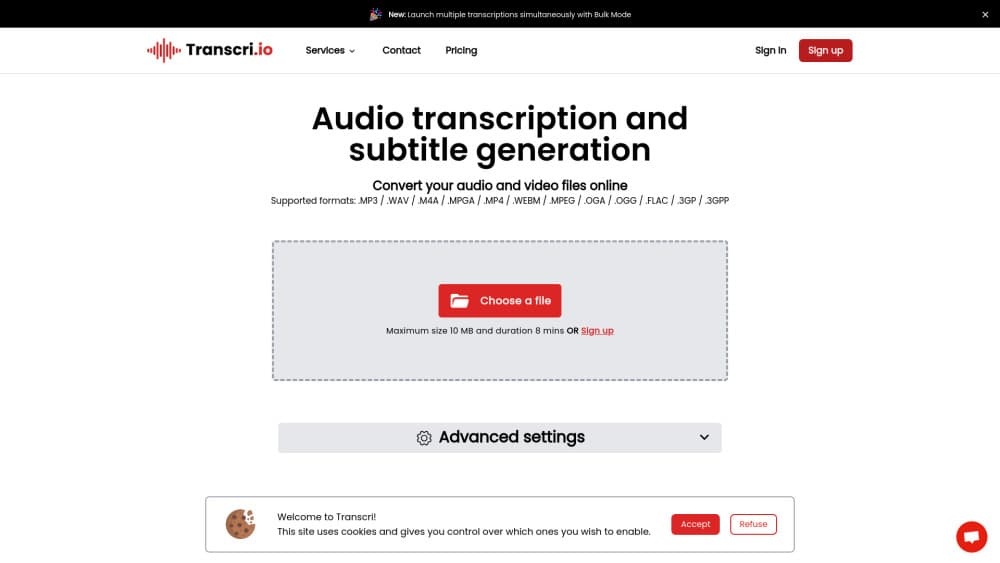
About Transcri.io
What Is Transcri.io
Transcri.io is a browser-based AI transcription tool from a French team that hosts its data in the EU. You upload an audio or video file, pick a language, and get a timed transcript you can edit, subtitle, translate, or hand to a colleague. The company reports up to 96% transcription accuracy and says more than 100,000 people use the service.
The product covers the full path from raw recording to finished subtitle file. A podcast episode becomes an SRT. A sales call becomes a summary plus a list of key moments. A lecture becomes a searchable document a student can quote. The AI assistant reads your file and answers questions about it, so you don't have to scrub through 90 minutes of audio to find one budget figure.
The limits matter as much as the features. Every plan runs on monthly transcription minutes, and the free tier gives you 15 minutes a month with standard processing. Translation into other languages, speaker identification, and batch processing sit on paid plans, and the Business plan allows up to 5 users. There's no self-serve API, but Enterprise customers can ask for custom API configuration.
Getting Started
- Create a free account on transcri.io. No credit card is needed for the free plan.
- Upload an audio or video file, or record straight from the browser. File size and length have no cap on any plan.
- Choose the spoken language and let the AI produce a timed transcript.
- Open the editor to fix names, punctuation, and speaker labels, then switch between dialogue mode and subtitle mode.
- Export as text, subtitles, or a subtitled video, or ask the AI assistant for a summary before you download.
Product Information
A quick look at Transcri.io's pricing, supported platforms, and performance.
Best for
The users, tasks, and scenarios where this tool fits best.
Users
- Journalists and podcasters
- Students and researchers
- Small teams that share video work
Tasks
- Turning interviews into articles
- Subtitling video for social platforms
- Translating a recording for a wider audience
- Summarizing long meetings
Scenarios
- A weekly podcast with two hosts and a guest
- A sales team reviewing calls
- A course creator subtitling lessons
Key features
Transcription in Over 100 Languages
The multilingual transcription engine accepts audio and video in more than 100 languages, including English, Spanish, French, German, Portuguese, Dutch, Italian, Polish, and Arabic. Upload a file and the service returns a timed transcript without a length or size limit, even on the free tier. The company says its model reaches up to 96% accuracy and handles fast speech, background noise, and heavy accents through a verbatim algorithm. Accuracy still drops on poor recordings, so a clean microphone matters more than any setting.
AI Assistant That Reads Your File
The assistant answers questions about a single recording. You can ask for a summary of a discussion, the moment a decision was made, a written report, or chapter markers for a video. Every plan includes a set number of requests per month: 3 on Free, 25 on Starter, 100 on Pro, and unlimited on Business. This is the feature that separates Transcri.io from a plain audio to text converter, since the output is usable analysis rather than raw words.
Subtitle Generation and Broad Export Options
The AI subtitle generator produces timed captions you can download in 20+ formats, including the SRT and VTT files that YouTube and most editing tools accept. Paid plans also export a video file with burned-in subtitles, and the free plan adds a watermark to that export. If you need captions for a client, check the format list before you upload, because a few niche formats only appear in the paid tiers.
Browser Editor for Transcripts and Subtitles
Everything happens in the browser, with no desktop install. The editor lets you fix words and timing, then switch between dialogue mode for interviews and subtitle mode for captions without re-uploading. You can split long captions, adjust line breaks, and keep speaker turns readable. For teams that already work in Google Docs or a browser tab, this keeps the whole job in one place, and transcription accuracy improves once you correct recurring names.
Translation and Multilingual Output
Starter includes translation into English only. Pro and Business unlock multilingual translation, so a French interview can ship with Spanish and German subtitle tracks. The source language stays intact in the transcript, which means you can compare the original line against the translation when a phrase looks off. Machine translation still needs a human pass on jargon, product names, and jokes.
Team Workspace and EU Data Handling
Transcri.io is built as a shared workspace, not a single-user tool. Business plan members can invite up to 5 users into a project, split review work, and keep files in one place. The company stores data in the EU, encrypts files with AES-256, and states compliance with GDPR and the EU AI Act. Teams in regulated sectors tend to ask about that hosting detail before they sign, and Transcri answers it on the pricing page.
Pros and cons
Pros
- No file length or file size limit on any plan, which removes the usual 2 hour ceiling on meeting recordings.
- Subtitle exports cover SRT, VTT, and 20+ other formats, so the file usually drops straight into YouTube or an editor.
- The AI assistant turns a transcript into a summary, a list of key moments, or chapter markers without a second tool.
- EU hosting with AES-256 encryption and stated GDPR and EU AI Act compliance suits teams with strict data rules.
- Free plan needs no credit card and includes 15 minutes a month, enough to test transcription accuracy on your own audio.
Cons
- Every plan runs on monthly minutes, so a heavy interview month pushes you into extra minutes billed at €0.04 to €0.10 per minute.
- Speaker identification only arrives on the Business plan, which means solo users editing panel recordings won't get automatic speaker labels.
- There's no self-serve API. Developers who want to wire transcription into their own product have to go through Enterprise and a custom setup.
- The free plan keeps files for 7 hours only, so anything you want to revisit has to be exported before storage runs out.
Frequently asked questions
The company claims up to 96% accuracy and says its model handles fast speech, noise, and varied accents better than major competitors. That figure comes from Transcri itself, and real results depend on your recording. A phone call in a quiet room transcribes cleanly; a crowded conference room with one shared microphone needs editing.
Related content
Explore related tools, skills, and articles for Transcri.io.
Transcri.io Alternatives

Google EmbeddingGemma 2
Google DeepMind · Writing · Image · CodingGoogle EmbeddingGemma 2 is a 740M-parameter open model that turns text, code, images, audio, and video frames into vectors in one 768-dimension space, running on phones and laptops.

MePersona
MePersona, Inc. · Writing · Productivity · MarketingMePersona is an AI unified inbox for creators. It learns your voice, drafts replies to fan messages from 12 platforms, and sends only what you approve.

Fluence
Yay Software (Yannick Huchard) · Writing · Voice & Language · ProductivityFluence is an Android app that reads PDFs, EPUBs, Word files and web articles aloud, follows each sentence as it speaks, and answers questions about the text on the phone itself.