

Transcribe Audio to Text
Audio Converter AI · Voice & Language · Video · Productivity
Transcribe Audio to Text is a web-based AI transcription tool from Audio Converter AI that turns audio files, video uploads and YouTube links into accurate, searchable text. It adds speaker labels, timestamps and AI summaries on top of the raw transcript, so you can jump to the right moment or skim a long recording instead of replaying it. The free plan gives you a daily credit allowance for short files, and paid tiers lift the file size, YouTube length and storage limits for anyone who transcribes regularly.
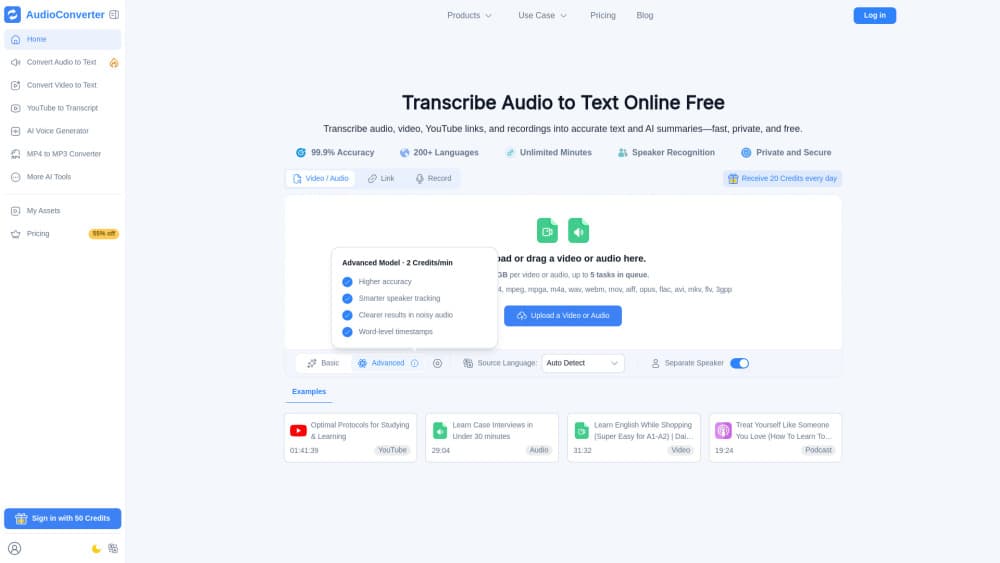
About Transcribe Audio to Text
What Is Transcribe Audio to Text
Transcribe Audio to Text is the transcription product of Audio Converter AI, a service built for people who deal with recorded speech every day: students, instructors, podcasters, marketers, HR teams and freelancers. You upload an audio or video file, or paste a YouTube link, and the tool returns an editable transcript with speaker labels and timestamps that you can search, quote and reuse across your own projects. From there you can generate AI summaries, chat with the transcript to pull out details, or export the text for notes, captions and articles.
The main problem it solves is time. Rewinding through an hour-long interview to find one quote is slow. Typing it out by hand is slower. This tool produces the full text first, then lets you search and summarize it.
The biggest limitation is the credit system. Free users get a small daily pool of credits, which covers roughly 40 minutes of basic transcription, and larger files or longer YouTube videos need a paid plan. If you transcribe a lot of long recordings, or you run a team that processes interviews and meetings every week, the cost stacks up quickly as your credit needs grow.
Getting Started
- Open the Audio Converter AI site and create an account, or sign in if you already have one.
- Upload an audio or video file, or paste a YouTube link into the transcription box.
- Choose your settings, such as the language and whether you want a summary or speaker labels.
- Start the transcription and wait for the text to appear; processing time depends on file length and priority tier.
- Review the transcript, then edit it, generate a summary, or export the text.
Product Information
A quick look at Transcribe Audio to Text's pricing, supported platforms, and performance.
Best for
The users, tasks, and scenarios where this tool fits best.
Users
- Students recording lectures
- Job seekers and journalists
- Podcasters and content creators
- Interviewers and researchers
- HR and operations teams
Tasks
- Transcribing interviews and focus groups
- Converting YouTube videos to text
- Generating meeting summaries
- Turning lectures into study notes
Scenarios
- Cleaning up a day of back-to-back calls
- Preparing course materials
- Drafting written content from spoken ideas
- Reviewing research audio before a report deadline
Key features
AI Transcription From Multiple Sources
The core feature handles audio files, video uploads and YouTube links in one place. Free accounts accept files up to 500 MB. YouTube videos stop at 30 minutes. Paid plans go up to 5 GB and 150 minutes. That range covers most podcasts, lectures and meetings. Very long recordings still push you toward the higher tiers.
Speaker Labels and Timestamps
Every transcript can carry speaker labels and timestamps, which is what separates a usable transcript from a wall of text. You can tell who spoke and when. Quoting a person or citing a moment takes seconds rather than re-listening. For interviews and panel discussions, this alone saves hours.
AI Summaries and Chat
Beyond the raw text, the tool generates AI summaries and lets you chat with the transcript to pull out specific details. Instead of reading a full hour-long transcript, you get the key points. Want to dig into a section? Ask a question about it. The free plan includes a limited number of summaries and chats per day.
Text-to-Speech and Voice Output
Audio Converter AI also offers text-to-speech and audio generation using the same credit pool. Free users get a small character allowance for standard and premium voices. Paid plans raise it into the tens or hundreds of thousands of characters. This makes the platform more than a one-way transcriber.
File Security and Retention
Files are encrypted in transit and at rest, and processed in isolated environments. On the free plan, files are removed after 24 hours. Paid plans keep permanent storage. You can manage exports, sharing and deletion yourself. That matters if your recordings contain sensitive information.
Flexible Export and Editing
Transcripts are editable, so you can fix names, clean up filler words or reformat before exporting. Once clean, the text drops straight into notes, captions or a draft article. Editable output is the difference between a finished document and a rough dump.
Pros and cons
Pros
- Handles audio, video and YouTube links in one tool, so you don't juggle separate apps.
- Speaker labels and timestamps make long recordings genuinely searchable and quotable.
- AI summaries and transcript chat give you the gist without reading the whole thing.
- A real free plan covers short files and light daily use with no upfront payment.
- Encrypted processing and 24-hour auto-deletion on free accounts suit sensitive recordings.
Cons
- The credit system caps free use at roughly 40 minutes of transcription per day, which runs out fast on long files.
- Free accounts keep files for only 24 hours, so you need to export anything you want to keep.
- YouTube length is limited by tier, so a 90-minute video needs a paid plan.
- There's no public API, which rules it out for teams wanting automated or bulk workflows.
Frequently asked questions
You can transcribe audio files, video uploads and YouTube links. Free accounts handle files up to 500 MB and YouTube videos up to 30 minutes, while paid plans support larger uploads and longer videos.
Related content
Explore related tools, skills, and articles for Transcribe Audio to Text.
Transcribe Audio to Text Alternatives

Foley
Hanamori Labs, LLC · Voice & Language · Productivity · AI AssistantFoley is a voice to-do list that turns a spoken sentence into a filed task, complete with project, date and time, then helps you plan the day around what is already there.

HireKey
HireKey · Voice & Language · Productivity · LeaningHireKey is an AI job search copilot built by a former tech recruiter. It checks role fit, tailors resumes, runs interview practice and tracks every application.

Fluence
Yay Software (Yannick Huchard) · Writing · Voice & Language · ProductivityFluence is an Android app that reads PDFs, EPUBs, Word files and web articles aloud, follows each sentence as it speaks, and answers questions about the text on the phone itself.