
TransDub
TransDub · Voice & Language · Video
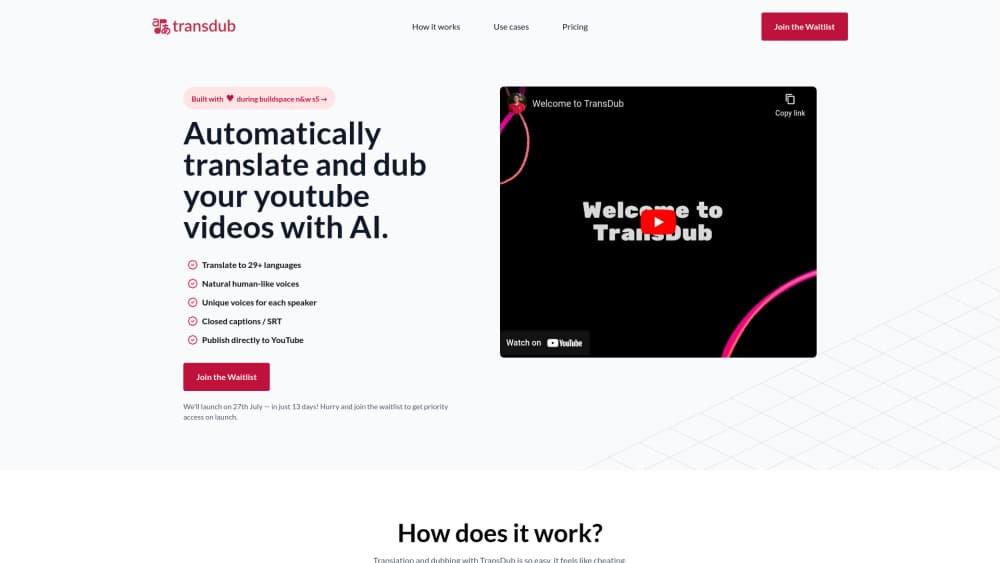
TransDub is an AI dubbing tool built for YouTube creators. It transcribes a video, translates the script into 70+ languages, and generates editable voice tracks before export.
About TransDub
What Is TransDub
TransDub is a browser-based service for AI voice dubbing. You bring a finished video, the platform handles the rest: speech recognition, translation, voice generation, and an editor where you fix what the machine got wrong.
The problem it attacks is the cost of YouTube video translation. A studio dub runs about $2,000 per video by the company's own comparison, needs booked talent, and takes weeks. TransDub charges by the minute instead, so a 10 minute upload costs less than lunch.
The limit worth knowing up front: there's no lip sync. Dubbed audio sits over the original footage, and tight close ups can drift out of alignment. Everything else assumes YouTube as the home base.
Getting Started
- Sign up with an email address. The free tier needs no credit card.
- Import a video file, paste a YouTube URL, or connect your channel directly.
- Pick a target language from the 70+ list, then read through the auto transcript and translation.
- Assign speakers, choose a voice for each one, and regenerate any clip that sounds flat.
- Export the dubbed file with optional SRT captions, or push it straight to YouTube.
Product Information
A quick look at TransDub's pricing, supported platforms, and performance.
Best for
The users, tasks, and scenarios where this tool fits best.
Users
- YouTube creators with a back catalog
- Podcasters and interview hosts
- Freelance localizers and small agencies
Tasks
- Turning a finished tutorial into a Spanish or Portuguese cut without booking a voice actor.
- Dubbing interviews where each guest needs a separate, consistent voice across the timeline.
- Producing multilingual video captions for viewers who watch muted or with hearing assistance.
- Testing whether a niche travels abroad before committing a localization budget.
Scenarios
- Launching a second YouTube channel for a new market and needing a steady stream of dubbed uploads.
- Reviving evergreen content that still gets search traffic but never reached non English viewers.
- Running a small media team where one editor handles video localization for several brands.
Key features
Clip by Clip Re-Translation
The editor splits a video into segments. You can rewrite the source text for any single clip and regenerate just that take, so a clumsy idiom gets fixed without touching the other 200 lines. Bulk re-translate and regenerate exist for the moments when you swap a voice and need everything rebuilt at once.
Speaker Management With Separate Voices
Up to 10 speakers are supported on paid plans, 2 on the free tier. Each speaker keeps a distinct voice that stays attached to their segments, which matters for interviews, panels, and any recording where two people talk over each other. You can add a speaker mid project and assign them afterward.
Multilingual Timeline Switching
Switching languages inside the editor is instant. Click a point on the timeline to seek, click a segment to hear it, then compare the dub against the original audio. For anyone juggling five language versions of the same upload, this removes a lot of tab switching.
Subtitle and SRT Export
Every project produces captions alongside the audio. SRT files can be exported on their own, which covers the audience that watches with sound off and gives you a fallback if a dub sounds off. Captions also help with YouTube search, since the platform indexes subtitle text.
Direct YouTube Publishing
Import and export both connect to YouTube. You can link an account, pull a video by URL, and publish the dubbed result to a specific channel. Creators who run one channel per language can route each version to the right destination without downloading and re-uploading by hand.
Cost Preview Before Bulk Actions
A cost summary appears before large operations, so the bill for a batch re-generation is visible before you commit. With usage based pricing that detail matters, especially when a 40 minute video gets regenerated three times in one afternoon.
Pros and cons
Pros
- Per minute pricing undercuts studio quotes by a wide margin, so small channels can afford video localization.
- Clip level control means one bad line never forces a full re-render.
- Speaker separation up to 10 people covers interviews and panel shows.
- SRT captions and direct YouTube publishing remove two manual steps from the workflow.
- The free plan includes 1 minute with no card, enough to judge voice quality on your own footage.
Cons
- No lip sync means dubbed versions can look loose on camera facing shots, so creators who film close up may need to reframe or cut away.
- Minutes expire: 90 days on paid credit and 7 days on the free allowance, which punishes anyone who buys in bulk and gets busy.
- Emotional delivery still sounds synthetic on laughter, shouting, and overlapping speech, so a human pass is often needed.
- There's no public API, so teams that want automated pipelines have to upload through the interface.
Frequently asked questions
It translates and dubs existing videos into other languages. The typical job is a YouTube upload that needs a Spanish, German, or Japanese version without hiring voice actors.
Related content
Explore related tools, skills, and articles for TransDub.
TransDub Alternatives

Foley
Hanamori Labs, LLC · Voice & Language · Productivity · AI AssistantFoley is a voice to-do list that turns a spoken sentence into a filed task, complete with project, date and time, then helps you plan the day around what is already there.

HireKey
HireKey · Voice & Language · Productivity · LeaningHireKey is an AI job search copilot built by a former tech recruiter. It checks role fit, tailors resumes, runs interview practice and tracks every application.

Fluence
Yay Software (Yannick Huchard) · Writing · Voice & Language · ProductivityFluence is an Android app that reads PDFs, EPUBs, Word files and web articles aloud, follows each sentence as it speaks, and answers questions about the text on the phone itself.