

Translator Maker
Translator Maker · Voice & Language
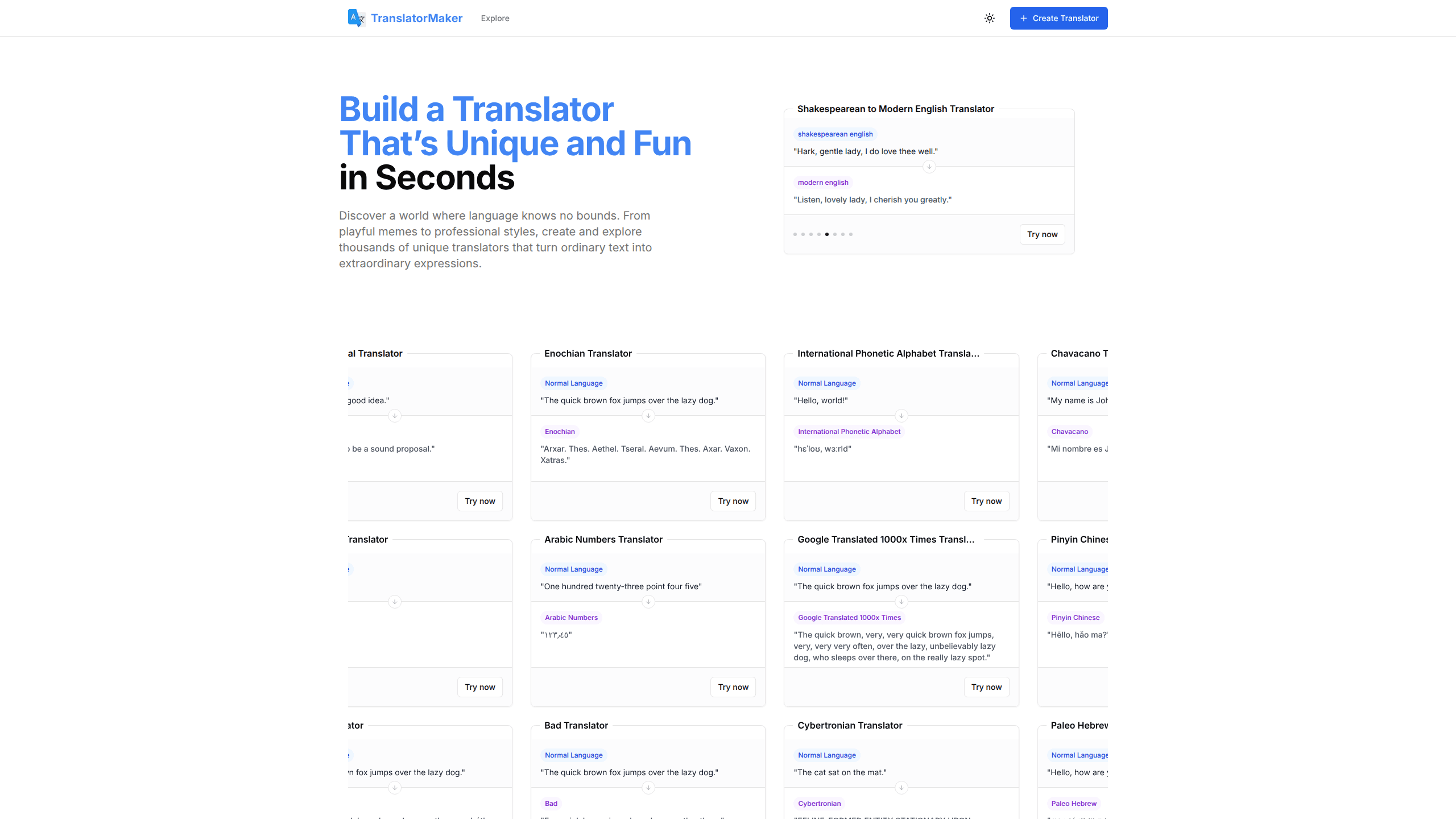
Translator Maker is a free browser tool that lets anyone build a custom AI translator in seconds. Instead of converting text between two standard languages, it turns ordinary sentences into playful, stylized or historical versions. The library runs from Google Translated 100 times to Shakespearean English and ancient Greek. Pick a style, paste your text, and the rewrite appears instantly.
About Translator Maker
What Is Translator Maker
Translator Maker is a web-based tool for creating and sharing AI-powered text translators. The idea is simple but unusual: most translation apps move text between real languages, while this one moves text between styles, tones and cultural voices. A phrase like "Hello, how are you?" can come out as "G'day, how you doin'?" or as an elaborate Shakespearean line depending on the translator you choose.
The platform hosts thousands of community-made translators covering meme speak, regional dialects, fictional languages and historical eras. You can browse what others built, run your text through any of them, or design your own translator from scratch. Everything runs in the browser. Nothing to install.
The main limit is that Translator Maker is made for creative rewriting, not accurate communication. If you need a reliable translation for travel, contracts or customer support, a standard translation service is the better choice. This is a free translation tool built for fun, content, and language experiments, and it stays honest about that scope.
Getting Started
- Go to translatormaker.com and browse the collection of existing translators, or click Create Translator to design your own.
- Pick a style you like, such as the Google Translated 100 Times translator or a Shakespearean English translator.
- Paste or type the text you want to transform into the input box.
- Let the AI rewrite your text in the chosen style and check the result.
- Share the output with friends, or save your favorite translator for later use.
Product Information
A quick look at Translator Maker's pricing, supported platforms, and performance.
Best for
The users, tasks, and scenarios where this tool fits best.
Users
- Social media creators who want punchy, shareable captions
- English teachers and students exploring how language changes across eras
- Game writers and worldbuilders who need consistent fictional voices
Tasks
- Rewriting a plain sentence into a funny style
- Understanding how a phrase sounds in an older form of English
- Stress-testing your own writing ideas
Scenarios
- Building a running joke for a group chat
- Light content production for a personal blog
- Classroom warm-ups
Key features
Style-Based Translation
Translator Maker separates itself from ordinary translation tools by working on style instead of language pairs. You choose a translator that defines a voice, and the AI rewrites your text to match it. The Google Translated 100 Times translator, for example, pushes text through repeated machine translation until the meaning drifts into something absurd and funny.
A Large Community Library
The platform hosts thousands of translators made by other users, so you rarely start from zero. Browsing the collection is the fastest way to find a voice that fits, whether that's Scottish English, Hokkien, Japanese kanji or a meme format. Each translator comes with an example so you can judge the result before using it.
Create Your Own Translator
If nothing in the library fits, you can build a translator from scratch and define the style you want. This is where the tool gets interesting for writers. A custom translator can hold a specific tone, character voice or genre that you reuse across projects. Your creation can then be shared with the community.
Instant, No-Install Use
Everything runs in the browser, and the site is free to use with no signup required for basic work. You paste text, pick a style and get a result in seconds. That low friction is what makes it practical for quick jokes and one-off experiments rather than a tool you'd only open for serious projects.
Pros and cons
Pros
- Free to use in the browser, with no install and no account needed for basic translation.
- Thousands of ready-made translators cover meme styles, dialects, and historical and fictional languages.
- New translators can be created and shared, so the library keeps growing with fresh styles.
- Results come back in seconds. That suits quick social posts and classroom demos.
Cons
- It's built for creative rewriting, not accurate translation. Don't trust it for travel, business or legal text.
- Output quality varies by translator, since community-made styles are uneven and sometimes produce awkward results.
- There's no clear public API, so developers can't easily plug the tool into their own apps.
- Pricing beyond the free tier isn't documented on the site, which leaves heavier users guessing about limits.
Frequently asked questions
Yes. The site is free to use in the browser, and you can run text through the available translators without paying. There's no paid plan listed on the site. Treat the free tier as the whole product for now.
Related content
Explore related tools, skills, and articles for Translator Maker.
Translator Maker Alternatives

Prosp
Prosp · Writing · Voice & Language · MarketingProsp is an AI LinkedIn outreach tool built for agencies and sales teams, and it writes the message and the voice note in your own voice for each prospect so they actually reply. You connect your accounts, find leads, and let the AI draft and send personalized messages at scale, all from one inbox. It's built for people running outbound at volume. That's the whole pitch. Every touchpoint still has to feel human.

Wordly AI Translation
Wordly · Voice & Language · ProductivityWordly AI Translation is a real-time AI translation and captioning platform built for meetings, conferences, and events. It delivers live translation, captions, transcripts, and summaries in more than 60 languages, and attendees join by scanning a QR code or opening a link instead of using dedicated headsets. The platform works with Zoom, Microsoft Teams, Google Meet, and Webex, and it's designed for organizations that want multilingual access without hiring human interpreters for every session. Simple as that.
Musicful
Musicful AI · Voice & Language · VideoMusicful is an AI music generator and AI music video maker that turns text to music in minutes. Give it a text prompt, a set of lyrics, or a hummed melody and it returns a finished track with vocals and instruments. It also doubles as an AI song generator, produces music videos from the songs you create, and offers an AI cover tool plus a developer API. The platform runs in a web browser and through an Android app, so you can start a song on desktop and pick it up on your phone.