
TTS-Generator.com
TTS-Generator.com · Voice & Language
TTS-Generator.com is a free browser-based text to speech tool that turns typed text into AI voices in up to 31 languages and saves the result as MP3 or WAV, with no account or API key.
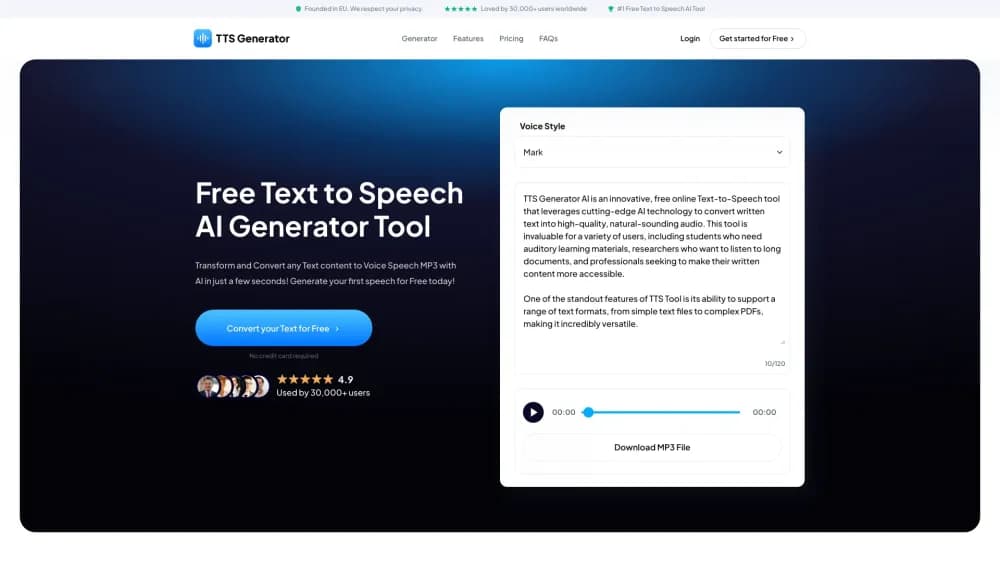
About TTS-Generator.com
What Is TTS-Generator.com
TTS-Generator.com is a web page that reads your script out loud by running a speech model inside the browser tab. There's no sign-up, no credit balance, and no key to paste. You open the page, start the voice engine, paste text, and hear it back.
The hard part of text to speech usually sits on someone else's server, which brings per-character billing and a privacy question about your script. This tool takes the opposite route. After the engine files load, the text you type, the speech generation, and the audio encoding all stay on your machine. The site runs Supertonic 2 or Supertonic 3 through ONNX Runtime Web, choosing the model and the compute path for you.
The trade-off is that a browser is not a studio. Output quality varies by language, voice style, and the device doing the work. Mobile browsers get five languages and a shorter text limit, and nothing here clones a voice, adds an emotion dial, or handles a full audiobook in one pass.
Getting Started
- Open TTS-Generator.com and select Start AI Voice Engine. The first run takes a moment while the model and voice files download.
- Paste or type your script into the text box. The counter beside it shows the live limit for your browser: 5,000 visible characters on most desktops, 1,000 on mobile.
- Pick a language from the list your browser offers, then choose one of the ten preset voice styles and set the speed between 0.80x and 1.30x.
- Generate the speech and listen through the whole clip and check names, numbers, and abbreviations.
- Download the take as MP3 for a smaller file or WAV for an uncompressed version, or switch on batch mode to get one file per line packed in a ZIP.
Product Information
A quick look at TTS-Generator.com's pricing, supported platforms, and performance.
Best for
The users, tasks, and scenarios where this tool fits best.
Users
- Students and language learners
- Video creators on a budget
- Accessibility and reading support
- Privacy-conscious writers
Tasks
- Turning a blog post or article into audio
- Narration drafts for video
- Pronunciation checks
- Multilingual samples
- Batch line export
Scenarios
- A student prepping for a presentation on a campus laptop
- A teacher building listening material for a class
- A solo video editor working late without a voice actor
- A researcher checking tone before a client call
Key features
Free Voice Generation in the Browser
The whole tool costs nothing and asks for no email, card, or API key. After the engine loads, speech synthesis and audio encoding run in the browser tab, so your script is not shipped to a remote speech server. That combination is rare in this category, where most free tiers are credits that run out.
Up to 31 Languages, Chosen by Your Device
Desktop and laptop browsers open with 31 languages, from Arabic and Bulgarian through Vietnamese, while phones and tablets get English, Spanish, Portuguese, French, and Korean. TTS-Generator.com decides which set you see based on the device, and the page shows the list before you generate, so you know what's on offer up front.
Ten Preset Voice Styles and Speed Control
You get ten voice styles to try per language and a speed slider from 0.80x to 1.30x. It's enough to make a read slow down for a tutorial or speed up for a news summary. Results still shift by language and device, so a style that sounds warm in English can come out flat in another voice.
Text to speech online with no install
Everything happens in the browser tab, so there is nothing to download or install. You can use the speech generator on a Chromebook, a borrowed laptop, or a classroom computer and still save a file.
MP3 and WAV Export
Approved takes save as MP3 at 96 kbps for a small file, or as uncompressed 16-bit mono WAV for editing in a DAW or video editor. The WAV route matters when the clip will be layered under music and needs headroom, while the MP3 wins when the file has to travel by email.
Batch Mode With Zip Downloads
Turn on the batch option and every line of your pasted text becomes its own audio file, packaged in a ZIP when the run finishes. Dialogue lists, vocabulary sheets, and sound-effect cue sheets become a folder of clips in one go. The character limit applies to the text as a whole, not to each line.
Commercial Use With a Disclosure
According to the site, audio made here can go into commercial projects under the Supertonic OpenRAIL-M terms. Two conditions come with it: state that the audio is machine-generated, and hold the rights to the script and other materials you feed in. Platform rules still apply, and approval on a given platform isn't guaranteed.
Browser-Native Engine With No Cloud Bill
Under the hood, mobile browsers run Supertonic 2 through WebAssembly, while desktop browsers try Supertonic 3 on WebGPU and fall back to WebAssembly if that fails. The speech generator picks the path automatically, which keeps the process free but ties the output quality to the machine you're on.
Pros and cons
Pros
- Costs nothing and needs no account, so a first test takes about a minute.
- Text and audio stay in the browser after the engine loads, which suits drafts you'd rather not upload.
- 31 languages on desktop cover most European and Asian scripts in one page.
- MP3, WAV, and per-line ZIP downloads mean the output drops straight into most editors.
- Commercial use is allowed under the open model license, with a disclosure requirement.
Cons
- Mobile browsers drop to five languages and a 1,000-character limit, so phone use is a quick-check tool at best.
- Engine files take time to load on the first run and again in later sessions, since offline use isn't supported.
- There's no voice cloning, no emotion control, and no multi-speaker dialogue, which rules it out for character-driven narration.
- Output quality shifts by language and device, so a clip can sound natural on one laptop and thin on another.
- No API means it can't be wired into an automated pipeline, and batch work has to go through the page.
Frequently asked questions
TTS-Generator.com turns written text into spoken audio in the browser. It's most useful for quick voiceovers, pronunciation checks, and turning an article or script into an MP3 or WAV without paying for a subscription.
Related content
Explore related tools, skills, and articles for TTS-Generator.com.
TTS-Generator.com Alternatives

Off the Record
Weird Machines · Voice & Language · ProductivityOff the Record is a macOS app from Weird Machines that reshapes your voice in real time to block AI transcription, so people hear you normally and notetakers get nothing usable.
Cekura Bench
Cekura · Voice & Language · BusinessCekura Bench is a public benchmark that runs speech-to-speech models and deployed voice agents through 82 simulated phone calls, three times each, then publishes pass rates, latency and cost.
Griffin by Tavus
Tavus · Voice & Language · Video · ChatbotGriffin by Tavus is the first Human Interaction Model: a full-duplex, video-to-video system that watches, listens, and answers during a live video call in real time.