

TTSMaker
TTSMaker · Voice & Language
TTSMaker is a free online text to speech tool that turns typed text into downloadable audio with 600+ AI voices across 100+ languages.
About TTSMaker
What Is TTSMaker
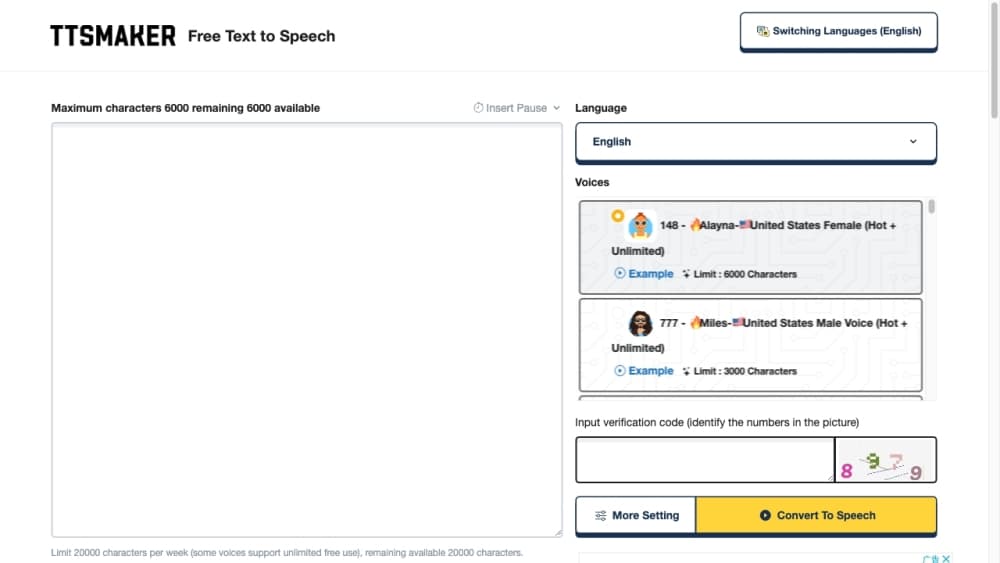
TTSMaker is a free online text to speech tool, also called an AI voice generator. You paste text into a box, pick a language and voice, and the site returns an audio file you can play or download. It supports English, Spanish, German, French, Arabic, Chinese, Japanese, Korean, Vietnamese and dozens of other languages, along with various voice styles.
As an online TTS service, it targets everyday tasks: reading articles and e-books aloud, dubbing a video, or generating a narration track for a presentation. The site says the synthesized audio carries full commercial usage rights at no cost, so a small creator can produce a voiceover without a studio or a paid voice actor.
The free tier is the main constraint. A free account gets 20,000 characters per week and up to 500 characters per single conversion, some unlimited voices aside. Heavy or long-form work needs the paid Pro plans, which raise the per-conversion limit and unlock the API, emotion controls and a multi-voice dialogue editor.
Getting Started
- Open ttsmaker.com in a browser. No account is needed to start a first conversion.
- Paste your text into the input box, then choose the language and a voice style from the list.
- Click Convert to Speech and wait while the tool synthesizes the audio.
- Open More Settings to change speed, volume, pitch, pause length, output format (MP3, OGG, AAC, OPUS, WAV) or add background music.
- Listen to the result, then download the audio file, export an SRT subtitle, or share it through a short link.
Product Information
A quick look at TTSMaker's pricing, supported platforms, and performance.
Best for
The users, tasks, and scenarios where this tool fits best.
Users
- Content creators
- Students and language learners
- Marketers and small teams
Tasks
- Dubbing a short video
- Creating an audiobook sample
- Learning pronunciation
- Adding subtitles
Scenarios
- Publishing daily social clips
- Repurposing written content
- Prototyping a voice app
Key features
Large Voice and Language Library
TTSMaker lists 600+ AI voices spread across 100+ languages, from widely spoken ones like English and Spanish to smaller ones like Welsh, Maltese and Kazakh. Each language carries several voice styles, and some voices run unlimited without counting against the free quota. That range helps when you need an accent or a rarer language most tools skip.
Free Commercial Use
The site grants full commercial usage rights to generated audio at no cost. You can drop the output into a monetized video, an ad, or a product without paying a license fee. The catch is legality: you still have to stay within local laws and the site's terms around content.
Flexible Output and Audio Controls
Audio exports in MP3, OGG, AAC, OPUS or WAV, with a choice of standard or high quality for MP3. Speed runs from 0.5x to 2x, volume and pitch are adjustable, and you can insert pauses between paragraphs. Background music can be uploaded and mixed in, and the tool exports an SRT subtitle file for the same clip.
Multi-Voice Dialogue Editor
On paid plans, a dialogue editor lets you assign different voices to different speakers and build a back-and-forth conversation, then export it as one track. This suits podcast sketches, character reads and training audio. The free tier does not include it.
Emotion and Prosody Controls
Pro plans add emotion settings for happiness, sadness, anger and similar tones, with an intensity slider. Speed, volume, pitch and pause adjustments round out the delivery controls. These settings matter when a flat read would undercut the message.
Developer API
Paid Pro and Studio subscribers can generate an API key and call the text to speech service from their own software. The API covers a voice list, order creation and token status checks. Lite plans and the free tier do not include API access.
Pros and cons
Pros
- Free tier works without an account, so you can test a voice before signing up.
- Audio is free for commercial use, which removes a common licensing cost.
- 600+ voices across 100+ languages cover most accents and less common languages.
- Outputs several audio formats plus an SRT subtitle file from the same conversion.
- The API on Pro plans lets developers embed the service into their own apps.
Cons
- The free quota is 20,000 characters per week and just 500 characters per conversion, so long text needs a paid plan.
- Free conversions show a captcha and ads, which slows a quick job.
- The dialogue editor, emotion controls and API all sit behind paid tiers.
- Conversion history lasts only 30 minutes, so you must download the audio promptly or lose the link.
Frequently asked questions
TTSMaker is an online text to speech tool, also called an AI voice generator. It converts typed text into audio you can play in the browser or download as a file.
Related content
Explore related tools, skills, and articles for TTSMaker.
TTSMaker Alternatives

Foley
Hanamori Labs, LLC · Voice & Language · Productivity · AI AssistantFoley is a voice to-do list that turns a spoken sentence into a filed task, complete with project, date and time, then helps you plan the day around what is already there.

HireKey
HireKey · Voice & Language · Productivity · LeaningHireKey is an AI job search copilot built by a former tech recruiter. It checks role fit, tailors resumes, runs interview practice and tracks every application.

Fluence
Yay Software (Yannick Huchard) · Writing · Voice & Language · ProductivityFluence is an Android app that reads PDFs, EPUBs, Word files and web articles aloud, follows each sentence as it speaks, and answers questions about the text on the phone itself.