
ttsMP3.com
ttsMP3.com · Voice & Language
ttsMP3.com is a free text to speech tool that turns written text into speech and downloads it as an MP3. It offers Amazon Polly regular voices and an OpenAI AI voice generator.
About ttsMP3.com
What Is ttsMP3.com
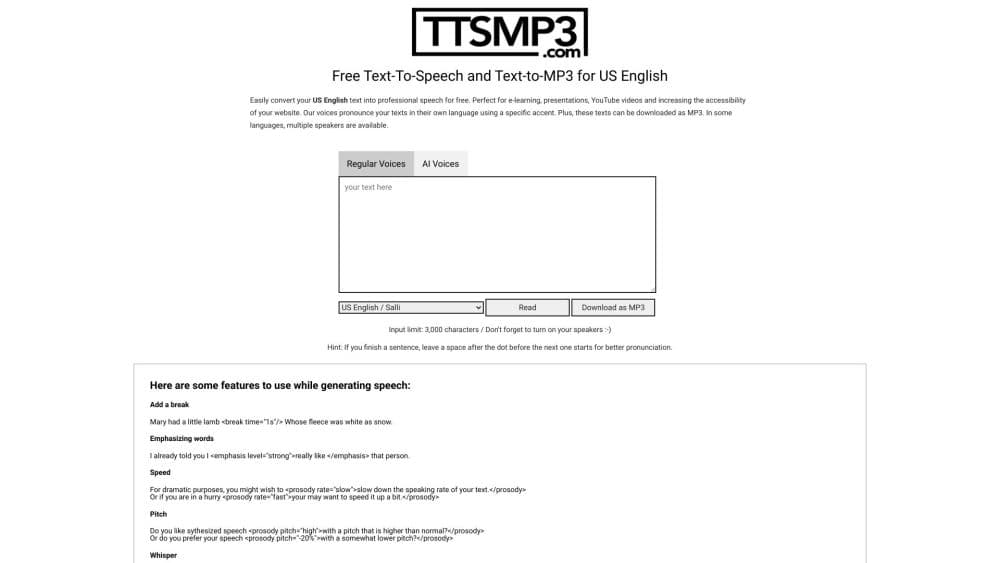
ttsMP3.com is an online text-to-speech service you use in a browser, with no software to install. You paste or type text into a box, pick a voice, and either listen to the result or download it as an MP3 file. The site is built for people who need quick spoken audio: educators recording course narration, video creators voicing a script, or anyone making a website more accessible.
The service splits into two engines. Regular Voices run on Amazon Polly and cover more than 28 languages, with several speakers in some languages and support for SSML tags that control breaks, emphasis, speed, pitch, and whispering. AI Voices run on OpenAI text-to-speech and aim at more natural delivery, with an optional instruction box for style, tone, and accent.
Where it fits and where it does not is mostly about limits. The free tier caps conversions by daily character count, so long projects need a paid package. Downloads come back as standard MP3 files, which is handy for editing but means you get audio only, with no built-in timeline editor. For short clips and one-off narration, the free tool covers a lot of ground before you pay anything.
Getting Started
- Open ttsmp3.com and choose a tab. Regular Voices use Amazon Polly, AI Voices use OpenAI. Each has its own daily free limit.
- Paste your text into the box. The regular converter accepts up to 3,000 characters per request and the AI converter up to 1,000. Pick a speaker and adjust speed on the AI tab if you want.
- Press Read to preview the speech, or the MP3 download button to save the file. The audio plays in the browser before you save it.
- Add SSML tags on the regular tab if you need pauses, emphasis, or a whispered line. Every opening tag has to be closed, or the conversion fails.
- Save or publish the MP3. You can use the file in videos, courses, and apps without crediting the site.
Product Information
A quick look at ttsMP3.com's pricing, supported platforms, and performance.
Best for
The users, tasks, and scenarios where this tool fits best.
Users
- Educators and course creators
- Video and podcast creators
- Web developers and accessibility teams
Tasks
- Turning a blog post into an audio version
- Voicing a YouTube or social video script
- Building e-learning narration
- Adding voice to an app or IVR flow
Scenarios
- Producing a batch of short clips on a deadline
- Prototyping voice ideas before a bigger spend
- Localizing narration across languages
Key features
Two Voice Engines in One Tool
ttsMP3.com runs Amazon Polly regular voices and OpenAI AI voices in the same place, so you can compare a robotic-but-controllable engine against a more natural one without signing up anywhere else. Regular voices give you precise control through SSML. AI voices aim for expressive delivery and accept plain-language instructions about tone and style.
Downloadable MP3 Output
Every conversion can be saved as a standard MP3 file, not just played back in the browser. That makes the audio easy to drop into a video editor, a slide deck, or a learning platform. There is no lock-in to a proprietary format, and you can replay a finished conversion as often as you like without spending more characters.
SSML Control on Regular Voices
On the regular tab, you can shape the speech with SSML tags for breaks, emphasis, speaking rate, pitch, and even a whispered effect. A single line of markup can slow a sentence for drama or raise the pitch for a question. The catch is that every tag must be well formed, since an unclosed bracket is the most common reason a conversion fails.
Voice Instructions on AI Voices
The AI tab adds a speed slider and an instruction field where you describe the delivery you want, such as a dramatic tone or a heavy accent. This is the feature that separates it from plain Polly voices: you steer the output with words rather than markup. The site notes that results vary by voice and recommends a few that handle instructions best.
Text-to-Speech API
A paid yearly plan includes API access, which you request by email after purchase. The API accepts a key, a speaker, and your text over GET or POST, and returns a JSON response with a URL to the generated MP3. It reports character quota, cache hits, and error codes, so it fits automated workflows, apps, and IVR systems.
Commercial Use Without Attribution
Audio generated on the site can be used in commercial and non-commercial projects, including YouTube videos, apps, and e-learning content, on both free and paid usage. Attribution is welcome but not required. That removes a common licensing snag for creators who want to monetize the output.
Pros and cons
Pros
- Works entirely in a browser, so there is nothing to install and you can start in seconds.
- The free tier covers up to 3,000 characters a day on regular voices, enough for short clips and testing.
- Two engines, Amazon Polly and OpenAI, let you trade control against naturalness in one place.
- MP3 downloads work in any editor, and finished audio can be replayed without spending more characters.
- The API on yearly plans supports automation, and generated audio is cleared for commercial use.
Cons
- The free daily limit is small, so long projects or frequent use push you toward a paid package.
- Regular Voices sound more synthetic than the AI engine, which matters for polished narration.
- Output is audio only. There is no built-in timeline or mixing, so you edit elsewhere.
- The AI voice converter caps input at 1,000 characters and supports fewer languages than the regular one.
- Malformed SSML tags cause conversions to fail, which trips up users new to the syntax.
Frequently asked questions
ttsMP3.com turns written text into spoken audio and lets you download it as an MP3. People use it for course narration, video voiceovers, website accessibility, and any task where you need a voice clip without recording one.
Related content
Explore related tools, skills, and articles for ttsMP3.com.
ttsMP3.com Alternatives

Prosp
Prosp · Writing · Voice & Language · MarketingProsp is an AI LinkedIn outreach tool built for agencies and sales teams, and it writes the message and the voice note in your own voice for each prospect so they actually reply. You connect your accounts, find leads, and let the AI draft and send personalized messages at scale, all from one inbox. It's built for people running outbound at volume. That's the whole pitch. Every touchpoint still has to feel human.

Wordly AI Translation
Wordly · Voice & Language · ProductivityWordly AI Translation is a real-time AI translation and captioning platform built for meetings, conferences, and events. It delivers live translation, captions, transcripts, and summaries in more than 60 languages, and attendees join by scanning a QR code or opening a link instead of using dedicated headsets. The platform works with Zoom, Microsoft Teams, Google Meet, and Webex, and it's designed for organizations that want multilingual access without hiring human interpreters for every session. Simple as that.
Musicful
Musicful AI · Voice & Language · VideoMusicful is an AI music generator and AI music video maker that turns text to music in minutes. Give it a text prompt, a set of lyrics, or a hummed melody and it returns a finished track with vocals and instruments. It also doubles as an AI song generator, produces music videos from the songs you create, and offers an AI cover tool plus a developer API. The platform runs in a web browser and through an Android app, so you can start a song on desktop and pick it up on your phone.