
Tubed.pro
Tubed.pro · Writing
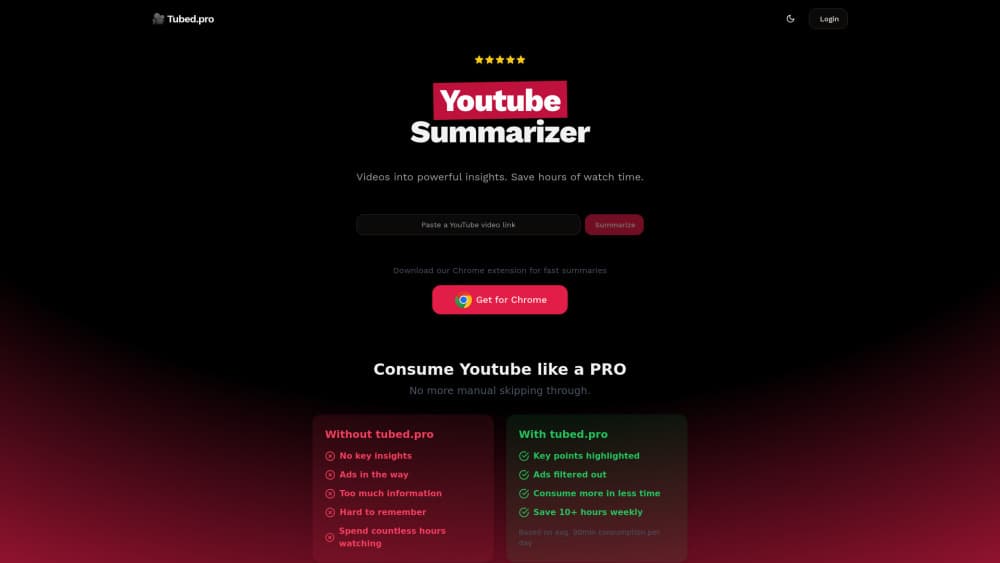
Tubed.pro is an AI YouTube summarizer that turns long videos into key insights, transcripts, and short roasts, saving viewers hours of watch time.
About Tubed.pro
What Is Tubed.pro
Tubed.pro is a Chrome extension that summarizes YouTube videos for people who watch a lot and have little time. Instead of scrubbing through a 90-minute video hoping to catch the useful parts, you get the key points up front. It also pulls a full transcript and adds a short, casual take on the video for good measure.
The problem it solves is familiar to anyone who follows a few channels. Skipping around wastes time. Ads break the flow. And it's hard to remember what a video actually said. Tubed.pro filters the noise and hands you the highlights, which matters most when you use YouTube for learning rather than entertainment. The company claims users save 10+ hours a week based on about 90 minutes of daily viewing, so treat that as a vendor estimate, not a measured number.
There are limits worth knowing before you install anything. It works on YouTube. That means no Vimeo, no podcasts, and no local files. It only runs as a browser extension on desktop Chrome, which means no mobile support and nothing inside the native YouTube app. And a summary is a compressed version of what a video says, not a fact-check, so accuracy depends on the original audio and captions.
Getting Started
- Go to the Tubed.pro site and install the Chrome extension from the official download link.
- Open any YouTube video and start the summarizer from the extension.
- Let it process the audio and captions, then read the key points, transcript, or roast.
- Upgrade to the PRO plan if you want unlimited summaries, roasts, and transcriptions.
- Copy the sections you need into your notes before you close the tab.
Product Information
A quick look at Tubed.pro's pricing, supported platforms, and performance.
Best for
The users, tasks, and scenarios where this tool fits best.
Users
- Students working through lecture channels
- Professionals who follow industry channels
- Anyone who watches a lot of YouTube for research
Tasks
- Summarizing a long interview or podcast episode
- Pulling a transcript for quoting or reference
- Getting a fast, casual take on a trending video
Scenarios
- Catching up on a backlog of tutorial videos over a lunch break
- Gathering quotes for a report
- Previewing a video before recommending it
Key features
AI Summaries of YouTube Videos
The core of the tool takes a YouTube video and produces a condensed version of what it says, with the key points pulled out for quick reading. You point it at a video and get the gist without scrubbing through the timeline. Want to summarize YouTube videos you'd normally skip? This is the feature that does it. It's built for people who want the substance of a video, not the full runtime.
Full Transcripts
Tubed.pro generates a transcript alongside every summary, which turns spoken content into text you can search, quote, or skim. That's the feature that matters most if you use YouTube for research. Find the exact line. Skip the hunting. The transcript also helps you double-check a summary against what was actually said.
Video Roasts
Not every video needs a formal recap. The roast feature gives you a short, blunt take on a video, which is handy when you want a quick read on whether something is worth your time. It's a lighter way to get the gist. Less structure, more opinion.
Ad Filtering and Highlighting
The extension filters out the ad clutter and highlights key points, so what you're reading is the video's substance rather than the noise around it. That keeps a summary clean and short, which is the whole point of using a summarizer in the first place. If a video is padded, this is where you notice it.
Chrome Extension Workflow
Tubed.pro runs as a Chrome extension, so it lives in your browser next to the video rather than as a separate app or website you have to keep switching to. That keeps the flow simple. Open the video. Run the tool. Read the result. The trade-off is that it's tied to desktop Chrome and doesn't travel to your phone.
Pros and cons
Pros
- Turns long videos into key points you can read in a minute or two, which is the fastest way to cut watch time.
- Includes a full transcript, so the content stays searchable and quotable long after you close the tab.
- The free plan lets you test summaries and transcripts before paying.
- PRO pricing is low at $3.99/mo, and there's no lock-in since you can cancel anytime.
- The roast feature adds a quick, casual alternative to a formal summary.
Cons
- No mobile support: it's a desktop Chrome extension, so it won't run in the YouTube phone app or on iOS and Android browsers.
- YouTube only, which means no help with other video sites, podcasts, or local files.
- Summary quality depends on the video's audio and captions, so poorly captioned or heavy-accented videos can produce weak output, and you'll still want to check the source on anything important.
Frequently asked questions
It's an AI YouTube summarizer that turns videos into key insights, full transcripts, and short roasts, so you can get the substance of a video without watching all of it. In short, it makes a YouTube video summary you can read in a minute.
Related content
Explore related tools, skills, and articles for Tubed.pro.
Tubed.pro Alternatives

Google EmbeddingGemma 2
Google DeepMind · Writing · Image · CodingGoogle EmbeddingGemma 2 is a 740M-parameter open model that turns text, code, images, audio, and video frames into vectors in one 768-dimension space, running on phones and laptops.

MePersona
MePersona, Inc. · Writing · Productivity · MarketingMePersona is an AI unified inbox for creators. It learns your voice, drafts replies to fan messages from 12 platforms, and sends only what you approve.

Fluence
Yay Software (Yannick Huchard) · Writing · Voice & Language · ProductivityFluence is an Android app that reads PDFs, EPUBs, Word files and web articles aloud, follows each sentence as it speaks, and answers questions about the text on the phone itself.