

TuneFlow - Intelligent Music Making Platform, Powered by AI
TuneFlow · Voice & Language
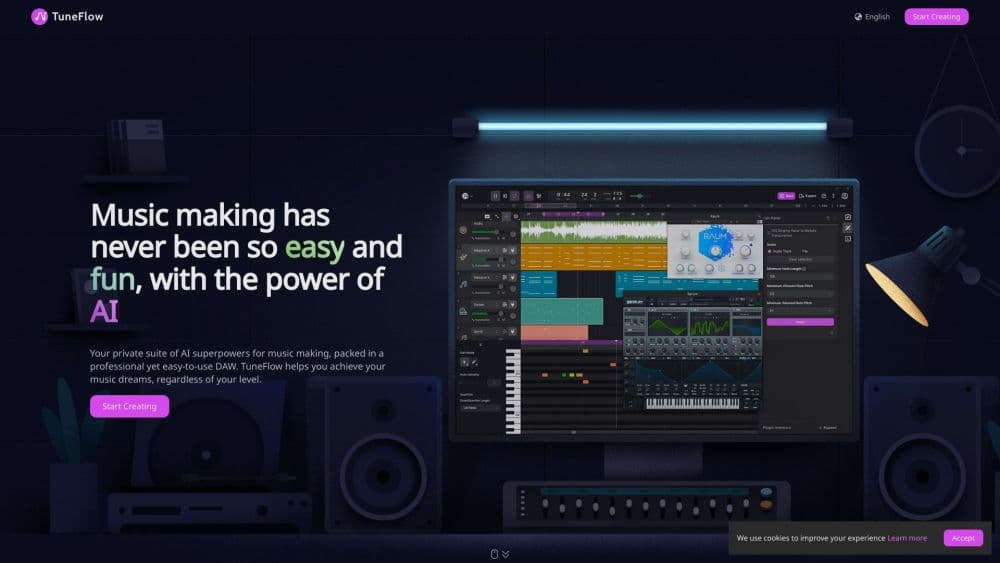
TuneFlow is an AI music production DAW that runs in a browser and as a desktop app, pairing a regular arrangement view with Smart Composer, drum generation, voice clone and stem tools.
About TuneFlow - Intelligent Music Making Platform, Powered by AI
What Is TuneFlow
TuneFlow is a music making platform built on a digital audio workstation, with AI helpers wired into the timeline. You still get the usual furniture: tracks, clips, a piano roll, automation lanes and a mixer. The difference is that the generator tools live in the same window as your project, so a melody or a drum part lands on a track you can edit instead of in a separate chat box.
The team's stated goal was to keep the producer in charge. Their own launch post put it this way: instead of building a workflow around AI, they wanted to give control back to the person making the song. In practice that means AI output arrives as editable MIDI or audio, not as a finished file you can only accept or throw away.
One thing to know before you invest time: the official site no longer serves the product. As of late October 2026, tuneflow.com and its subdomains return a parked domain page, and the public SDK repositories on GitHub last took commits in June 2023. If you already have the desktop build installed, it may still open. New signups and cloud projects are a different question, so check before you plan a release around it.
Getting Started
- Create an account in the web editor, or install the desktop app for macOS or Windows if you need VST and AU plugin support.
- Open a project and set the tempo, key and time signature before you touch any AI tool. Generated parts follow the grid you give them.
- Add an instrument or audio track, then open the AI panel and pick a tool: Smart Composer for melodies and accompaniment, Smart Drummer for a filled drum clip, or the separator for an existing mix.
- Edit what comes back on the piano roll or in the waveform view, then export stems or a full mixdown.
Product Information
A quick look at TuneFlow - Intelligent Music Making Platform, Powered by AI's pricing, supported platforms, and performance.
Best for
The users, tasks, and scenarios where this tool fits best.
Users
- Bedroom producers
- Songwriters who don't play every instrument
- Developers testing music models
Tasks
- Turning a hummed idea into an arrangement
- Pulling stems from a finished track
- Drafting lyrics against an existing melody
Scenarios
- A weekend demo
- Sampling your own back catalog
- Teaching arrangement basics
Key features
Smart Composer
Smart Composer takes a style and a tempo and returns a melody with accompaniment, usually a few bars you can extend. It's the fastest way into a project when you have a mood but no motif. Because the result is MIDI, you can rewrite notes one at a time instead of regenerating and hoping for a better take.
Smart Drummer
Drop an empty drum clip on the timeline, pick a beat style, and Smart Drummer fills it with a pattern that fits the section. The useful part is the editing: hits sit on a normal MIDI grid, so you can move a snare or thin out a fill by hand. It won't replace a drummer who knows your song, but it kills the twenty minute blank-clip problem.
Voice Clone
Voice Clone lets you pick a voice model or build one from a sample, then sing a written melody through it. Producers use it for guide vocals that sound close enough to judge an arrangement, and for stacked harmony parts nobody has time to record. Rights and consent are on you here. Cloning a voice you don't own is a bad idea in most places.
ChatGPT Lyrics
The lyrics tool generates verses and choruses from a topic, a mood or a rough idea you type in. Treat the output as a first draft. It tends toward clean, rhymed, radio-shaped lines, so the edits that make a song yours still have to come from you.
Ultra-Clean Source Separation
The separator takes a mixed track and splits it into vocals, drums, bass and remaining instruments. It's the feature people reach for when they want an acapella, a loop from an old project or a quieter backing track. Quality depends on the source: dense mixes with heavy reverb smear more than dry ones.
Audio to MIDI Transcription
Sing or play into a track and TuneFlow converts the performance into MIDI notes you can quantize, transpose or hand to a synth. It handles monophonic lines best. Chords and fast runs come back messier, so budget time to clean them up.
Plugin SDK
TuneFlow ships a plugin system with Python and TypeScript SDKs, documented on GitHub under an MIT license. You can wrap your own model or algorithm, load it in the DAW and hear the result next to regular tracks. For research teams this is the reason to care: it puts a model in front of a real session instead of a benchmark.
Pros and cons
Pros
- AI tools sit inside the arrangement view, so output is editable MIDI and audio rather than a locked file.
- The generator set covers the boring middle of production: melody drafting, drum filling, guide vocals and stem splitting.
- Free tier existed, which made it cheap to test against a full DAW.
- Open SDKs mean a developer can plug a custom model into a session and hear it in context.
Cons
- The official site is offline and the repository has been quiet since June 2023, so support, new signups and cloud storage are all uncertain.
- VST and AU plugin support only arrives with the desktop app, which leaves browser users with a thinner instrument set.
- Generated parts often need real editing. Expect to move notes and rewrite lyrics before anything sounds like your record.
- No public REST API. Automation means the plugin SDK, not a simple endpoint call.
Frequently asked questions
Not reliably. The tuneflow.com domain now shows a parked page, and the last public code update was in June 2023. An existing desktop install may still run, but new accounts and cloud projects can't be counted on.
Related content
Explore related tools, skills, and articles for TuneFlow - Intelligent Music Making Platform, Powered by AI.
TuneFlow - Intelligent Music Making Platform, Powered by AI Alternatives

Off the Record
Weird Machines · Voice & Language · ProductivityOff the Record is a macOS app from Weird Machines that reshapes your voice in real time to block AI transcription, so people hear you normally and notetakers get nothing usable.
Cekura Bench
Cekura · Voice & Language · BusinessCekura Bench is a public benchmark that runs speech-to-speech models and deployed voice agents through 82 simulated phone calls, three times each, then publishes pass rates, latency and cost.
Griffin by Tavus
Tavus · Voice & Language · Video · ChatbotGriffin by Tavus is the first Human Interaction Model: a full-duplex, video-to-video system that watches, listens, and answers during a live video call in real time.