

TuneKit
TuneKit · Coding
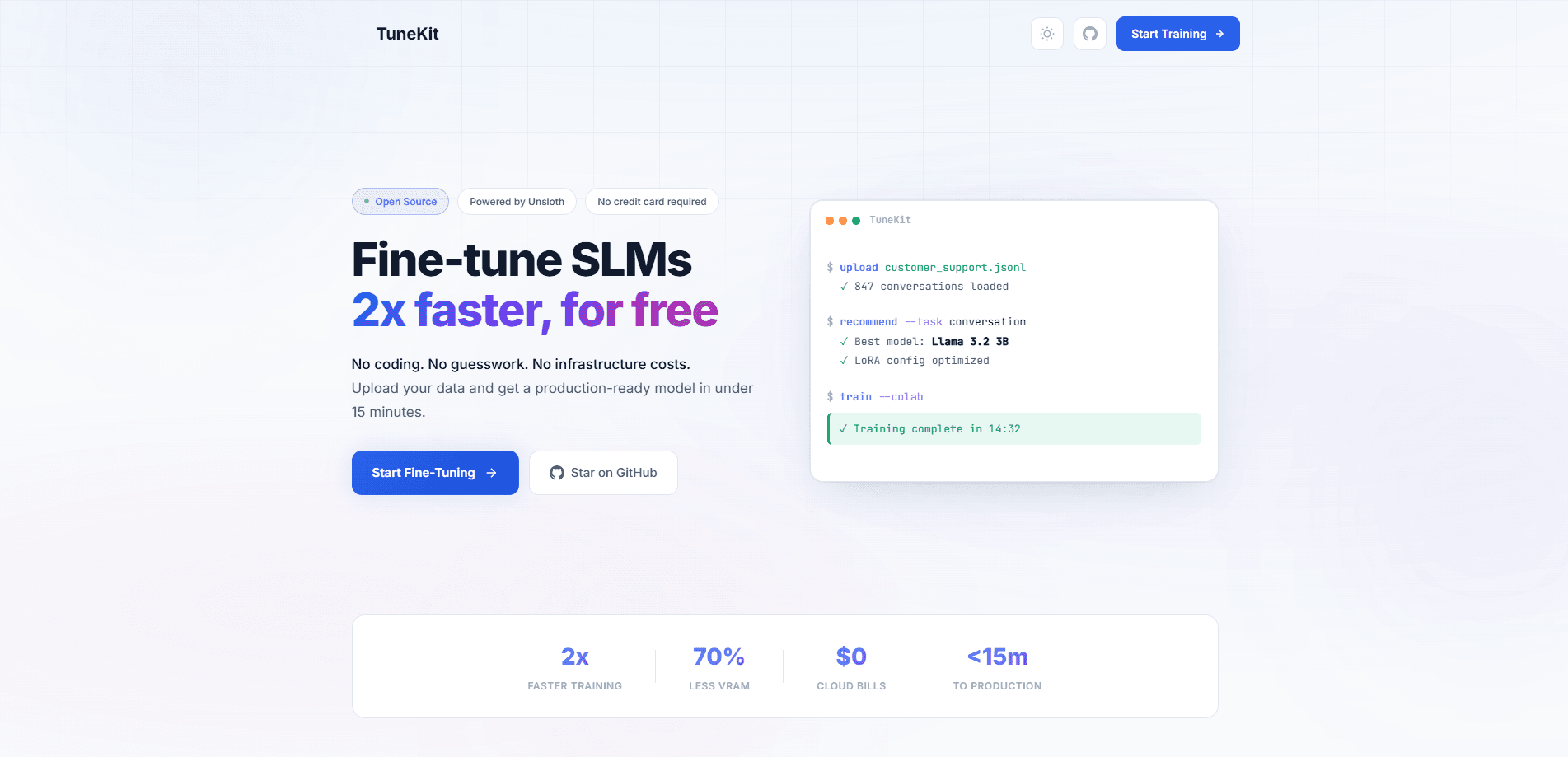
TuneKit is an open-source platform for fine-tuning small language models (SLMs) without writing any code. It's an AI fine-tuning tool built around a simple loop that hides almost all of the usual setup work. You upload a JSONL dataset, and the platform analyzes it, recommends a base model and LoRA settings, then generates a ready-to-run Google Colab notebook. Training runs on a free T4 GPU. It takes about 15 minutes. From there you can export the finished model as GGUF for Ollama, merged weights for Hugging Face, or LoRA adapters, and the underlying Unsloth fine-tuning engine is where the speed and memory savings come from.
About TuneKit
What Is TuneKit
TuneKit is a web-based fine-tuning workspace for small language models. It targets people who want a custom model but don't want to touch training scripts, GPU provisioning, or hyperparameter math. The pitch is narrow on purpose: upload data, get a model.
The heavy lifting comes from Unsloth, a widely used open-source fine-tuning library. TuneKit wraps that engine in a guided workflow so the same 2x-faster training and lower VRAM use are available to someone who has never opened a terminal. Fine-tuning an SLM used to mean juggling CUDA versions and writing a training loop. Here you skip both. If you want to fine-tune Llama or a similar open small model, this is one of the shortest paths to it.
The main limits are worth knowing up front. TuneKit is built for small models, not giant ones, and it points to Google Colab's free tier as the default compute path. If you need multi-GPU runs or a 70B model, you'll outgrow it fast. It's also open source, so pricing is simple: nothing. No credit card, no seat count.
So who is no-code model training actually for? Mostly people who have a dataset and a clear idea but no training infrastructure sitting around.
Getting Started
- Sign in and open the dashboard, then drag your JSONL dataset into the upload area.
- Let TuneKit validate the file format and analyze your data patterns.
- Review the recommended base model and LoRA hyperparameters it suggests for your task.
- Open the generated Google Colab notebook, which has your dataset embedded and settings filled in.
- Click "Run All" in Colab, wait about 15 minutes on the free T4 GPU, then export the result as GGUF, merged weights, or LoRA adapters.
Product Information
A quick look at TuneKit's pricing, supported platforms, and performance.
Best for
The users, tasks, and scenarios where this tool fits best.
Users
- Developers who want a custom SLM but don't want to write training code
- Students and hobbyists on a tight budget
- Small teams prototyping a vertical model
Tasks
- Building a support-bot model from your own conversation logs
- Adapting a base model to a niche writing style or tone
- Turning a dataset into a deployable model for Ollama or Hugging Face
Scenarios
- A weekend experiment where you want to see how far a 3B model gets on your data
- Prepping a model before a demo or internal review
- Learning how fine-tuning works hands-on
Key features
Unsloth-Powered Speed
Training is roughly 2x faster and uses up to 70% less VRAM than a standard setup, according to TuneKit. That gap is what makes a free T4 GPU viable for a real fine-tune instead of a toy run. If you've ever watched a Colab session time out mid-training while the loss curve was still falling, this is the difference that actually matters.
No-Code Workflow
There's no Python to write. You upload a JSONL file. The platform handles validation, model choice, and configuration on its own. The trade-off is flexibility: you get fewer knobs than a hand-written script, so researchers with very specific needs may want more control.
Smart Model Selection
TuneKit looks at your dataset and recommends a base model plus LoRA settings for the task it detects. If you have no idea which small model fits your data, that suggestion saves real time, and unlike a lot of auto-tuning tools it shows you the choice rather than hiding it.
Free GPU Training
The default path uses Google Colab's free tier, with no credit card and no setup. That removes the biggest cost barrier for hobbyists. The catch is that free-tier Colab has usage limits, so heavy or repeated runs can get throttled, and there's nothing TuneKit can do about that ceiling.
One-Click Colab Notebooks
TuneKit generates a notebook with your dataset embedded and the training code already written. You click "Run All" and wait. It's about as close to a single button as LoRA fine-tuning gets, and it keeps you from copying config between tools by hand.
Flexible Export Formats
Finished models export as GGUF for Ollama, as merged weights for Hugging Face, or as standalone LoRA adapters. That covers local inference, hosting, and lightweight distribution in one place, so you're not locked into a single runtime or stuck converting files yourself later.
Pros and cons
Pros
- No coding required, so you can fine-tune an SLM without a machine-learning background.
- Runs on free Colab GPUs, which keeps the cost at zero for experimentation.
- Unsloth underneath means faster training and lower memory use than a plain setup.
- Exports to GGUF, merged weights, and LoRA adapters, which covers most of the deployment paths a small team would realistically need.
- Open source, so there's no subscription and nothing hidden behind a paywall.
Cons
- Aimed at small models, so large models and multi-GPU jobs aren't in scope.
- Relies on Google Colab's free tier, which caps session length and can throttle heavy use.
- Guided workflow means fewer manual controls than a custom training script for advanced tuning.
Frequently asked questions
It's a platform for fine-tuning small language models on your own data without writing code. You bring a dataset, and it handles model selection, configuration, and training through a generated notebook.
Related content
Explore related tools, skills, and articles for TuneKit.
TuneKit Alternatives
Forefront
Forefront · CodingForefront is a web platform for building with open-source AI. It lets you fine-tune leading open-source language models on your own data, evaluate how they perform, and run them through an API or export them to host yourself. Developers who want the convenience of a closed-source platform but insist on owning their models and data are the target audience here.

Startkit
StartKit.AI · CodingStartkit is a boilerplate for building AI SaaS and AI wrapper products. Think of it as an AI startup boilerplate with the boring parts already wired up: authentication, Stripe and Lemon Squeezy payments, usage limits, transactional email, and an AI API starter that talks to OpenAI, Anthropic, Groq, or Llama. You clone the repo, set your price, and start on the part of your product that people actually pay for. It's Next.js under React and Tailwind, so most of the boilerplate code already feels familiar.
Testim
Tricentis · CodingTestim is an AI-powered test automation platform for building and running end-to-end tests across web, mobile, and Salesforce applications. It leans on machine learning to keep tests stable when an interface changes, so teams spend less time fixing broken selectors. Not bad for an automated testing tool you can start using today. You create tests by recording actions in a browser, then optionally add JavaScript when you need more control. It's a solid pick for busy QA teams.