

Turn It Gen Z
Turn It Gen Z · Writing · Marketing
Turn It Gen Z is a free online text translator that rewrites everyday sentences into Gen Z slang. You paste a line, pick a vibe like brainrot, NPC mode, or e-girl, and it returns the same idea in internet-native language you can copy and post. It's built for anyone who wants captions, replies, or jokes that sound like they came from a group chat instead of a press release. Think of it as an internet slang converter for anyone who types like a robot.
About Turn It Gen Z
What Is Turn It Gen Z
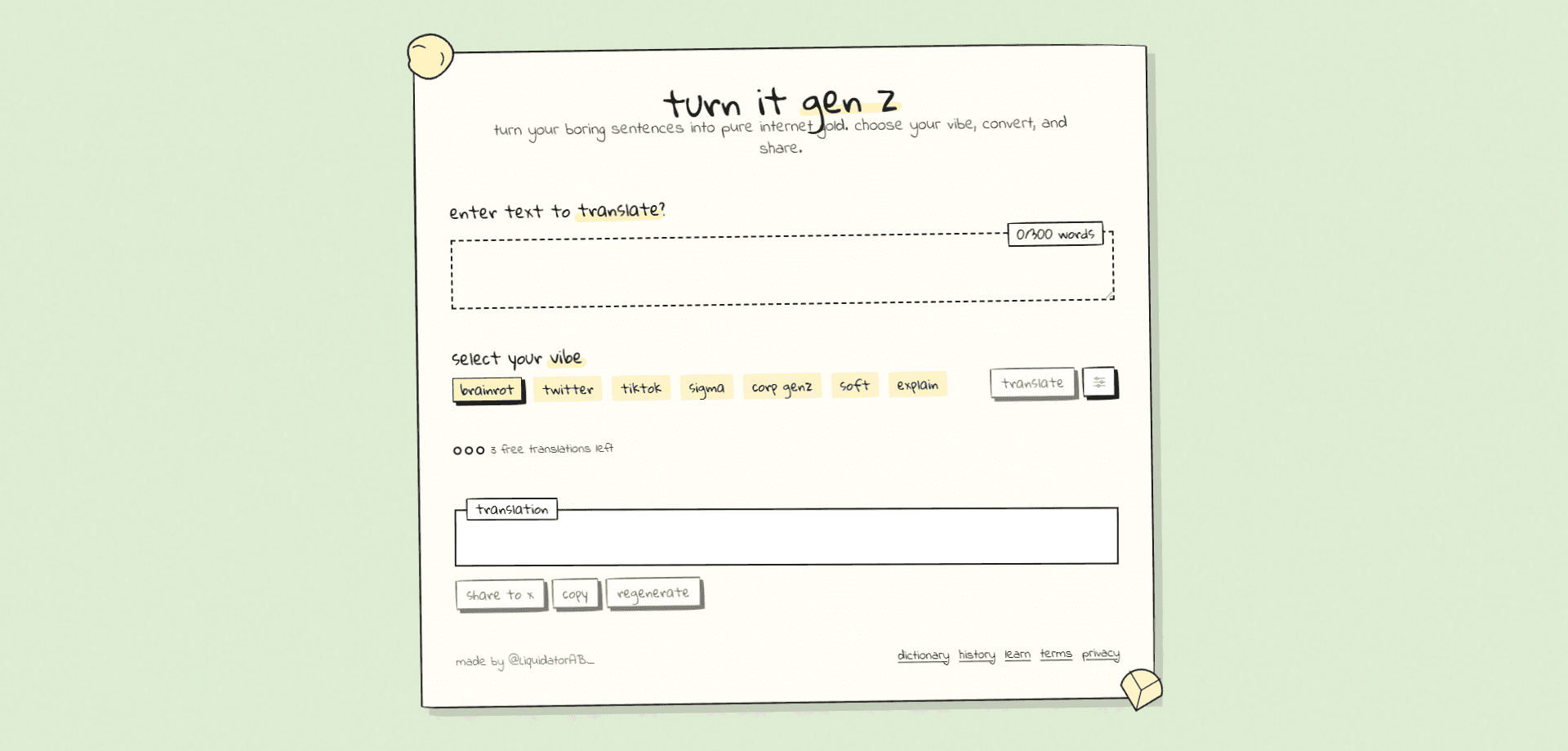
Turn It Gen Z is a browser-based AI slang translator. There's nothing to install and no account needed to start, because it runs entirely on the web at turnitgenz.com. The whole point is speed: drop in a normal sentence, choose a vibe, and get slang back in one pass.
The tool solves a narrow but real problem. Plenty of people can write clear sentences but freeze when they try to sound casual online. Rewriting "I'm tired and staying home tonight" into something a TikTok comment section would actually post takes practice. Turn It Gen Z does that translation for you, then lets you tune how far it goes.
The main limits are worth knowing up front. Every translation caps at 300 words, so it's fine for captions, messages, and short paragraphs, not long documents. And free users get a small number of runs before the tool asks them to subscribe. If you write long-form content or need heavy daily use, that ceiling shows up fast.
Getting Started
- Open turnitgenz.com in any browser. No sign-up, download, or login is required.
- Paste or type your text into the input box, up to 300 words.
- Pick a vibe from the options, such as brainrot, twitter, tiktok, sigma, corp genz, soft, or explain.
- Adjust the intensity slider, toggle output length, and switch emojis on or off if you want them.
- Hit convert, then copy the slang result and share it wherever you need.
Product Information
A quick look at Turn It Gen Z's pricing, supported platforms, and performance.
Best for
The users, tasks, and scenarios where this tool fits best.
Users
- Social media creators who need casual captions fast, as long as the post stays under 300 words
- Teens and young adults who want replies that match how their friends actually text
- Marketers and community managers trying to sound current without guessing at slang, when they have a paid pass for unlimited runs
Tasks
- Rewriting captions and comments into brainrot or e-girl tone before posting
- Turning a stiff work message into a softer, friendlier version in soft mode
- Explaining a slang phrase back into plain English with the explain vibe
- Drafting banter for TikTok or Twitter replies with the matching vibe preset
Scenarios
- Filling a group chat with a joke that lands in the right register
- Testing how a brand line reads once it's translated into Gen Z slang
- Quick copy for a meme post when you don't want to sound like an ad
- Decoding a slang-heavy message you received and want spelled out in normal words
Key features
Seven Slang Vibes
Turn It Gen Z gives you a set of presets instead of one fixed output. Brainrot pushes hard into absurd internet humor, NPC flattens text into deadpan non-answers, and e-girl leans on flirty, soft phrasing. Twitter, tiktok, sigma, corp genz, soft, and explain cover the rest of the range, so you can match the tone to the platform rather than settle for one generic voice. Want the whole brainrot translator feel without writing the jokes yourself? That's the preset most people reach for first.
Intensity and Length Controls
The intensity slider decides how far the translation drifts from your original meaning. Keep it low and the slang stays readable for a general audience. Push it up and the output gets more chaotic. You can also set the output length, which matters when you want a tight one-liner instead of a paragraph. Small change, big difference in the result.
Emoji Toggle
Slang and emoji tend to travel together, but not every post needs them. A single checkbox adds or removes emojis from the result, which keeps the output usable on platforms where a wall of emoji reads as spam.
300-Word Input Cap
Each run handles up to 300 words. That covers captions, comments, DMs, and short paragraphs cleanly. For anything longer, you'll split it into pieces and translate each one.
Slang Invention Mode
On the paid pass, the tool offers a slang invention mode that goes past known phrases and improvises new wording. It's the feature most likely to produce something you haven't seen before, and it's the main reason to upgrade if the standard presets start to feel predictable.
Pros and cons
Pros
- Runs in the browser with no install, login, or setup
- Several vibes let you target a platform's tone instead of one generic output
- Intensity, length, and emoji controls give real fine-tuning over each result
- Free tier works for occasional captions and replies without any payment
Cons
- The 300-word cap blocks long documents, so big writing jobs have to be split up
- Free runs are limited, which interrupts anyone using it daily
- The subscription price isn't published on the site, so you only see the cost at checkout
Frequently asked questions
It rewrites normal text into Gen Z slang. You add a sentence, choose a vibe, and the tool returns the same idea in internet-native language you can copy and post.
Related content
Explore related tools, skills, and articles for Turn It Gen Z.
Turn It Gen Z Alternatives

Google EmbeddingGemma 2
Google DeepMind · Writing · Image · CodingGoogle EmbeddingGemma 2 is a 740M-parameter open model that turns text, code, images, audio, and video frames into vectors in one 768-dimension space, running on phones and laptops.

MePersona
MePersona, Inc. · Writing · Productivity · MarketingMePersona is an AI unified inbox for creators. It learns your voice, drafts replies to fan messages from 12 platforms, and sends only what you approve.

Fluence
Yay Software (Yannick Huchard) · Writing · Voice & Language · ProductivityFluence is an Android app that reads PDFs, EPUBs, Word files and web articles aloud, follows each sentence as it speaks, and answers questions about the text on the phone itself.