
Turtle
Turtle · Marketing · Chatbot
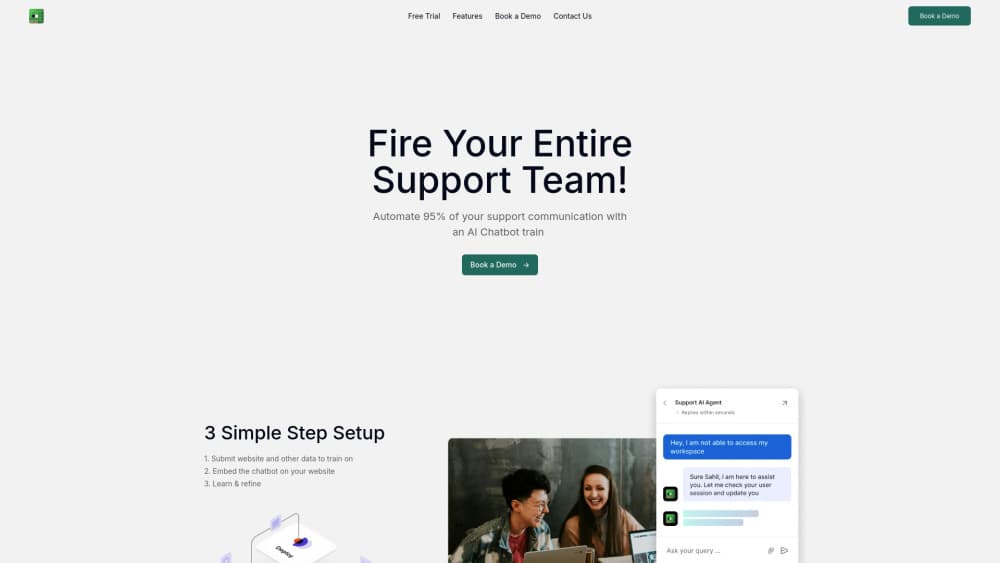
Turtle is an AI customer service chatbot that you train on your website content to answer common support questions and automate routine conversations.
About Turtle
What Is Turtle
Turtle is a chatbot built for the support desk. You point it at your website content, it learns what your pages already say, and then it answers the questions customers keep asking without a human typing each reply. Setup is meant to be quick, and the whole point is to take the repetitive load off a support team.
The idea is straightforward. Most support inboxes are full of the same handful of questions about pricing, shipping, hours, and how to use a product. Those answers usually already live somewhere on your site. Turtle turns that existing content into a conversation. A visitor gets a reply in seconds instead of waiting for an agent.
It isn't a general-purpose assistant that knows everything. It answers from what you feed it. That's both the strength and the limit. If your documentation is thin, the answers will be thin too. But if keeping replies tied to your own material matters, that narrow scope is the feature. Support automation only works as well as the content underneath it.
Turtle fits a small team best. A business with a steady stream of repeat questions gains the most, because that's the work a chatbot can absorb cleanly. Why? Because repetition is exactly what software handles well. A one-person operation with a handful of tickets a week may not feel the difference as sharply.
Getting Started
- Sign up on the Turtle site and start a new chatbot for your business.
- Point it at your website content so it can read the pages you want it to learn from.
- Review the answers it drafts and correct anything that reads wrong or sounds off-brand.
- Embed the chatbot on your site using the provided code where customers expect help.
- Watch the live conversations, refine the content it draws from, and expand its coverage over time.
Product Information
A quick look at Turtle's pricing, supported platforms, and performance.
Best for
The users, tasks, and scenarios where this tool fits best.
Users
- Small support teams
- Small business owners
- Website operators
Tasks
- Answering frequent support questions
- Training a bot on website content
- Handling first-line conversations
Scenarios
- A visitor has a pricing question at midnight
- A support inbox swells after a launch
- A small team wants coverage without new headcount
Key features
Train On Your Own Content
The core of Turtle is training. You give it access to your website pages, and it answers from what those pages say. That keeps replies grounded in material you already control, so you update the page and the answers follow. It also means accuracy depends on how clear your content is, which is worth remembering before you blame the bot for a vague answer.
Automate Routine Support
Turtle is aimed at the repetitive end of support: the questions you've answered a hundred times. Handling those automatically frees a team to spend its attention on the cases that actually need a person. The value shows up fastest where the same few questions dominate the inbox.
Instant Setup
The pitch is that you can get a working chatbot going quickly rather than through a long implementation. You connect your content, check the answers, and embed the widget. That's it. For a team without engineers to spare, that short path is the main draw.
Website Embedding
The chatbot lives on your site where customers already go for help. There's no separate app to install on the visitor's side. They ask, it answers, in the same place they were already reading, and nobody has to be taught a new interface before the help arrives.
Always-On Coverage
Because it runs as software, Turtle can field questions outside office hours, on weekends, and during busy spikes. That's the practical gain over a human-staffed queue, which has to clock out.
Pros and cons
Pros
- Answers from your own website content, so replies stay tied to material you control.
- Set up quickly without a heavy engineering project.
- Covers routine questions around the clock, including outside business hours.
- Takes the repetitive load off a support team so agents handle harder cases.
- Embeds directly on your site, right where customers look for help.
Cons
- Answer quality depends on how good and complete your website content is.
- Best suited to high-volume, repetitive support, so low-ticket businesses may not gain much.
- Verified public details on pricing, integration depth, and an API are scarce, so a demo is worth requesting before you commit.
Frequently asked questions
Turtle is an AI customer service chatbot that you train on your website content so it can answer common support questions and automate routine conversations.
Related content
Explore related tools, skills, and articles for Turtle.
Turtle Alternatives

ngram 2.0
ngram · Video · Marketingngram 2.0 is an AI video generator for teams. It turns a prompt, a screen recording, or a product URL into a narrated explainer, product demo, or AI avatar video, and every scene stays editable.

shippedit.me
Krawlup · Marketing · Businessshippedit.me now redirects to Krawlup, a web platform that audits SEO, AEO and page speed every week, then hands the fixes to AI coding agents over MCP.

MePersona
MePersona, Inc. · Writing · Productivity · MarketingMePersona is an AI unified inbox for creators. It learns your voice, drafts replies to fan messages from 12 platforms, and sends only what you approve.