

ASKEYGEEK.com - AI Tools For Content Creators!
AskeyGeek · Voice & Language · AI Detection
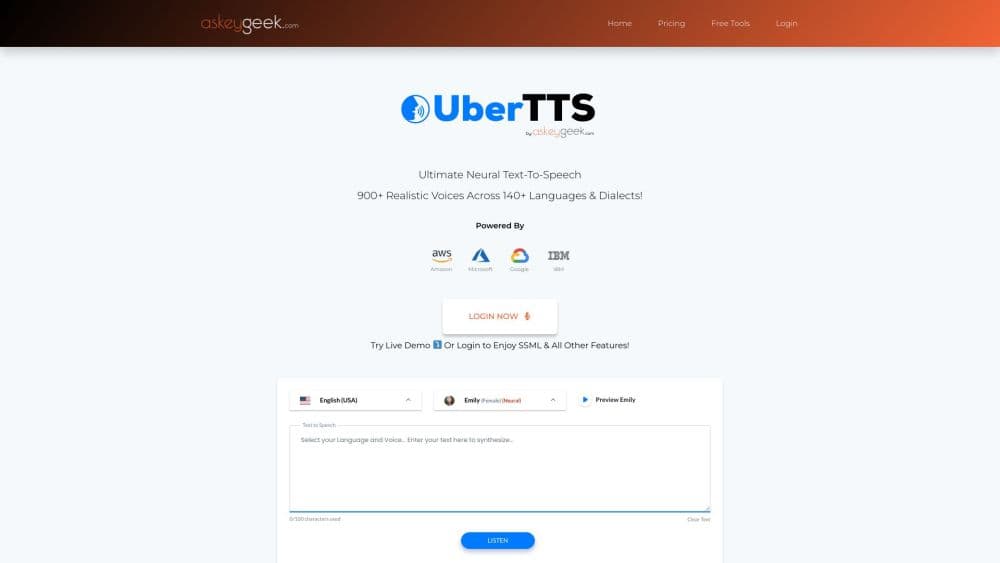
UberTTS is a browser based AI text to speech studio from AskeyGeek that reads scripts aloud with 900+ voices in 140+ languages, offers SSML controls, and grants commercial rights.
About ASKEYGEEK.com - AI Tools For Content Creators!
What Is UberTTS
UberTTS is a web app that turns written text into spoken audio. You paste a script, pick a voice, and get a file you can drop into a video, a course, or a podcast. The company behind it, AskeyGeek, has run a content and automation business since 2012, and UberTTS is its consumer facing arm.
The pitch is straightforward. Run any text to speech online service and the same complaints show up. Most AI voice generators charge per character, cap each clip, or hold your audio hostage behind a subscription. UberTTS leans on a prepaid $1 starter pack that covers 70,000 characters, plus a free plan with 5,000 characters. That makes it easy to test a full narration before deciding anything.
The tradeoffs come from the same place. There is no public API, no voice cloning option listed, and the site is sparse on documentation, so geography and language support are best checked by testing the demo first. Users who need contract grade licensing terms or enterprise support will want to ask before committing.
Getting Started
- Open askeygeek.com/ubertts and click the live demo button, which needs no credit card.
- Type or paste your script, then choose a language and a standard or neural voice from the picker.
- Open the editor panel to set volume, speed, pitch, and pauses, or write SSML tags directly.
- Hit generate, listen back in the browser, and mix up to 20 voices per clip if a scene needs more than one speaker.
- Download the result as MP3, WAV, OGG, or WEBM, or upload a TXT file and convert it in one pass.
Product Information
A quick look at ASKEYGEEK.com - AI Tools For Content Creators!'s pricing, supported platforms, and performance.
Best for
The users, tasks, and scenarios where this tool fits best.
Users
- YouTube narrators
- Course creators and trainers
- Small marketing teams
Tasks
- Turning a blog post into audio
- Building multilingual voiceovers
- Tuning delivery for pronunciation
Scenarios
- Handling voiceover for YouTube uploads at volume
- Publishing a narratable audiobook draft
- Localizing a channel for new markets
- Producing tutorials on a tight deadline
Key features
Voice Library with 900+ Standards and Neural Voices
The catalog runs past 900 voices across 144 languages and dialects, split between older standard voices and newer neural ones. Neural output sounds noticeably smoother on long passages, while standard voices load faster and cost less to test. Picking by accent and gender from a grid is quick, and a live demo plays samples before you spend credits.
Long Clip Ceiling at 60,000 Characters
Most consumer voice generators stop around 15,000 characters per clip. UberTTS pushes the limit to 60,000, which matters when a chapter or a lecture runs long. One file covers the whole section, so you skip stitching several exports together and avoid the audible seam that comes with joining clips.
Full SSML Control
SSML is markup that tells a speech engine how to read a passage, and UberTTS exposes the full set. You can insert pauses, change pitch and rate mid sentence, stress a word, or spell out an acronym letter by letter. Names, model numbers, and technical jargon stay intelligible once tagged, which is where plain text input usually falls apart.
Sound Studio for Merging and Cleanup
The built in sound studio layers clips into one track. You can place segments in order, adjust the mix, and run light cleanup on the combined result. For a podcast intro, a sponsor read, and an outro, that means one exported file instead of three loosely related downloads.
Mixing Up to 20 Voices Per Clip
A single clip can carry as many as 20 different voices. Dialogue scenes, interview simulations, and narrated stories with several characters all stay in one project. Competitors often allow one voice per clip, which forces a manual merge in a separate editor.
Multiple Export Formats and TXT Upload
Finished audio downloads as MP3 for quick sharing, WAV for editing work, and OGG or WEBM for web players. You can also upload a TXT file and convert it without pasting anything by hand, which speeds up bulk work on long manuscripts.
Commercial License and Referral Program
Every plan states that output carries a commercial license, so monetized YouTube uploads, client work, and paid courses are covered. A referral program pays 15 percent commission on referred signups, which suits creators with an audience already asking about voice tools.
Pros and cons
Pros
- The $1 prepaid pack delivers 70,000 characters, the cheapest way to test a full narration before choosing a plan.
- 60,000 characters per clip cuts long scripts into far fewer files than tools capped near 15,000.
- SSML support gives fine control over pauses and emphasis without switching to a developer tool.
- Commercial rights are stated on every plan, so monetized channels do not need a separate audio license.
- Downloads arrive in MP3, WAV, OGG, and WEBM, covering both editing and web playback needs.
Cons
- There is no public API, which rules out automated pipelines and app integrations.
- Voice cloning is not advertised anywhere on the site, so matching a specific person's voice is off the table.
- Documentation is thin beyond the demo page, and licensing terms for large teams need a direct question to support.
- The unlimited subscription lists at $599 per month before discount, a steep jump from the prepaid option for occasional users.
Frequently asked questions
It converts written scripts into spoken audio for YouTube videos, courses, ads, audiobooks, and tutorials. You paste text, choose a voice, and export a finished file, all inside a web browser.
Related content
Explore related tools, skills, and articles for ASKEYGEEK.com - AI Tools For Content Creators!.
ASKEYGEEK.com - AI Tools For Content Creators! Alternatives

Foley
Hanamori Labs, LLC · Voice & Language · Productivity · AI AssistantFoley is a voice to-do list that turns a spoken sentence into a filed task, complete with project, date and time, then helps you plan the day around what is already there.

HireKey
HireKey · Voice & Language · Productivity · LeaningHireKey is an AI job search copilot built by a former tech recruiter. It checks role fit, tailors resumes, runs interview practice and tracks every application.

Fluence
Yay Software (Yannick Huchard) · Writing · Voice & Language · ProductivityFluence is an Android app that reads PDFs, EPUBs, Word files and web articles aloud, follows each sentence as it speaks, and answers questions about the text on the phone itself.