

Udio
Udio · Voice & Language
Udio is an AI music generator that turns a short text prompt into a full song with vocals. It suits fast experimentation with style, structure, and edits, and paid plans add stems and downloads.
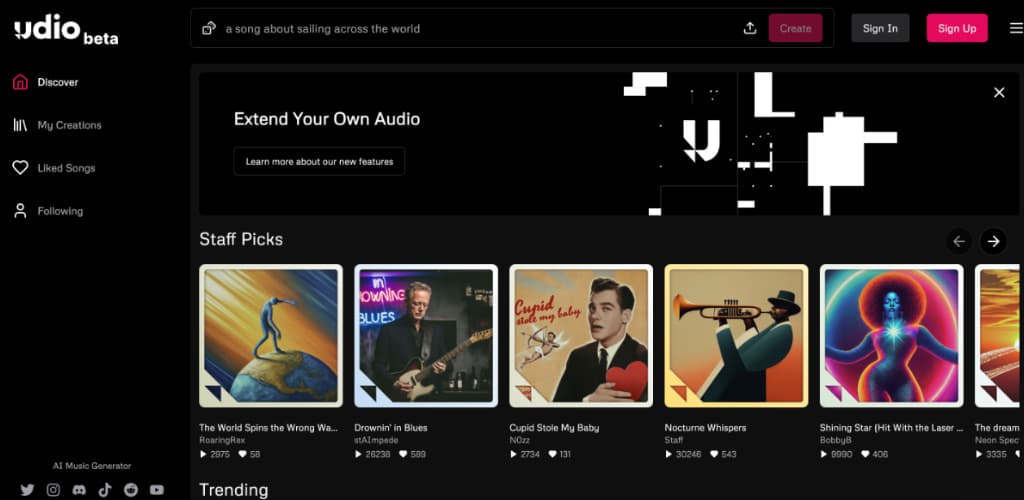
About Udio
What Is Udio
Udio is a web-based AI music generator from a team of former Google DeepMind researchers. You type a description of the song you want, and it produces a track with vocals, instruments, and a song structure, not just a loop or a melody line. The pitch is speed: an idea becomes a listenable draft in about a minute, and you keep shaping it from there.
The part that separates Udio from a one-shot AI music studio is the editing layer. Extend adds another section to a track, Remix changes specific elements while keeping the rest, and Inpaint lets you redo a stretch you didn't like. Sessions go further, letting you rearrange a song's sections and control its structure directly. That's what makes it useful for people who treat AI output as a starting point rather than a finished product.
Two limits matter before you commit. Udio is browser-only, so there's no desktop app or mobile app to install. And commercial use depends on your plan and on rights that Udio is still settling with major labels, so check the current terms before you build a business on the output. For hobbyists and demo-making, neither limit bites.
Getting Started
- Go to udio.com and create an account. You can sign in with Google, Discord, or an email address, and the free tier starts you off with a monthly credit allowance.
- Describe the song. Type a prompt covering genre, mood, instruments, and topic, or write your own lyrics and paste them in.
- Generate and listen. Udio returns tracks for each prompt, normally two per pass, so you can pick the better one or remix either.
- Shape the result. Use Extend to add sections, Inpaint to redo a part, or open a Session to rearrange the structure and swap styles or voices.
- Download and share. Paid plans unlock WAV and stem downloads so you can take the track into a DAW, while every plan can publish to the Udio feed and share a link.
Product Information
A quick look at Udio's pricing, supported platforms, and performance.
Best for
The users, tasks, and scenarios where this tool fits best.
Users
- Music hobbyists and beginners
- Songwriters and producers
- Content creators and video makers
Tasks
- Turning a rough idea into a demo
- Testing a genre or style
- Adding a section to an existing song
- Editing one part of a track
- Making royalty-free background audio
Scenarios
- Sketching a song idea on a laptop during a commute
- Producing demo ideas before a studio session
- Filling a library of background music for an editing project
Key features
Text to Music Generation
The core feature takes a written prompt and returns a produced song with vocals, instruments, and a structure. You can describe a genre, a mood, or a scene, or supply your own lyrics and have them sung. Each prompt normally returns a pair of options, so you compare two takes before deciding which to keep. Vocal and instrument quality scale with the model version you're on.
Extend, Remix, and Inpaint
These three tools cover the editing most people actually need. Extend keeps a track going past its original length by generating a new section that fits. Remix reworks an element you point at, like the vocals or the instrumentation, without touching the rest. Inpaint redoes a specific slice of the audio, which is the fix for a verse that came out wrong while everything around it works. Together they turn a single generation into a back-and-forth workflow.
Sessions and Structure Control
Sessions give you a visual way to work on a song's shape. You can reorder sections, adjust how long they run, and reshape the arrangement instead of regenerating everything from a prompt. This matters when a track is close but the structure is off, since rearranging is cheaper than starting over.
Voice and Style Controls
Udio maintains a library of styles you can apply and combine, so you can aim at a specific sound rather than a generic genre. Voice features let you work with particular vocal characteristics across tracks. Manually tagging sections and setting style references gives finer control than a plain sentence prompt for anyone who wants to steer the output.
Stem Downloads and WAV Export
Paid plans let you download a finished track as separate stems, typically isolating vocals, drums, bass, and other parts, along with WAV files. Stem separation like this is what makes the output usable in a mix. This is what turns Udio into a tool a producer can use: you export the stems, drop them into a DAW, and mix or master with the tools you already own. The free tier is limited to lower-fidelity exports.
Community Feed and Sharing
Udio includes a public feed where users publish tracks and listen to each other's work. You can share a song with a link and browse what others have made for inspiration. The feed doubles as a way to see how far a prompt can be pushed before you spend credits on your own experiments.
Pros and cons
Pros
- A prompt turns into a full song with vocals in about a minute, so idea-to-draft is fast.
- The editing tools (Extend, Remix, Inpaint, Sessions) make it workable as a real project rather than a toy.
- Stem and WAV downloads on paid plans let producers finish tracks in a DAW.
- The free tier with monthly credits is enough to test whether the output fits your needs.
- Paid plans are relatively cheap, starting at $10/mo, which is low for a tool with stem export.
Cons
- It's browser-only. There's no desktop or mobile app, so offline work isn't an option.
- Commercial rights are tangled in ongoing label negotiations, so you need to check current terms before selling anything you make.
- The free tier limits generations and caps export quality, which can frustrate heavy users quickly.
- Output still needs editing. The first pass is a starting point, not a release-ready track.
Frequently asked questions
Udio generates songs from text. You describe a genre, mood, or topic, or paste your own lyrics, and it produces a track with vocals and instruments that you can extend, remix, and export. People use it for demos, background music, and style experiments.
Related content
Explore related tools, skills, and articles for Udio.
Udio Alternatives

Foley
Hanamori Labs, LLC · Voice & Language · Productivity · AI AssistantFoley is a voice to-do list that turns a spoken sentence into a filed task, complete with project, date and time, then helps you plan the day around what is already there.

HireKey
HireKey · Voice & Language · Productivity · LeaningHireKey is an AI job search copilot built by a former tech recruiter. It checks role fit, tailors resumes, runs interview practice and tracks every application.

Fluence
Yay Software (Yannick Huchard) · Writing · Voice & Language · ProductivityFluence is an Android app that reads PDFs, EPUBs, Word files and web articles aloud, follows each sentence as it speaks, and answers questions about the text on the phone itself.