

Udon
Udon · Coding · Productivity
Udon turns an Apple Silicon Mac into a home server you run from a browser, with container controls, file shares, and an optional AI sysadmin.
About Udon
What Is Udon
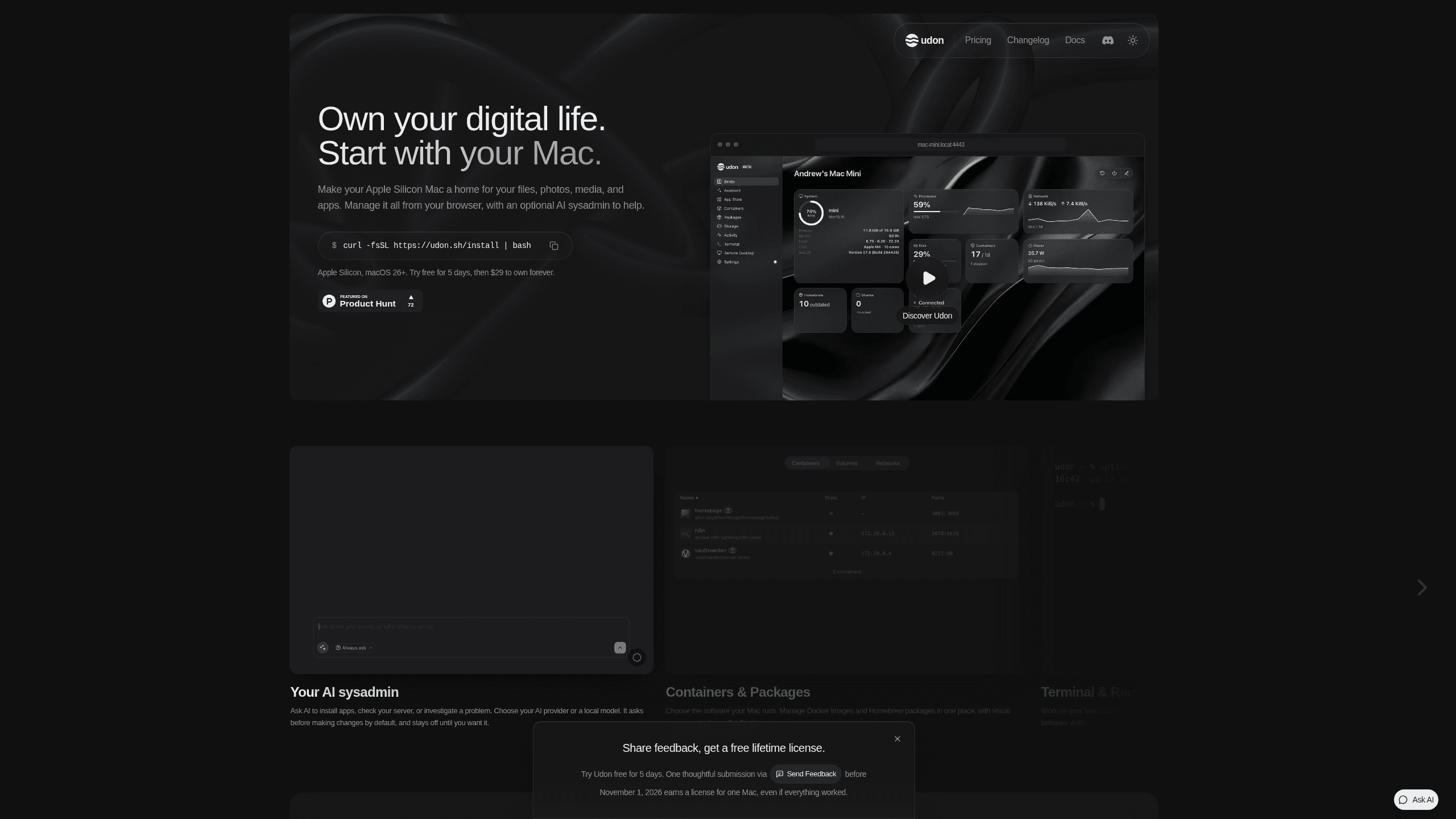
Udon is a control deck for a Mac home server. You install it with one terminal command on an M1 or newer Mac running macOS 26, and it serves a dashboard in the browser where you run containers, mount shares, check drive health, and open App Store apps. The Mac keeps working as a normal Mac while it does this.
The gap it fills is real. Docker on Mac is well served by command line tools, but self-hosting on Mac still has no single place to see what is running, so most people end up with an SSH window, a separate container UI, and a folder of commands they copied from a blog two years ago. Udon gathers those jobs into one page and adds an assistant that can carry out the steps for you, from pulling an image to reading a failing container's logs.
The limits are worth knowing before you install. It needs Apple Silicon and macOS 26, so Intel Macs are out. It turns one machine into a server, which means no RAID and no disk redundancy. The assistant is optional and needs model access you pay for separately. Phone apps are announced but not shipped yet.
Getting Started
- Run the install command from udon.sh in Terminal on the Mac you plan to leave switched on.
- Open the dashboard address on your network and create the admin account.
- Run a first container from the Run dialog: enter an image such as nginx:latest, publish a port, and mount a folder or named volume.
- Connect Tailscale on the Mac and on your phone or laptop, so the dashboard follows you out of the house.
- Turn on the assistant in Settings, pick Anthropic, OpenAI, a coding CLI already signed in on the Mac, or a local model, and let the connection test finish before you use it.
Product Information
A quick look at Udon's pricing, supported platforms, and performance.
Best for
The users, tasks, and scenarios where this tool fits best.
Users
- Mac owners with a spare Mac mini
- People who tried a NAS and lost interest
- Developers who want a remote box
Tasks
- Running a media server
- Replacing paid cloud storage for photos
- Setting up a stack without reading five guides
Scenarios
- A Mac mini sits in a cupboard with an external SSD, and the dashboard opens on a phone over Tailscale while you are travelling.
- A container crashes overnight
- Two people in the same flat need a shared folder for scans and backups, so you create an SMB share with its own account and permissions.
Key features
One Command Install That Leaves the Mac Usable
Setup is a single command in Terminal rather than a reinstall or a bootable USB. Udon runs as a background service and the Mac still boots to the normal desktop, so a spare Mac mini can be a server and a machine you occasionally sit at. That matters if the same computer also runs a desktop app you need.
Browser Dashboard for Containers and Stacks
The Containers page covers images, ports, volumes, environment variables, CPU and memory caps, networks, and restart policy. You can run one container from the Run dialog on either Apple Container or OrbStack, or build a multi-service Docker Compose stack in the visual Composer on OrbStack. Pull output streams live, and a finished container lists a LAN URL for each published port.
AI Sysadmin With Approvals and an Audit Log
The assistant calls Udon's own tools, so it works with the same permissions as your account and records every action in the audit log. It can search the app catalog, propose a stack with a shared network and volumes, create it, then read each container's logs and suggest fixes. The approval pill decides when it stops to ask: reads only by default, reversible changes if you relax it, everything if you trust it. Keys stay on the Mac in a file only the daemon can read.
Files, SMB Shares, and Drive Health
File browsing, SMB shares, and disk health sit in the same dashboard as the containers that consume them. You mount a host folder once and use it across containers and shares, which removes the usual guessing about where a volume actually lives. Drive health monitoring is the part that matters for a machine holding the only copy of your photos.
Remote Access on Your Own Tailscale Network
Remote access runs over Tailscale, your own private network, instead of an open port on your router. The dashboard is served over HTTPS, and you log in from a phone browser at home or away. That design keeps the traffic off Udon's servers, and it means you are not exposing a home IP address to the internet to check on a container.
A Catalog for the Usual Self-Hosted Apps
Udon ships an app catalog and setup flows for the software people actually run at home: Jellyfin and Plex for media, Immich for photos, Nextcloud for files, Vaultwarden for passwords, Paperless for documents, and n8n for automation. Each one still needs configuration, and the assistant can do much of that work, but the catalog shortens the distance between an empty Mac and a working service.
Pros and cons
Pros
- One payment of $29 per Mac instead of a subscription, with updates included and no account to create.
- The dashboard works from any browser, so a phone becomes the console for a Mac home server without extra software.
- A Mac mini draws a few watts at idle and stays quiet, which makes it a reasonable always-on host for containers.
- The assistant is off by default, asks before changes, and writes an audit log, so the AI sysadmin is something you opt into rather than something that runs loose.
- Remote access through Tailscale avoids port forwarding and keeps the dashboard off the public internet.
Cons
- Apple Silicon and macOS 26 are required, so every Intel Mac and older system is excluded.
- The iPhone app is still in TestFlight and the Android app is scheduled for January 2027, which leaves the browser as the only option for now.
- The assistant needs an Anthropic or OpenAI key, a signed-in coding CLI, or a local model, so the AI part carries a cost or a setup step beyond the $29 license.
- A single Mac is not a NAS replacement: no RAID, no hot spare, and a dead machine takes the services and the files with it unless you keep a separate backup.
Frequently asked questions
Udon is software that turns an Apple Silicon Mac into a home server. It installs with one terminal command and serves a browser dashboard for containers, files, shares, packages, and system stats, with an optional AI assistant that can run the same tasks.
Related content
Explore related tools, skills, and articles for Udon.
Udon Alternatives

Base Code
Base44 (Wix) · Coding · ProductivityBase Code is a shared cloud development environment from Base44. Teammates describe changes to an existing GitHub codebase in chat, preview them live and send them back as pull requests.

Google EmbeddingGemma 2
Google DeepMind · Writing · Image · CodingGoogle EmbeddingGemma 2 is a 740M-parameter open model that turns text, code, images, audio, and video frames into vectors in one 768-dimension space, running on phones and laptops.

GitGlow
GitGlow · Coding · ProductivityGitGlow is a local-first desktop Git client that lets independent developers review their own code and their AI agents' changes in one place before shipping.