

UIQuill
Sliday Limited · Writing
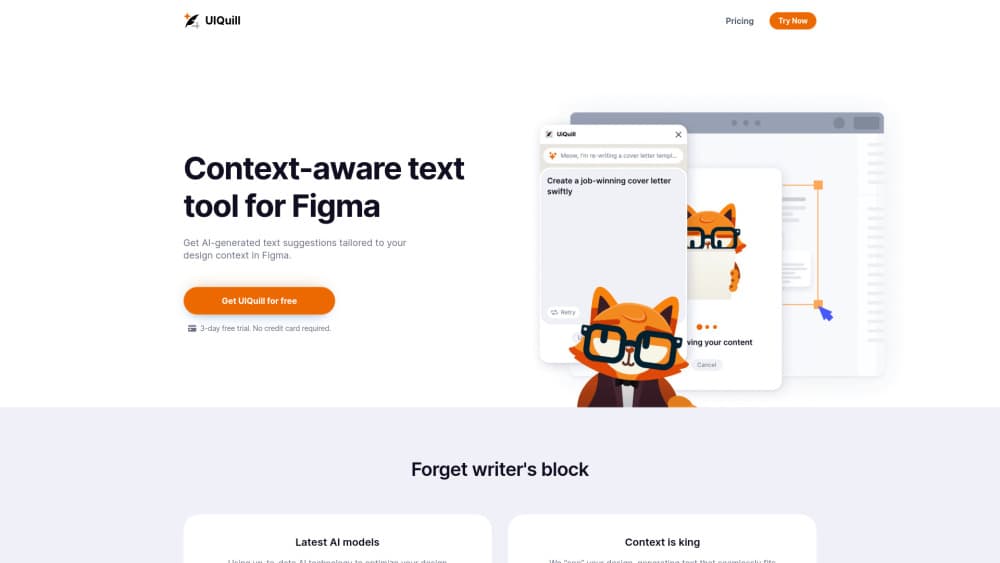
UIQuill is a Figma plugin that rewrites design copy in place, reading the layout around each text layer so the result matches tone, length, and search goals.
About UIQuill
What Is UIQuill
UIQuill is a Figma AI copywriter plugin built for the part of design work nobody enjoys: typing real words into a mockup. Instead of writing copy in a doc and pasting it back, you run the plugin inside your Figma file and let it propose AI text suggestions for the layer you're looking at.
The idea behind it is context. A general chatbot gets a sentence and nothing else. UIQuill reads the surrounding design, so a button label stays short, a hero headline gets room to breathe, and a pricing card doesn't overflow its box. The plugin's own pitch is that it "sees" the design and writes to fit its function, style, tone, and length.
Sliday Limited develops the plugin, and Stas Kulesh is the name on the Figma Community listing. Pricing is simple: a 14 day free trial with no card required, then $9 per month or a one time $299 lifetime license. Both paid options advertise unlimited usage, current AI models, and early access to new features.
The limits are worth knowing before you install. It runs only inside Figma, so there's no browser editor, no API, and no way to use it on a live website. There's also no permanent free tier, which means teams testing it on many seats pay per seat after two weeks. And like any AI copywriter, it writes plausible text, not verified product facts.
Getting Started
- Install UIQuill from the Figma Community page and open it from the plugins menu in a design file.
- Sign in and start the 14 day trial. No payment details are needed at this stage.
- Choose what to work on: a single text layer, a group, a frame, or the whole page.
- Tell it what the copy should sound like and how long it can run, then generate a suggestion.
- Read the result in place, keep what works, and rerun the parts that miss. The text lands in the layers you selected, so there's no copy and paste step.
Product Information
A quick look at UIQuill's pricing, supported platforms, and performance.
Best for
The users, tasks, and scenarios where this tool fits best.
Users
- Product designers who write their own UI copy
- Small UX writing and content design teams
- Startup founders designing their own marketing pages
- Design agencies working on client mockups
Tasks
- Replacing lorem ipsum before a review
- Fitting text into a fixed space
- Cleaning up inherited design files
- Writing SEO copy inside a landing page mockup
- Updating copy across a whole page
Scenarios
- The week before a client presentation
- Early concept exploration
- Handoff crunch
Key features
Context-aware text suggestions
The plugin reads the design around a text layer before it writes. That means a compact toolbar label and a full-width hero headline get different answers from the same prompt, because the available space and surrounding elements are part of the input. That's what context-aware copy means in practice, and it's the main difference between a Figma plugin and a chatbot tab.
Layer, frame, and page scope
You pick the scope: one text layer, a group, a frame, or the entire page. Running it at page level replaces placeholder text across every frame at once, which is the feature that saves the most time on large files. You can still drop back to a single layer when one line needs a careful edit.
Length-aware rewriting
Copy that doesn't fit is worse than no copy. UIQuill takes the box size into account and aims for text that sits inside it, so you spend less time trimming sentences after generation. Buttons, tabs, and card titles benefit most, since those are the places where one extra word breaks a layout.
Grammar and style cleanup
Beyond new text, the plugin corrects grammar, punctuation, and style in copy that already exists. That's useful on inherited files, where five people have written labels in five different voices. It's a copy edit, not a strategy, so brand terms still need a human pass.
SEO copy for design mockups
Landing page designs often ship with headlines written for looks rather than search. UIQuill offers SEO copy generation, so the words in the mockup can carry target phrases from the start. Treat the output as a first draft: search intent and page structure still decide whether the copy ranks.
No API key, unlimited use on paid plans
Some Figma copy tools ask you to bring your own OpenAI key, which turns a design task into a billing setup. UIQuill bundles the model, and the paid plans advertise unlimited usage. It also has light and dark mode, a small thing until you're working at night.
Pros and cons
Pros
- Context awareness is real: suggestions respect the space and role of each layer, so less manual trimming after generation.
- Page-level rewriting handles the tedious part of design work, replacing placeholder text across many frames in one run.
- Flat pricing is easy to justify: $9 per month, or $299 once for people who'd rather not keep a subscription.
- No API key or model setup, which removes the step that scares off designers who don't want to touch a developer console.
Cons
- Figma only. No standalone editor, no API, and no browser extension, so copy outside a design file stays manual.
- No permanent free tier. After the 14 day trial, every seat needs a plan, which adds up for a five person team.
- It can't know your product. Generated lines read well but may promise features that don't exist, so someone has to fact check.
Frequently asked questions
It writes and edits text inside Figma designs. You select a layer, group, frame, or page, and the plugin suggests copy that fits the space and the surrounding layout.
Related content
Explore related tools, skills, and articles for UIQuill.
UIQuill Alternatives

Emailwritr
Emailwritr · Writing · MarketingEmailwritr is an AI email copywriting tool built for affiliates, course creators, and online businesses that want more revenue from the list they already own. Instead of blank pages or generic chatbot prompts, this AI email writer generates welcome sequences, launch campaigns, cart recovery emails, and promo series from frameworks modeled on well-known direct-response copywriters. You connect your autoresponder, answer a few questions about your offer, and it writes the copy for you.

Swms
Swms AI · Writing · Productivity · BusinessSwms is an AI safety compliance tool that turns a plain description of a job into ready-to-use safety documents. Describe your project, trade, and known hazards, and it writes a safe work method statement, job hazard analysis, safe work procedure, RAMS, or safety data sheet in seconds. It also ships with Oscar, a chat assistant that answers workplace safety questions in any language. Teams in construction, mining, transport, and warehousing use it to cut the paperwork that usually eats into a workday.

Prosp
Prosp · Writing · Voice & Language · MarketingProsp is an AI LinkedIn outreach tool built for agencies and sales teams, and it writes the message and the voice note in your own voice for each prospect so they actually reply. You connect your accounts, find leads, and let the AI draft and send personalized messages at scale, all from one inbox. It's built for people running outbound at volume. That's the whole pitch. Every touchpoint still has to feel human.