

Unaimytext
UnAIMyText · Writing · AI Detection
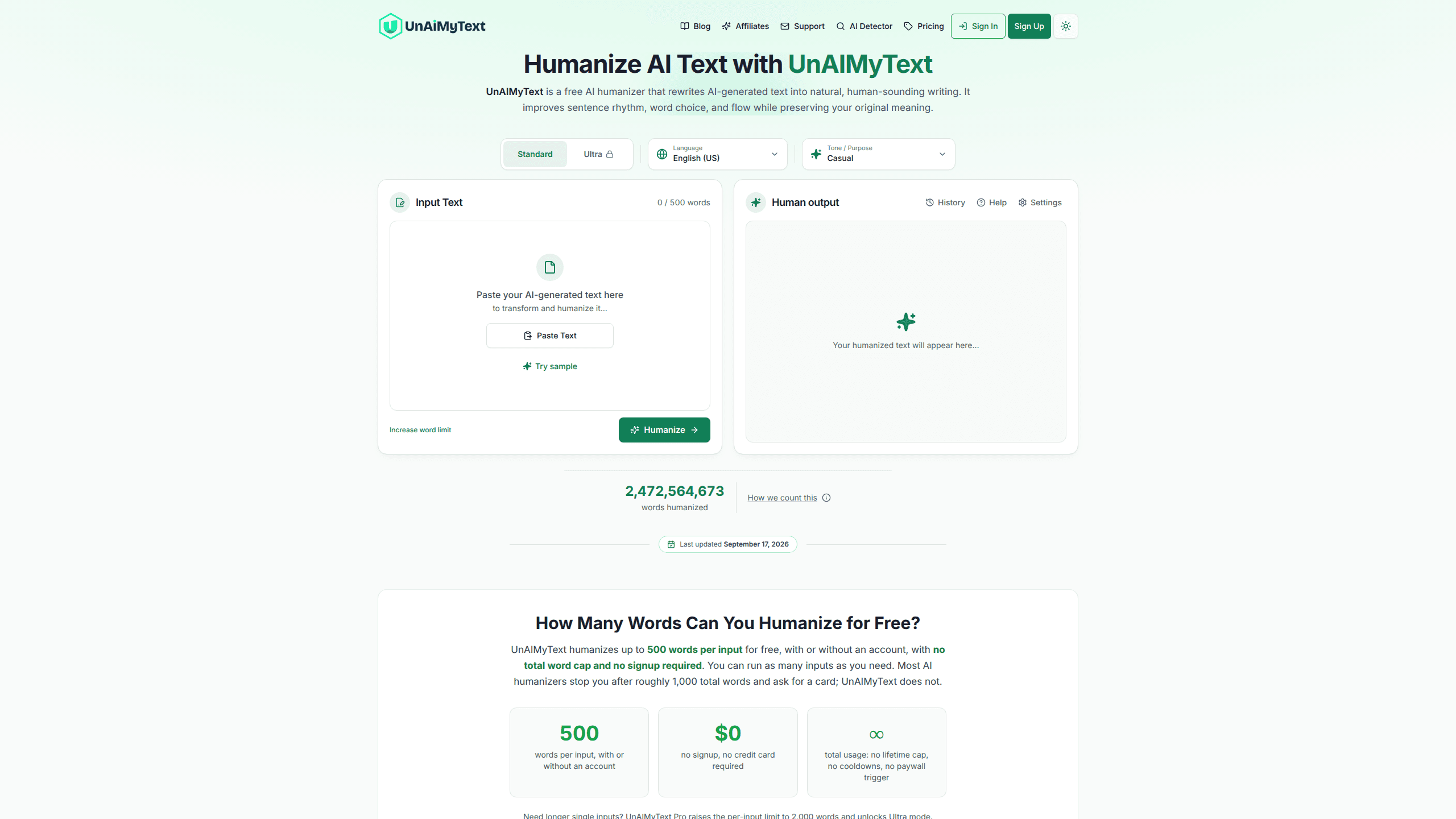
UnAIMyText is a free AI humanizer that rewrites AI-generated text so it reads like a person wrote it. It's an AI text rewriter at heart: you paste a draft from ChatGPT, Claude, or Gemini, pick a mode and tone, and get cleaner sentence rhythm and word choice back in seconds. The free tier handles up to 500 words per input with no signup, no credit card, and no lifetime cap, which is the main reason people pick it over tools that lock you out after a thousand words. If you came here to humanize AI text without paying, this is one of the few options that lets you do it at scale.
About Unaimytext
What Is UnAIMyText
UnAIMyText is a web-based writing editor built for one job: taking AI drafts and making them sound human. It focuses on how your text reads, not what it says. The tool varies sentence length, swaps out repetitive AI phrasing, and restructures flow at the sentence level, while context checks try to keep your original meaning intact.
The product targets a real problem. AI writing has a recognizable texture: flat tone, uniform sentence lengths, the same transitions over and over. Detectors look for exactly those patterns. UnAIMyText edits them out and then publishes its own monthly detector tests so you can see the numbers instead of taking a marketing claim on faith. People who want to bypass AI detection usually care less about beautiful prose and more about a score that clears a threshold, and the tool is built around that reality.
The biggest limit is scope. UnAIMyText refines a draft rather than rebuilding it, so it works best on text that already says what you want. It won't fix weak arguments or bad structure. It's also a web tool with no desktop app or mobile version, and the deeper controls sit behind the Pro tier.
Getting Started
- Open the UnAIMyText site in your browser. No account is needed to start.
- Paste AI-generated text into the input box, or upload a PDF or Word document.
- Choose Standard or Ultra mode, then set the language and adjust formality, emotional tone, and creativity to match your voice.
- Click Humanize and wait a few seconds for the rewritten version.
- Copy the output, or rephrase a single sentence on its own if one line doesn't land.
Product Information
A quick look at Unaimytext's pricing, supported platforms, and performance.
Best for
The users, tasks, and scenarios where this tool fits best.
Users
- Students
- Bloggers and content writers
- Non-native English writers
Tasks
- Humanizing ChatGPT output
- Rewriting marketing copy
- Cleaning up emails and reports
Scenarios
- Redoing a client draft that reads too obviously machine-written
- Polishing a school essay before a checker runs
- Batch work on short pieces
Key features
No-Signup Free Tier
You can humanize up to 500 words per input without creating an account or entering a card. The site advertises no lifetime word cap, no cooldowns, and no paywall trigger, so you can run as many inputs as you need. Most competing humanizers cut you off around 1,000 total words and ask for payment, which makes the free tier here the standout feature for casual users.
Standard and Ultra Modes
Standard mode suits everyday text: blog posts, emails, social copy, and product descriptions. Ultra mode, which is Pro-only, is aimed at academic writing, reports, and long-form work where sentence-level precision matters. Ultra also raises the per-input limit to 2,000 words. In the site's own published tests, Ultra scores better against every detector it reports on. Keep in mind that this is the vendor's data, not an independent result.
Tone and Creativity Controls
Beyond mode selection, you can set language, formality, emotional tone, and creativity. That's more knobs than most AI humanizers expose for free. The creativity slider is the useful one: turn it up and the rewriter moves further from your original phrasing, which matters when a draft's wording is the thing getting flagged.
Sentence-Level Rewriting
The tool changes sentence structure rather than swapping in synonyms wholesale. It shortens and lengthens lines to vary rhythm, replaces repeated AI phrasing, and reworks flow. The result usually keeps your point but changes the feel. If you need a full rebuild of ideas, this isn't the right tool; paraphrasing and rewriting tools do that.
PDF and Doc Upload
Instead of pasting, you can upload PDF and Word files. That saves steps on longer assignments where copy-pasting from a document gets messy. It's a small feature, but it removes friction for the exact people most likely to need a humanizer, like students working from written assignments.
Monthly Detector Testing
UnAIMyText publishes its own detector tests every month, running 50 samples through GPTZero, Turnitin, Copyleaks, and similar tools before and after humanizing. In the September 2026 round, it reports dropping GPTZero's detection rate from 97% to 3% in Ultra mode, a figure it presents plainly on the site. Treat those figures as vendor-reported. The site is upfront that no humanizer can guarantee a score, because detectors change and also flag real human writing. Anyone shopping for an AI detector bypass should read that caveat before they buy anything.
Pros and cons
Pros
- Free tier uses 500 words per input with no account, no card, and no total cap.
- Tone, formality, and creativity controls give more fine-tuning than most free humanizers.
- Publishes monthly detector test results with an explicit caveat about guarantees.
- Supports PDF and Word upload, not just pasting.
- Handles multiple target languages, not English alone.
Cons
- No API, so you can't wire it into a writing workflow or script.
- Ultra mode, which performs best in the site's tests, is locked to the paid Pro tier.
- Web-only. There's no desktop or mobile app if you want offline access.
- It refines drafts rather than rebuilding them, so it can't rescue a poorly structured piece.
Frequently asked questions
Yes. The free tier humanizes up to 500 words per input with no account or credit card, and there's no total word limit. Pro is a paid upgrade that raises the per-input cap to 2,000 words and unlocks Ultra mode.
Related content
Explore related tools, skills, and articles for Unaimytext.
Unaimytext Alternatives

Google EmbeddingGemma 2
Google DeepMind · Writing · Image · CodingGoogle EmbeddingGemma 2 is a 740M-parameter open model that turns text, code, images, audio, and video frames into vectors in one 768-dimension space, running on phones and laptops.

MePersona
MePersona, Inc. · Writing · Productivity · MarketingMePersona is an AI unified inbox for creators. It learns your voice, drafts replies to fan messages from 12 platforms, and sends only what you approve.

Fluence
Yay Software (Yannick Huchard) · Writing · Voice & Language · ProductivityFluence is an Android app that reads PDFs, EPUBs, Word files and web articles aloud, follows each sentence as it speaks, and answers questions about the text on the phone itself.