

uPass
uPass AI · Writing · AI Detection
uPass AI is an AI humanizer and detector that rewrites machine-generated text to pass AI checks in over 50 languages, with a free tier and paid plans for heavier use.
About uPass
What Is uPass AI
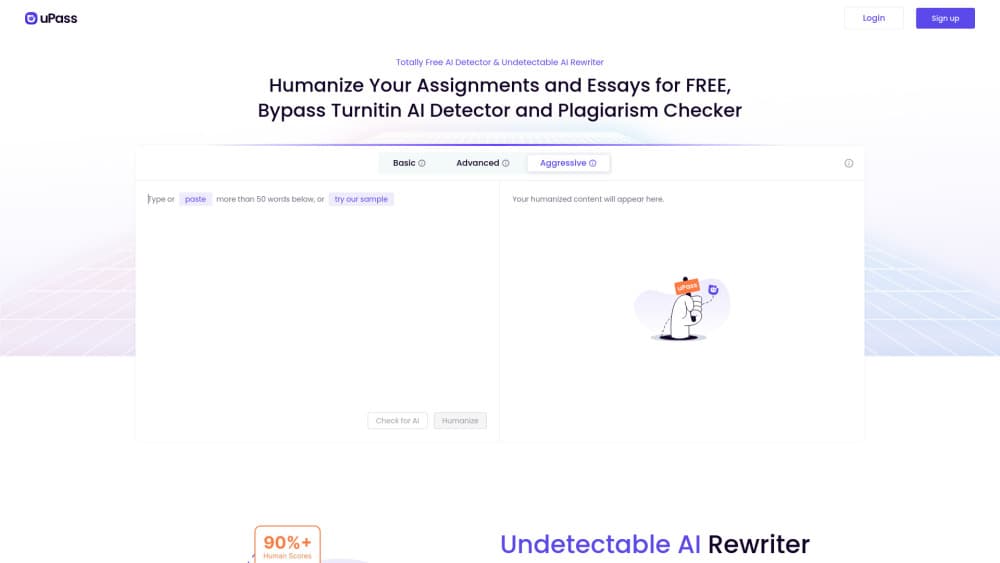
uPass AI is a web app that rewrites text so AI writing detectors score it as human. Students are the loudest users, but anyone who drafts with ChatGPT and needs a cleaner final version can use it. You paste text, pick a strength setting, and the tool returns a new draft that keeps the meaning while changing the phrasing patterns detectors look for.
The service also ships an AI detector that runs one sample against several checkers at once. That pairing is the main draw: most competing tools sell rewriting or detection, not both, which is why the undetectable AI pitch lands with students. You see scores side by side from Turnitin, GPTZero, Copyleaks and others before deciding whether to rewrite again.
Two limits deserve a mention up front. Detection scores are estimates, and the detectors update constantly, so no tool can promise a permanent pass. The site also aims at academic work, which puts users in conflict with most university integrity policies. uPass says it encourages responsible use, and its terms leave that judgment with you.
Getting Started
- Create an account at upass.ai with an email address, or start on the free plan without adding a card.
- Paste at least 50 words into the editor. Input caps depend on your plan, from 80 words on Free to unlimited on the top plan.
- Choose a humanization mode: Basic, Advanced or Aggressive. Stronger settings change more of the sentence structure.
- Run the rewrite, then send the output to the built-in AI detector and compare scores from each checker.
- Copy the result, or open your history to compare earlier versions. History is limited on the free plan.
Product Information
A quick look at uPass's pricing, supported platforms, and performance.
Best for
The users, tasks, and scenarios where this tool fits best.
Users
- University students
- Non-native English writers
- Content freelancers
Tasks
- Humanizing an essay draft
- Cleaning up AI-assisted blog copy
- Checking text before submission
- Rewriting marketing copy
Scenarios
- Deadline week
- Client work with originality checks
- Reusing your own AI notes
Key features
Three Rewrite Strengths
Basic, Advanced and Aggressive modes change how far the rewrite departs from your input. All three humanize AI text at different depths. Basic makes small edits that keep your voice close to the original. Aggressive rebuilds sentence structure, which reads more natural but raises the odds of a shifted nuance. Pick the lightest mode that clears the detectors you care about.
Multi-Detector AI Checker
The built-in checker queries several detectors in one run and returns each score separately. That saves the tab juggling most people do with GPTZero, Originality.ai, Sapling and ZeroGPT. Scores disagree often, so treat the spread as a signal rather than a verdict.
50+ Language Support
uPass handles more than 50 languages, which puts it ahead of tools that only work in English. Quality varies by language, and the site does not publish per-language accuracy. If you write in a smaller language, test a sample before paying.
Plagiarism-Free Rewriting
The rewriter swaps phrasing rather than copying sentences, so output tends to clear Copyscape, Quetext and Scribbr checks. That covers duplicate text, not citation rules. Quoted material still needs attribution.
Plan-Based Word Limits
Free gives 300 words a month for both rewriting and detection, with an 80 word cap per input. Basic raises that to 5,000 words a month, Pro to 30,000, and the Unlimited plan removes the ceiling. The two pools are separate, so heavy checking eats a different allowance than rewriting.
History and Version Comparison
Paid plans keep a full history of past rewrites. That helps when a second pass scores worse and you want the earlier version back. Free accounts get limited history, which is the main reason to upgrade if you iterate a lot.
Pros and cons
Pros
- Rewriter and detector live in one place, so you can test and fix without switching services.
- The free plan is usable: 300 words a month is enough to judge output quality on real text.
- Supports more than 50 languages, well beyond the English-only norm in this category.
- Three strength settings give you control over how much of your original wording survives.
- Paid tiers scale from $9.99 to $79.99 a month, so light and heavy users do not pay the same rate.
Cons
- Detection scores shift as detectors retrain, so a passing draft can fail a week later.
- The 80 word input cap on the free plan is tight for essays, which forces a paid plan early.
- Academic use conflicts with most university integrity policies, and the site's own terms push responsibility onto the user.
- No public API, so teams cannot wire the rewriter into their own publishing workflow.
Frequently asked questions
It rewrites text so AI writing detector scores drop, and it also scans text against several detectors at once. You get a new draft plus a readout of how each checker rates it.
Related content
Explore related tools, skills, and articles for uPass.
uPass Alternatives

Google EmbeddingGemma 2
Google DeepMind · Writing · Image · CodingGoogle EmbeddingGemma 2 is a 740M-parameter open model that turns text, code, images, audio, and video frames into vectors in one 768-dimension space, running on phones and laptops.

MePersona
MePersona, Inc. · Writing · Productivity · MarketingMePersona is an AI unified inbox for creators. It learns your voice, drafts replies to fan messages from 12 platforms, and sends only what you approve.

Fluence
Yay Software (Yannick Huchard) · Writing · Voice & Language · ProductivityFluence is an Android app that reads PDFs, EPUBs, Word files and web articles aloud, follows each sentence as it speaks, and answers questions about the text on the phone itself.