

Upstream
Upstream Labs, Inc. · Writing · Productivity
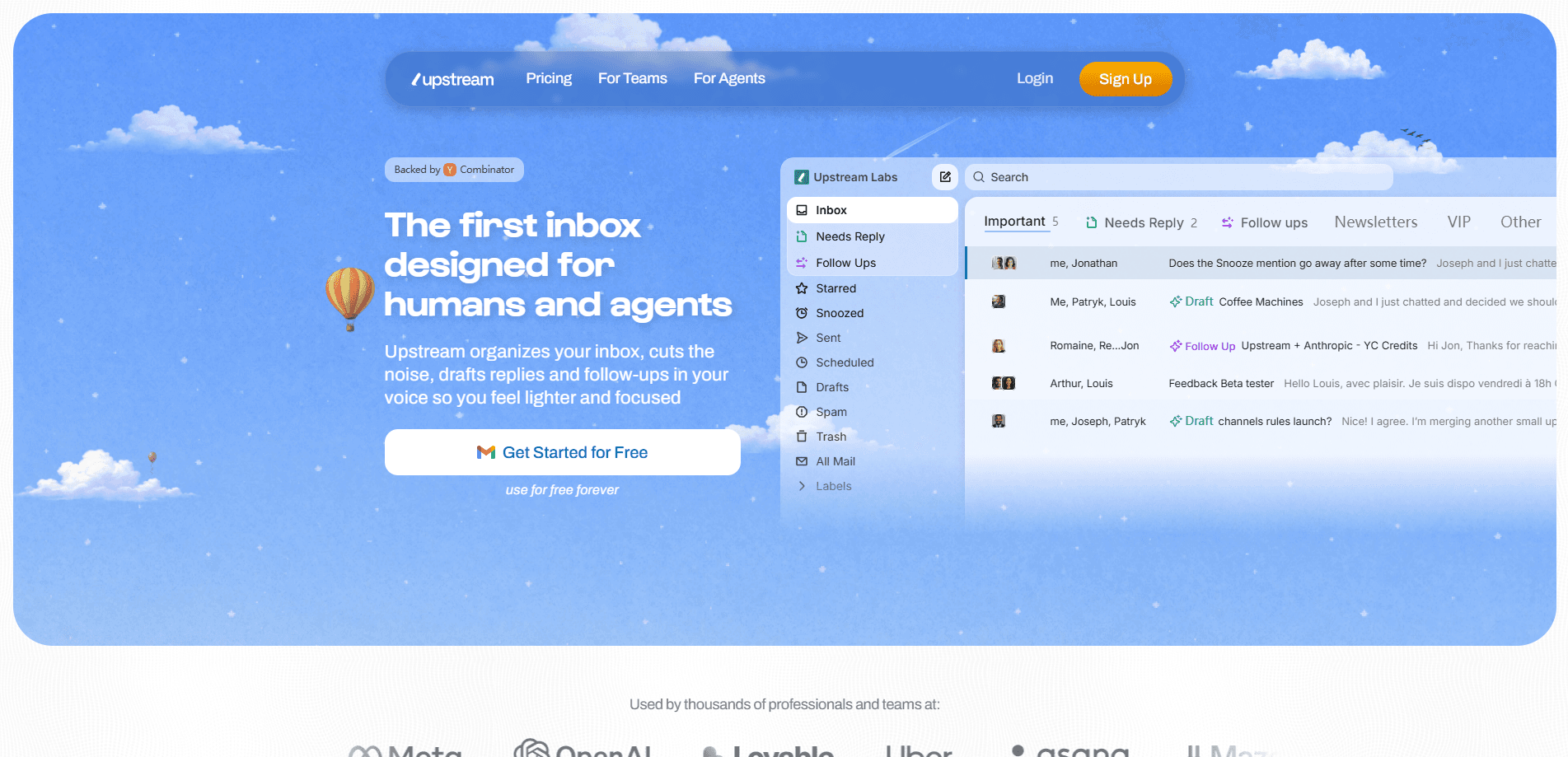
Upstream is an AI email inbox built for both people and software agents. This email triage app sorts incoming messages into Splits, generates AI draft replies and follow-ups that sound like you, and gives teams shared channels to handle email together. Think of it as an inbox organizer that never sleeps. If your inbox has become a second job, Upstream takes that job off your plate.
About Upstream
What Is Upstream
Upstream is a messaging app for teams and individuals that runs on top of regular email. It reads your inbox, works out which messages actually need an answer, and pushes the rest out of the way. Cold outreach and newsletters land in a Noise split. Not in your face.
The product's core promise is simple. Email stops being a chore you grind through every morning. Instead of scrolling a single long list, you open an inbox already split into what needs attention, what can wait, and what you can ignore. Upstream Labs runs the project, and it went through Y Combinator.
The catch? All of this runs in the cloud. Upstream connects to your existing mail provider and processes messages on its servers, so anyone handling sensitive mail should read the privacy policy before committing. It also works best with keyboard-first workflows. Some people love that. Others find it fiddly at first.
Getting Started
- Go to the Upstream site and sign up with the email account you want to tame.
- Authorize Upstream to connect to that mailbox so it can read and send on your behalf.
- Let the AI learn your writing patterns, then save them as a custom voice for up to three audiences.
- Set up your Splits so messages route themselves into categories like Needs Reply, VIP, and Noise.
- Open your inbox, review the AI drafts already waiting on each thread, tweak them, and hit send.
Product Information
A quick look at Upstream's pricing, supported platforms, and performance.
Best for
The users, tasks, and scenarios where this tool fits best.
Users
- Founders and operators drowning in inbound
- Small teams sharing one function
- Developers and AI tinkerers
Tasks
- Sorting a messy inbox
- Drafting AI draft replies
- Chasing follow-ups
Scenarios
- Clearing a morning inbox before meetings
- Coordinating on a shared customer thread
- Running email from an AI agent
Key features
Reply-needed detection
Upstream doesn't just sort by sender. It reads each thread and figures out whether it needs your reply. Then it pre-sorts those messages to the top when you open your inbox. That one behavior is the difference between scanning and deciding.
AI drafts in your voice
The assistant studies your past messages and saves your writing patterns as a personalized prompt. New replies come out in your tone, tailored to the recipient and the thread history, and they're already waiting when you open the message. You tweak and send. No blank page.
Splits and channels
Your inbox breaks into Splits that match how you work, and teams organize email into shared channels for projects, teams, or anything else. Filters auto-route messages into the right channel, so onboarded teammates walk into a tidy inbox instead of a pile.
Smart follow-ups
Upstream tracks threads where a reply is owed and drafts the nudge for you. So instead of trying to remember to circle back three days later when the thread has gone cold and the details have faded, you get a ready-to-send follow-up built from the conversation context.
Team collaboration
Share whole conversations without forwarding, add followers, and comment privately inside a thread while keeping its context. Access is revocable just as easily, which matters when someone leaves a project.
MCP server for agents
Upstream runs a Model Context Protocol server at api.upstream.do/mcp. Any MCP-compatible assistant connects with a Personal Access Token and gets 44 tools to browse splits, search threads, reply, and organize the inbox. It's a clean way to give an AI agent real email reach.
Keyboard-first workflow
The app leans on a command palette, instant send, undo send, and send later. Power users who never touch a mouse move quickly; newcomers may need a day to learn the shortcuts.
Pros and cons
Pros
- Reply-needed detection does real triage. It goes far beyond sender-based filtering.
- AI draft replies arrive pre-written in your saved voice, tailored to each conversation.
- The free Core plan is genuinely usable and covers teams up to 5 seats.
- An MCP server with 44 tools opens the inbox to any compatible AI assistant.
- Shared channels and in-thread comments cut the forwarding mess inside teams.
Cons
- Everything runs in the cloud, so sensitive mail requires a careful read of the privacy policy first.
- Fully customizable Voice & Tone, unlimited drafts, and private channels sit behind the $20/member Pro tier.
- The keyboard-first design has a learning curve if you'd rather click.
Frequently asked questions
It's an AI email inbox that sorts your messages into categories, drafts AI draft replies and follow-ups in your voice, and lets teams share conversations. It works on top of the email account you already use.
Related content
Explore related tools, skills, and articles for Upstream.
Upstream Alternatives

Claude for Google Workspace
Anthropic · Writing · Productivity · BusinessClaude for Google Workspace puts Claude in a sidebar inside Google Docs, Sheets, and Slides, where it reads the file you have open and edits it in place.

Claude Haiku 5.5
Anthropic · Writing · Coding · ChatbotClaude Haiku 5.5 is Anthropic's fastest and cheapest small model, built for high volume tasks at $0.10 per million input tokens with a 1M token context window.

NoteWorthy
Suman Hansada · Writing · Productivity · AI AssistantNoteWorthy is a notes app for iPhone, iPad and Mac that writes titles, tidies formatting, summarizes long notes and files each one with on-device AI. No account, no upload, no network requests.