

UpSum
UpSum · Writing · Productivity
UpSum was a GPT-4 powered AI PDF summarizer and text summarizer for students and researchers. It handled documents up to 70,000 words. The service shut down in November 2025.
About UpSum
What Is UpSum
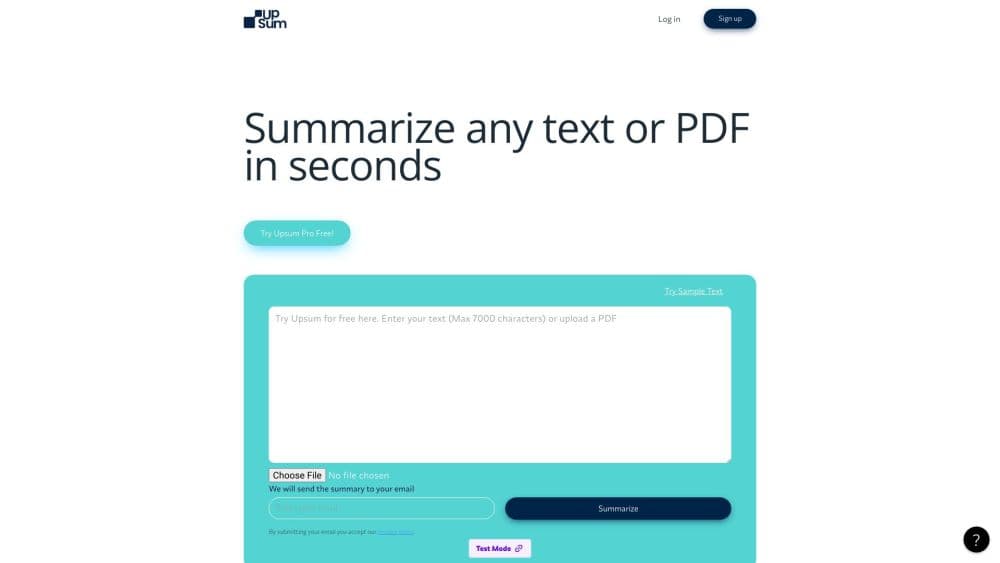
UpSum was a browser based document summarization tool built for one job: getting the point of a long document without reading all of it. You uploaded a PDF or pasted text, picked how short you wanted the result, and got a condensed version back in seconds. The team worked out of Barcelona and launched the product in early 2023.
The pitch was practical. A 40 page annual report, a dense research paper, or a 300 page book all took the same effort: upload, choose a length, read. Summaries could be exported as text or PDF, and a chat mode let you ask follow up questions about the document instead of re-reading a section. UpSum also supported output in several languages, which made it useful for readers working across language barriers.
The limits showed up fast. Free accounts got three uploads a month, which is barely enough to test the tool on real work. Everything ran through a browser, so there was no desktop app and no offline mode. And the biggest caveat is simple: UpSum announced it would shut down in November 2025. The domain no longer serves the product, so the features below describe what it offered while it was live, not something you can sign up for today.
Getting Started
- Create a free account on upsum.io with an email address.
- Upload a PDF or paste the text you want condensed.
- Choose a summary style and length, from a short overview to a detailed brief.
- Generate the summary, then copy it, export it as a PDF, or ask follow up questions in chat.
Product Information
A quick look at UpSum's pricing, supported platforms, and performance.
Best for
The users, tasks, and scenarios where this tool fits best.
Users
- Students
- Researchers
- Consultants and analysts
Tasks
- Summarizing PDF reports
- Condensing long articles and pasted text
- Asking questions about a document
- Producing short briefs in another language
Scenarios
- Pre meeting document review
- Study sessions with limited time
- Early stage literature screening
Key features
GPT-4 Summarization Engine
UpSum ran on GPT-4, which put it in the same class as the stronger general purpose summarizers of its era. The model read the whole document and pulled out main arguments, figures, and conclusions rather than lifting random sentences. That distinction mattered: extractive tools returned awkward copied fragments, while UpSum produced readable prose.
Adjustable Summary Length and Style
You set how long the result should be, from a tight overview to a multi paragraph brief. Style options let you ask for bullet points, a narrative summary, or a more formal tone. This was the feature that made the tool flexible across use cases, because a student revising for an exam and an analyst prepping a client call want very different outputs from the same PDF.
Uploads up to 70,000 Words
The 70,000 word ceiling covered most books, long reports, and full research papers in a single pass. Competing free tools often capped uploads far lower or split long files into chunks that lost context. Hitting the limit meant splitting the document yourself, which usually hurt summary quality.
Chat With Your PDF
Beyond a one shot summary, UpSum offered an interactive chat mode. You could ask what a specific section said, request a definition from the text, or check whether a claim appeared in the document. It turned the summarizer into a light research assistant for a single file.
Export and Share
Summaries could be downloaded as a PDF or copied as plain text, and saved for later reference. For students building a notes archive or analysts circulating a brief to a team, export mattered more than the on screen view.
Multi-Language Support and GDPR Compliance
UpSum generated summaries in several languages and stated that it handled data in line with GDPR rules, without keeping uploaded files longer than needed. For users in the EU, that answered the first question most people ask before uploading a confidential document to an unknown AI service.
Pros and cons
Pros
- Long upload ceiling of 70,000 words handled full books and reports in one pass.
- GPT-4 output read like edited prose, not stitched together sentences.
- Chat mode answered targeted questions about a single PDF.
- Clear pricing: a free tier plus two cheap monthly plans under $13.
- Multi-language summaries and PDF export fit cross-border research work.
Cons
- The service shut down in November 2025, so new users cannot sign up.
- Three free uploads a month ran out before most people finished a single project.
- Browser only, with no desktop app, mobile app, or offline option.
- No public API, which ruled out batch processing or wiring it into an existing workflow.
Frequently asked questions
UpSum condensed long PDFs and text into short summaries. Students used it for reading packets, researchers for literature screening, and analysts for quick report reviews.
Related content
Explore related tools, skills, and articles for UpSum.
UpSum Alternatives

Google EmbeddingGemma 2
Google DeepMind · Writing · Image · CodingGoogle EmbeddingGemma 2 is a 740M-parameter open model that turns text, code, images, audio, and video frames into vectors in one 768-dimension space, running on phones and laptops.

MePersona
MePersona, Inc. · Writing · Productivity · MarketingMePersona is an AI unified inbox for creators. It learns your voice, drafts replies to fan messages from 12 platforms, and sends only what you approve.

Fluence
Yay Software (Yannick Huchard) · Writing · Voice & Language · ProductivityFluence is an Android app that reads PDFs, EPUBs, Word files and web articles aloud, follows each sentence as it speaks, and answers questions about the text on the phone itself.