

UsageGuard
UsageGuard, Inc. · Coding · Other
UsageGuard is an AI observability platform that routes model calls through one endpoint and adds monitoring, security and cost controls on top.
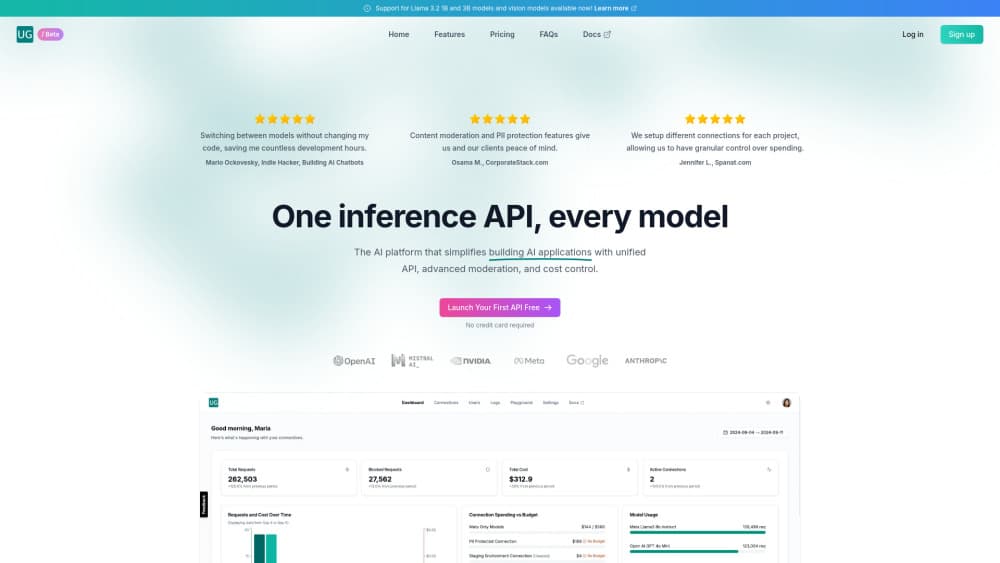
About UsageGuard
What Is UsageGuard
UsageGuard is a platform for building and monitoring AI applications. It sits between your app and the model providers, so every request passes through one endpoint that applies your security rules, tracks usage and reports on cost. The company markets it as the last integration a team needs, and the pitch is aimed at engineering and platform teams rather than individual developers.
This UsageGuard review covers what the platform actually does. Most teams that ship LLM features end up with the same three problems: provider code scattered across services, no clear view of what a feature costs, and no policy layer between the app and the model. UsageGuard answers all three with one gateway. You point your code at its endpoint, keep your provider keys in the platform, and switch between OpenAI, Anthropic, Meta or Google models without touching application logic. From there the observability side tracks performance and spend, and the security side scans requests before they reach the model.
Two things are worth knowing up front. It is an enterprise product sold through demos, so the entry point is a sales conversation rather than a signup form. And the value depends on how many models and services you already juggle, so a team running a single model out of one service gets less out of it than a platform group running many.
Getting Started
- Request a demo and describe which providers and services you want behind the gateway
- Get your connection ID and API key, then point your application calls at the UsageGuard endpoint
- Move your provider keys into the platform and set the security policies and budget limits per connection
- Watch request, latency and spend data in the analytics dashboard, then tune policies as usage grows
Product Information
A quick look at UsageGuard's pricing, supported platforms, and performance.
Best for
The users, tasks, and scenarios where this tool fits best.
Users
- Platform and infrastructure engineers
- AI product teams
- Security and compliance leads
- Engineering managers
Tasks
- Unified model access
- Usage and cost tracking
- Budget enforcement
- Request monitoring
- Security scanning
- Session management
Scenarios
- A team runs features on three providers
- Finance asks what AI cost last month
- A security review asks how prompts are controlled
- A feature ships and usage spikes
- A regulated deployment needs data isolation
Key features
Unified Endpoint for Every Model
UsageGuard puts one API in front of OpenAI, Anthropic, Meta Llama and Google Gemini, among others. Your application calls the UsageGuard endpoint, and the platform routes the request to whichever provider and model you configured. Switching models, or running several side by side for comparison, becomes a settings change rather than a rewrite. The platform supports real-time streaming, so responses still arrive token by token, and it handles the format differences between providers so the calling code stays the same.
Observability and Monitoring
The observability side gives you a single view of what your AI systems are doing. It monitors performance, logs requests and traces traffic, and it tracks usage patterns so you can see which features and which teams drive load. For engineering teams, that means prompts and responses are inspectable for debugging, and for managers, latency and error data sit next to the cost figures. The goal is to make an LLM feature as measurable as any other service in the stack.
AI Spend Management
Cost control is built into the gateway rather than bolted on afterward. The platform tracks usage and lets you set budgets, so an expensive model or a runaway loop hits a limit you set instead of a surprise invoice. Because every call passes through the same endpoint, LLM cost control is accurate by design: spend can be attributed by connection, project or environment, which is the granularity finance usually asks for. The company cites cost reduction as a headline outcome, and the mechanism is simply visibility plus enforced ceilings.
Security and Governance
The security layer sits in the same request path as the model call. It scans prompts for injection attempts and other malicious input before the request reaches the provider. It also filters content and guards PII so sensitive data does not leave your boundary unchecked. That is prompt injection protection and AI security governance in one place rather than two bolted-on tools. Policies are set per connection, so you can run different rules for dev, staging and prod, or for different teams, from one control plane. Compliance-oriented features round this out for regulated buyers.
Multiple Connections and Policy Isolation
UsageGuard lets you create many connections, each with its own API key, security policies, usage limits and configuration. That is how a single organization separates projects, teams or environments without standing up separate installations. A development connection can run loose limits and test policies while a production connection enforces the strict ones, and the analytics can still be read together. For platform teams, this is the feature that turns a gateway into a governance tool.
Flexible Deployment
The platform supports several deployment models. It runs as a managed service on AWS across US and European regions, which suits teams that want the compliance and data residency of a major cloud. It also offers private cloud and on-premise options. These cover air-gapped deployments with custom security policies for organizations that need data isolation and full control over their infrastructure. The same product runs in each case, so the choice is about where the data lives rather than which features you get.
Model-Agnostic Integration
Because the gateway abstracts the providers, your integration does not hard-code one vendor. The documented setup is close to a drop-in: update your API endpoint to point at UsageGuard and add your UsageGuard API key and connection ID. That keeps the door open to newer or cheaper models without a migration project. It also means an app can use a strong model for one task and a cheaper one for another, with the routing handled centrally rather than in each service.
Pros and cons
Pros
- One endpoint covers OpenAI, Anthropic, Meta and Google, so model changes stay out of application code
- Spend tracking and budgets live in the same gateway that routes the traffic, so cost data is accurate by design
- Security scanning and PII protection run in the request path rather than as a separate tool
- Per-connection policies let one platform serve dev, staging and prod from a single control plane
- Deployment choices span managed AWS, private cloud and on-premise, which helps with data residency
Cons
- No free plan or self-serve signup, so you cannot try it before a sales conversation
- Pricing is not published, which makes budgeting harder for teams that compare tools on a public price list
- The value scales with how many providers and services you run, so a single-model setup benefits less
- Added latency is small but real, reported in the tens of milliseconds per request
Frequently asked questions
UsageGuard is a platform for building and monitoring AI applications. It places a single gateway in front of model providers like OpenAI, Anthropic and Google, then adds observability, security and cost controls on top. Every request passes through UsageGuard, which applies policies, tracks usage and reports on spend.
Related content
Explore related tools, skills, and articles for UsageGuard.
UsageGuard Alternatives

Base Code
Base44 (Wix) · Coding · ProductivityBase Code is a shared cloud development environment from Base44. Teammates describe changes to an existing GitHub codebase in chat, preview them live and send them back as pull requests.

Google EmbeddingGemma 2
Google DeepMind · Writing · Image · CodingGoogle EmbeddingGemma 2 is a 740M-parameter open model that turns text, code, images, audio, and video frames into vectors in one 768-dimension space, running on phones and laptops.

GitGlow
GitGlow · Coding · ProductivityGitGlow is a local-first desktop Git client that lets independent developers review their own code and their AI agents' changes in one place before shipping.