

Use of English AI
Shining Apps LLC · Writing · Leaning · AI Detection
Use of English AI generates endless Cambridge English exercises for levels B1 to C2, marks every answer on the spot and scores writing tasks in seconds.
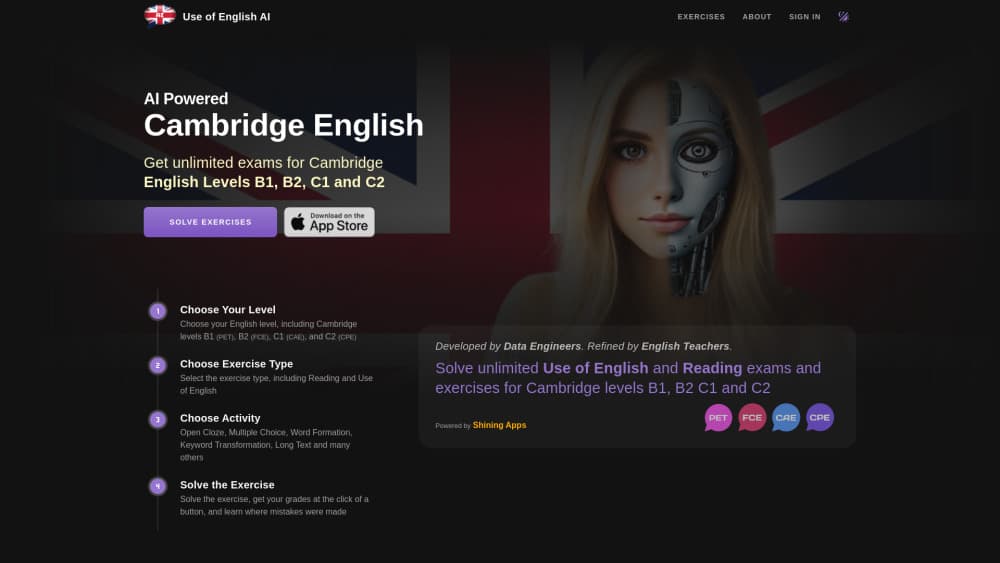
About Use of English AI
What Is Use of English AI
Use of English AI is a practice platform for the Cambridge English exams, covering B1 Preliminary, B2 First, C1 Advanced and C2 Proficiency. It was built by Shining Apps LLC together with the team behind Use of English PRO, and it runs in a browser as well as on iOS and Android. The idea is simple. You don't work through a fixed set of past papers. You pick a level and a task type, and the platform builds an exercise for you.
The exercise base comes from a library the site puts at more than 15,000 official exams. An AI model trained on Cambridge coursebooks and official materials rewrites those items, changing details, wording and context while keeping the format of the real paper. Every so often it writes a new exercise from scratch, and those get a small marker on the page so you know where they came from. After you finish, you rate the item, and low-rated exercises are dropped.
What it does not do matters just as much. There is no speaking or listening section, so it covers the reading, writing, grammar and Use of English parts only. The free tier is also tight: one AI exercise a day. PRO lifts that to three exercises every five minutes and one writing submission every 30 minutes. Prices sit inside the apps rather than on the website, which is worth knowing before you sign up.
Getting Started
- Open useofenglish.ai or install the app on iOS or Android. You can solve a first exercise without creating an account.
- Pick your level: B1 Preliminary, B2 First, C1 Advanced or C2 Proficiency.
- Choose an exercise type, then an activity. Reading, Writing, Grammar and Use of English each hold their own task list.
- Work through the exercise at your own pace. Once generated, it stays open until you close it, so there's no timer running against you.
- Check your answers. Wrong items come back with an explanation, and writing tasks return corrections, a Cambridge-style score and notes on what to fix next.
Product Information
A quick look at Use of English AI's pricing, supported platforms, and performance.
Best for
The users, tasks, and scenarios where this tool fits best.
Users
- Candidates booked for a Cambridge exam
- Self-study learners without a teacher
- Teachers building homework
Tasks
- Drilling open cloze and multiple choice cloze
- Practising word formation and key word transformation
- Getting Cambridge writing feedback on an essay or report
- Checking which level you actually sit at
Scenarios
- A 20-minute session on the train
- The last month before the exam
- Revising a weak part rather than the whole paper
Key features
Four Cambridge Levels in One Account
The platform covers B1 Preliminary, B2 First, C1 Advanced and C2 Proficiency, the four levels most candidates actually sit. Switching level changes the length of the texts, the vocabulary and the difficulty of the distractors. That matters if you're climbing from B2 to C1, because you can compare how the same task type feels at each level instead of guessing whether the next level is within reach.
Task Types That Mirror the Real Paper
Open cloze, multiple choice cloze, word formation, key word transformation, long text, missing paragraphs and missing sentences are all there, alongside essays, articles, formal letters and reports for the writing side. The formats follow the Cambridge papers rather than a generic fill-in-the-blank template. If your exam has a part you dread, you can spend a week on just that part.
Marking With an Explanation, Not Just a Score
Answers are checked as soon as you submit them, and wrong items come with a note on why the right answer works. That turns a practice run into something closer to a lesson. The catch is that you have to slow down and read it. Skipping straight to the percentage is the fastest way to repeat the same mistake next week.
AI Feedback on Writing Tasks
The newer writing feature takes a full essay, article, letter or report and returns corrections, a Cambridge-style score and suggestions tied to your level. It's the part of the product with the least competition from free past papers, since nobody can mark their own writing objectively. Treat the score as a second opinion rather than a final verdict, and read the corrections closely.
A Library That Doesn't Run Out
The generator draws on more than 15,000 official exams and produces variations, so the same exercise rarely appears twice. Items the AI invents from scratch are flagged with a symbol, and every exercise can be rated after you finish it. Those ratings feed back into the pool: the good ones stay, the bad ones go. Over a few months of steady practice, that's the difference between finishing every past paper you own and still having material left.
Practice on Web, iOS and Android
The same account works in a browser and in the mobile apps, so a session can start on a laptop and finish on a phone. The Android build has passed 10,000 downloads and was last updated in late October 2026. There's no desktop app to install, and no signup is needed to try a first exercise, which makes it easy to check the format before committing to anything.
Pros and cons
Pros
- The exercise supply is effectively unlimited, which solves the main problem with Cambridge preparation: running out of past papers.
- Answers are marked instantly with explanations, so a session without a teacher still gives you something to learn from.
- Cambridge writing feedback is included, and that's the skill most self-study learners have no way to check.
- All four levels live in one account, so moving from B2 to C1 doesn't mean buying a new course.
- The formats match the real papers, including the parts that rarely show up in free online quizzes.
Cons
- The free tier allows one AI exercise a day, so a serious study plan needs PRO from the start.
- There's no speaking or listening practice, which leaves two full papers of the exam untouched.
- PRO still caps generation at three exercises every five minutes and writing at one submission per half hour, which can interrupt a long session.
- Subscription prices aren't listed on the website, so you only see the cost once you're inside the app.
Frequently asked questions
There's a free tier, and you can solve your first exercise without an account. The limit is one AI-generated exercise a day. Unlimited practice, three exercises every five minutes, needs a PRO subscription bought inside the iOS or Android app.
Related content
Explore related tools, skills, and articles for Use of English AI.
Use of English AI Alternatives

Google EmbeddingGemma 2
Google DeepMind · Writing · Image · CodingGoogle EmbeddingGemma 2 is a 740M-parameter open model that turns text, code, images, audio, and video frames into vectors in one 768-dimension space, running on phones and laptops.

MePersona
MePersona, Inc. · Writing · Productivity · MarketingMePersona is an AI unified inbox for creators. It learns your voice, drafts replies to fan messages from 12 platforms, and sends only what you approve.

Fluence
Yay Software (Yannick Huchard) · Writing · Voice & Language · ProductivityFluence is an Android app that reads PDFs, EPUBs, Word files and web articles aloud, follows each sentence as it speaks, and answers questions about the text on the phone itself.