

Vectorize
Vectorize · Coding · Leaning
Vectorize is a managed RAG platform that pulls unstructured data from documents, SaaS apps, and knowledge bases into your own vector database, then keeps that index current with real-time updates.
About Vectorize
What Is Vectorize
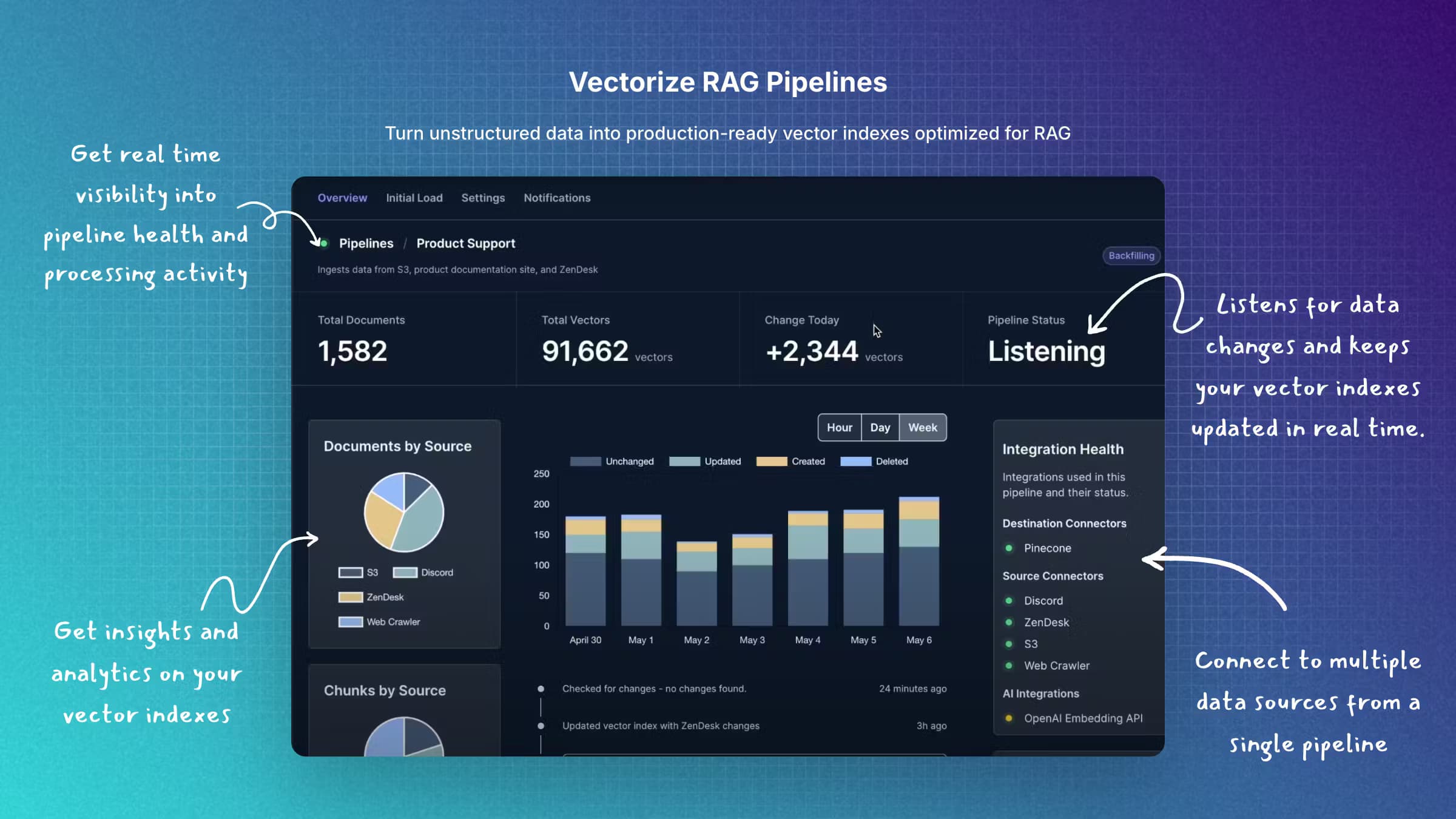
Vectorize is a hosted platform for building retrieval-augmented generation, or RAG, pipelines. It focuses on real-time RAG pipeline setups, where the search index updates as your source data changes. It connects to the data you already have, files, cloud drives, chat histories, support tickets, and website content, turns that content into embeddings, and writes them into a vector database you control. The point is to give a language model fresh, private context it was never trained on.
The problem it targets is stale or scattered knowledge. Assemble the same pipeline by hand and you end up wiring several services, one to extract text, another to chunk and embed it, another to store vectors, plus your own code to keep everything synced. Vectorize bundles those steps behind one interface and keeps every change in your source data flowing into the index.
The main limitation is scope. Vectorize handles the retrieval layer, not the model layer, so you still bring your own LLM and vector database. It also favors preconfigured connectors over fully custom pipelines, which means an unusual data source may need extra work.
Getting Started
- Create an account at platform.vectorize.io and set up an organization for your project.
- Connect a data source, such as a cloud drive, file upload, or SaaS knowledge base, from the built-in connector list.
- Choose a destination vector database, like Pinecone, Qdrant, or PostgreSQL, and pick an embedding model from OpenAI, Voyage AI, or the built-in options.
- Configure the pipeline so it syncs changes as they happen, then start indexing your content.
- Query the index through the retrieval endpoint, which embeds the question, runs a k-ANN search, and returns ranked results with relevancy scores.
Product Information
A quick look at Vectorize's pricing, supported platforms, and performance.
Best for
The users, tasks, and scenarios where this tool fits best.
Users
- Backend and ML developers
- Startup teams shipping an AI product
- Data and platform engineers at larger firms
Tasks
- Grounding a support chatbot
- Keeping a search index fresh
- Prototyping retrieval quality
Scenarios
- Teams with fast-moving documentation
- Products with many data sources
- Regulated environments
Key features
RAG Pipeline Builder
The pipeline builder is the toolkit's center. You pick a source, a destination database, and an embedding model, and Vectorize assembles the extraction, chunking, embedding, and storage steps for you. It is a point-and-configure approach rather than a code-first framework, which shortens the time from a connected source to a queryable index. Teams that want to swap models later can do so without rebuilding the whole flow.
Real-Time Vector Updates
Most RAG setups go stale the moment a document changes, because indexing runs on a fixed schedule. Vectorize watches your connected sources and pushes changes into the vector store as they happen, so a new policy page or a resolved ticket lands in the index shortly after it appears. That keeps answers tied to what is actually in your systems today.
Advanced Retrieval Endpoint
The retrieval endpoint folds several steps into one call. It vectorizes the incoming query, runs a k-ANN search against your index, optionally rewrites the query using conversation history, and applies built-in reranking. Results come back with relevancy scores, cosine similarity, and metadata, which is useful when you need to show sources or filter by document attributes rather than just get a blob of text.
Vector Database Integrations
Vectorize stores embeddings in a database you choose rather than locking data into its own store. Preconfigured connectors cover Pinecone, Qdrant, Weaviate, PostgreSQL, Elastic, Azure AI Search, Neo4j, Milvus, and others. You keep the query tooling, access controls, and backups you already rely on, and you can move the data or run mixed workloads with the same store.
Source Connectors
The connector list reaches into the places where real content lives: cloud storage such as Amazon S3 and Google Cloud Storage, productivity apps like Google Drive and Dropbox, conversation tools such as Discord, and platforms like Confluence, GitHub, and Intercom. Ingesting from these directly avoids exporting everything to a staging folder first, which cuts down both setup work and drift.
Embedding Model Choice
You are not tied to one embedding provider. The platform supports models from OpenAI, Voyage AI, Amazon Bedrock, Vertex AI, and other AI platforms, so you can weigh cost against retrieval quality and pick per pipeline. Switching providers later is a configuration change rather than a rewrite, which helps when a better or cheaper model shows up.
Iris Vision Processing
Vectorize Iris handles complex PDFs that plain text extraction mangles, such as scanned pages, dense tables, and layouts where meaning depends on structure. It reads the visual layout so the embedded chunks keep the table and page relationships that matter for accurate retrieval, which is often where plain parsers fall short.
Pros and cons
Pros
- Keeps your vectors in a database you control, so existing access rules and backups still apply.
- Real-time sync reduces the manual re-indexing work that stale RAG setups depend on.
- Preconfigured connectors for common storage, SaaS, and knowledge-base sources cut setup time.
- The retrieval endpoint bundles query rewriting and reranking, so you write less glue code.
- A free tier exists for individual developers and side projects.
Cons
- You still need your own LLM and vector database, so it is not a complete application stack.
- Unusual or in-house data sources may need custom work outside the ready-made connectors.
- Pricing scales with pages processed, so heavy document volumes can raise costs quickly.
- The pipeline builder is interface-driven, so teams that prefer code-first tooling may find it limiting.
Frequently asked questions
Vectorize builds and runs RAG pipelines that give a language model private, up-to-date context from your own data. You connect sources, choose a vector database, and query the index through a retrieval endpoint.
Related content
Explore related tools, skills, and articles for Vectorize.
Vectorize Alternatives

Base Code
Base44 (Wix) · Coding · ProductivityBase Code is a shared cloud development environment from Base44. Teammates describe changes to an existing GitHub codebase in chat, preview them live and send them back as pull requests.

Google EmbeddingGemma 2
Google DeepMind · Writing · Image · CodingGoogle EmbeddingGemma 2 is a 740M-parameter open model that turns text, code, images, audio, and video frames into vectors in one 768-dimension space, running on phones and laptops.

GitGlow
GitGlow · Coding · ProductivityGitGlow is a local-first desktop Git client that lets independent developers review their own code and their AI agents' changes in one place before shipping.