

Verol
Verol · AI Detection
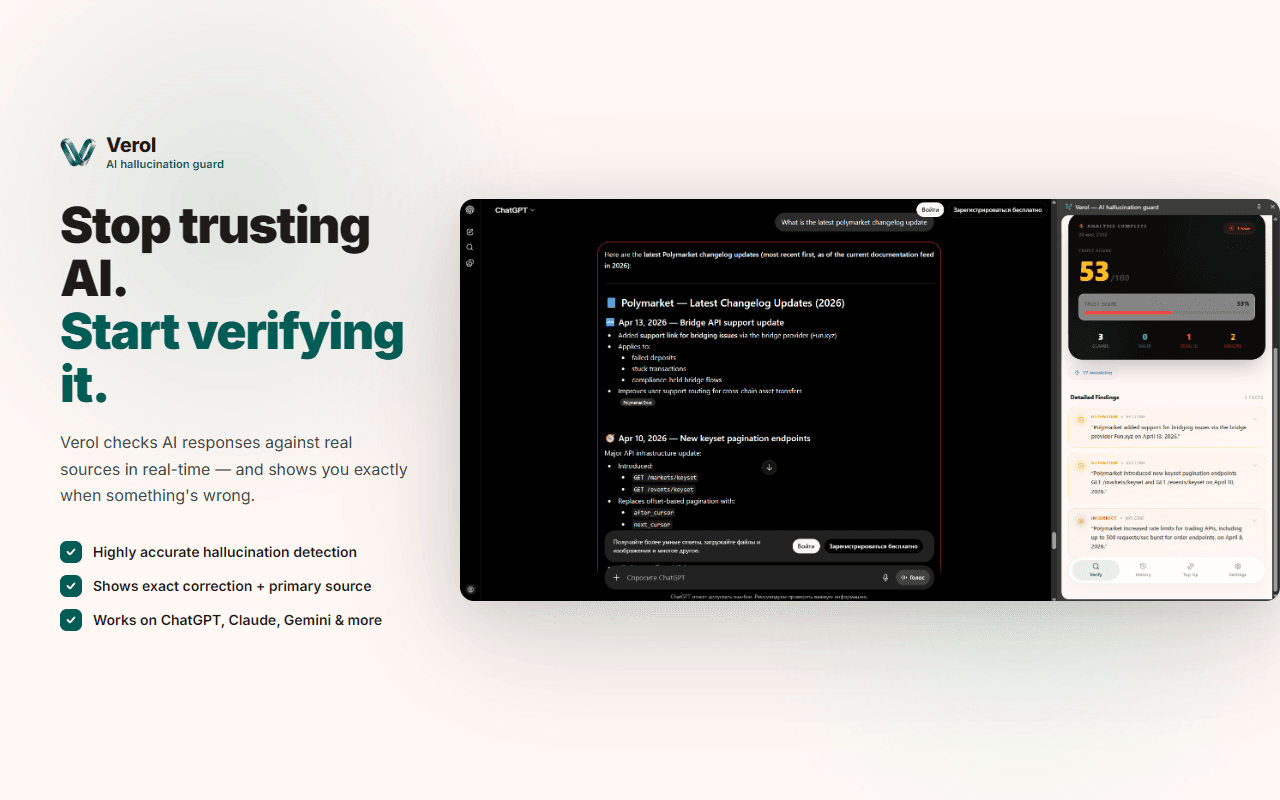
Verol is a Chrome extension that reads AI answers from ChatGPT, Claude, Gemini, and Grok while those answers are still being written, then flags the claims that might be wrong. It works as an AI fact checker and an AI hallucination detector at once. In practice it's a ChatGPT fact checker, a Claude fact check layer, and a Gemini fact check layer too. It tests risky statements against live sources, drops inline annotations next to the sentences that need a second look, and attaches an AI confidence score to what it finds. You keep chatting the way you normally do, and the extension quietly marks which parts of an answer are worth verifying before you rely on them.
About Verol
What Is Verol
Verol is an AI fact-checking extension for Chrome. It sits on top of the AI chat tools you already use and watches their answers for claims that don't hold up.
Most people treat a chatbot reply as a finished product. That's the problem. Models like ChatGPT, Claude, and Gemini all generate plausible-sounding text that can be flat-out wrong, and nothing in the interface tells you which sentences are shaky. Verol tries to close that gap. It checks claims against live sources and points out the risky ones while the answer is still on screen.
The extension is honest about its limits. It doesn't rewrite answers. It doesn't tell you what to believe. A confidence score is a hint, not a verdict. Fast-moving facts, niche numbers, and fresh events are exactly where it earns its keep, and also where it struggles to keep up.
Getting Started
- Install Verol from the Chrome Web Store and pin the extension to your toolbar.
- Open ChatGPT, Claude, Gemini, or Grok in a normal tab and sign in to your own account.
- Ask a question the way you always do and let the answer generate.
- Watch for inline annotations beside sentences the extension flags, and check the confidence score it attaches.
- Click a flag to review the source the extension matched against the claim, then decide whether to trust that part of the answer.
Product Information
A quick look at Verol's pricing, supported platforms, and performance.
Best for
The users, tasks, and scenarios where this tool fits best.
Users
- Students and researchers
- Writers and editors
- Analysts and product teams
- Everyday AI users
Tasks
- Fact-checking chatbot answers
- Spotting AI hallucinations
- Verifying numbers and dates
- Cross-checking research notes
Scenarios
- Drafting an article with AI help
- Prepping a presentation
- Studying for an exam
- Quick research on a topic you don't know well
Key features
Real-Time Claim Flagging
Verol watches an answer as it streams in, not after it finishes. It scans each new sentence for factual claims and marks the risky ones with an inline annotation right next to the text. That timing matters. You see the warning before you've copied the answer into a document or acted on it. The extension works inside the ChatGPT, Claude, Gemini, and Grok web interfaces, so you keep your normal chat flow.
Live Source Checking
The extension tests claims against live sources rather than a fixed database. That's how it keeps up with topics that change week to week. When it flags a statement, you can open the matched source and judge it yourself. This is more useful for current events and shifting numbers than a static knowledge snapshot would be. Very fresh or very obscure claims can still slip past.
Confidence Scores
Every claim Verol reviews gets a confidence score. A low score doesn't mean the claim is false, and a high score doesn't mean it's safe to cite without a look. Treat the number as a nudge. It sorts the statements that deserve a check from the ones you can probably let go. The score is the fastest way to scan a long answer, especially when a model has produced several paragraphs of confident prose and you need to know which two or three statements are worth opening a source for before you paste any of it into something that matters.
Multi-Model Coverage
Verol covers four major AI assistants in one extension: ChatGPT, Claude, Gemini, and Grok. You need one tool, not four. You don't change how you prompt them either. If you switch between models for different jobs, the same checking layer follows you across all four. That single-layer approach is the main reason to pick it over stitching together several single-model tools, each with its own panel, its own login, and its own idea of what counts as a reliable claim.
Inline Annotations
Findings show up beside the sentence they relate to, not in a separate panel you have to hunt through. Inline placement keeps the check tied to context, so you can see exactly which claim a score belongs to. For long answers this beats a summary report at the bottom. You don't lose the thread between what the model said and what the extension found.
Pros and cons
Pros
- Works across ChatGPT, Claude, Gemini, and Grok in one extension, so you aren't juggling separate fact-checkers per model.
- Flags claims as the answer streams, which catches problems before you act on the reply.
- Inline annotations and confidence scores make long answers quick to scan.
- Checks against live sources, so it keeps up with facts that change over time.
- Runs quietly in the background without changing how you prompt or chat.
Cons
- It points out risky claims but doesn't always tell you the correct answer, so you still do the final verification.
- Coverage depends on how well the underlying sources match the claim, and niche or very recent statements can slip through.
- As a Chrome extension, it's tied to the desktop browser, so there's no help for AI answers you read on a phone.
Frequently asked questions
It's a Chrome extension that watches AI answers from ChatGPT, Claude, Gemini, and Grok as they generate, then flags claims that might be wrong. It checks those claims against live sources, adds inline annotations beside risky sentences, and gives each one an AI confidence score, so you can see at a glance which parts of a long answer deserve a closer look before you quote them anywhere.
Related content
Explore related tools, skills, and articles for Verol.
Verol Alternatives
Isgen AI
Isgen · AI DetectionIsgen AI is a web-based AI detector that scores text for machine authorship and shows you which sentences and phrases push the number up. It's built for teachers, editors, students, and writers. Their question is simple: did this draft come from ChatGPT, GPT-5, Claude, Gemini, DeepSeek, or another model? You paste or upload content, run a scan, and get a Human, AI, and Mixed breakdown in seconds. There's also a companion editor that scores text while you write it.
Humanizeai Tools
Humanizeai Tools · Writing · AI DetectionHumanizeai Tools is a web-based AI humanizer that rewrites machine-generated text so it sounds like a person wrote it, which is the whole point of the category it belongs to. Paste a draft from ChatGPT, Claude, or Gemini, run it through the tool, and it swaps out the phrases and sentence patterns that AI detectors flag. If your goal is to make AI text sound human before you publish it, this is the kind of tool built for exactly that. It suits students, bloggers, and marketers who need copy that reads naturally and clears tools like GPTZero, Copyleaks, and Winston AI after a single pass.

Hidemyai
Hidemyai · Writing · AI DetectionHidemyai is an AI content humanizer. It rewrites text from ChatGPT, Jasper, and similar tools so the result reads like a person wrote it. You paste your draft, pick a document type and tone, and the service returns a version meant to bypass AI detectors such as Originality.ai, Turnitin, and ZeroGPT. It targets writers, marketers, and students who lean on AI drafts but can't ship copy that sounds robotic. The promise is simple: make AI content undetectable.